
Product Video with Model: 11 Proven Steps for Fashion, Jewellery & Ecommerce Brands
A Product Video with Model shows how a wearable product looks, fits, moves, scales and interacts with a real person. For clothing, jewellery, footwear, handbags and beauty products, this human context can answer questions that still photographs cannot—while creating marketplace, website and social assets from one planned ecommerce content production workflow.
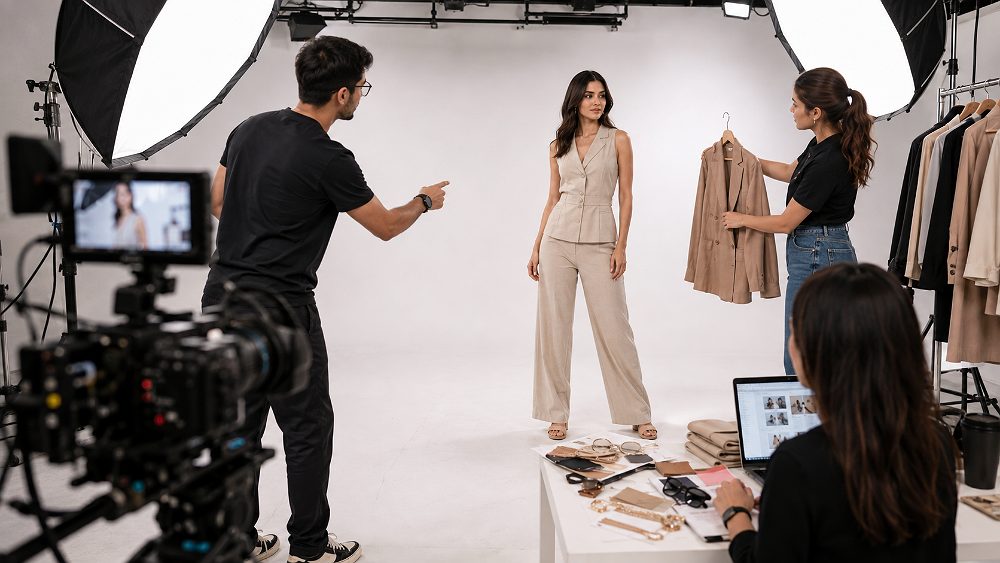
Featured image placeholder path is ready for the WordPress Media Library. Use a real Uniqs Studio frame when available; until then, the article also uses relevant free-stock production references.
Brands usually reach this topic with practical commercial questions: Is a model actually necessary? Should the model be male or female? Is full-face footage better than cropped framing? How many model poses are enough? Should the shoot be a white background video or lifestyle videography? And can one master production be reused for Amazon, Myntra, a Shopify store and product reels?
This guide answers those questions with a product-first approach. The goal is not to create a generic fashion film. It is to build a repeatable ecommerce product demonstration that communicates fit, scale, garment movement, product styling and real-use context while controlling model casting, video editing and export requirements. For brands already comparing professional service options, Uniqs Studio’s Professional Ecommerce Video Production page explains the core production service.
Key Takeaways
- Use a model when fit, scale, movement or interaction materially affects the buying decision.
- Plan the shoot around product information first, not random cinematic posing.
- Capture a master sequence with horizontal-safe and vertical-safe framing for marketplace video, website edits and short-form product video.
- Choose model type, background, shot count and editing based on SKU volume and sales channels.
- For large fashion catalogue production, repeatability is as important as visual polish.
What Is a Product Video with Model?
Direct answer: A Product Video with Model is a product-led video in which a real person wears, holds or interacts with an item so shoppers can understand its fit, scale, movement, proportions and practical use. It is especially useful for clothing, jewellery, footwear, handbags, accessories and beauty products.
Ordinary product video production can rotate an item, reveal details or demonstrate a function without a person. Model product videography adds human scale and wearing context. That matters when a customer needs to judge sleeve length, saree drape, ring proportion, earring movement, handbag scale or how a pair of shoes behaves while walking.
The model is not the hero; the product is. Strong ecommerce videography uses the person as a controlled reference point. Good product presentation keeps the garment, jewellery or accessory visually dominant while the performer supplies context, proportion and believable interaction. This difference separates useful catalogue footage from a fashion film that looks attractive but hides the information a buyer actually needs.
What a Model Adds That Product-Only Video Cannot
A product model video can reveal human scale, wearing context, silhouette, fit, movement and styling in one sequence. It also shows how fabric responds to walking, how a necklace falls on the neck, how a tote sits against the body and whether a footwear upper flexes naturally. For wearable categories, that information often reduces ambiguity before a shopper opens the size chart or zooms into still images.
Use the MODEL-FIT Framework Before Booking an Ecommerce Videoshoot
MODEL-FIT is a planning framework for deciding what the shoot must communicate before camera, model and styling costs are locked. It connects marketplace destination, on-model behaviour, demonstration movements, editing, look and location with the three outcomes that matter most: Fit, Interaction and Trust.
FIT then works as the quality test: Fit asks whether size and silhouette are clear; Interaction asks whether the motion demonstrates real use; Trust asks whether the result feels consistent, accurate and credible. This makes the workflow practical for high-SKU ecommerce content production instead of treating every outfit, attire or set of threads as a separate creative experiment.
When Does an Ecommerce Product Need a Model?
Direct answer: A model is most valuable when understanding fit, size, scale, movement or real-world use materially affects the customer’s buying decision. Wearable categories benefit most because still images can show construction, but not always behaviour on a person.
For clothes and clothing, a model can show silhouette, shoulder placement, sleeve length, hem position and drape. For jewellery, the model gives a real reference for scale. Footwear gains from walking and pivot shots. Handbags and accessories become easier to judge when held, carried, opened or worn. Beauty products can use application sequences when texture or usage matters.
This is also where category expertise matters. A jewellery model shoot should not copy an apparel model shoot. Likewise, a high-volume garment catalogue has different consistency needs from premium fashion videography. Brands comparing production styles can also review studio vs outdoor fashion production and the fashion catalogue production guide to align still and motion assets.
Products That Benefit Most From Model Video
- Clothing and apparel: shirts, dresses, ethnicwear, westernwear, activewear, loungewear and other outfits where garment fit demonstration matters.
- Jewellery: necklaces, earrings, rings and bracelets where jewellery scale demonstration and controlled reflection are important.
- Footwear: shoes and sandals where stride, flex and side profile improve product understanding.
- Handbags and accessories: products where carrying scale, strap length and functional interaction are useful.
- Beauty and wearables: items where application, texture, body placement or usage context helps the shopper.

Product Video with Model vs Product-Only Video: Which Should You Choose?
Recommendation: Choose model-led video for wearable products where fit, scale, styling or movement affects purchase confidence. Choose product-only video when construction, features, mechanisms or small details matter more than wearing context.
| Factor | Model Video | Product-Only Video | Better Choice When |
|---|---|---|---|
| Fit | Excellent | Limited | Garment sizing and silhouette matter |
| Scale | Human reference | Needs props or measurements | Jewellery, bags, footwear |
| Movement | Natural product movement video | Turntable or hands | Fabric, footwear, accessories |
| Product detail | Good with close-ups | Excellent for macro/detail | Construction is the priority |
| Human context | Strong | None | Wearing/use context helps |
| Styling | Shows full look | Isolated product | Fashion brand positioning matters |
| Marketplace use | Strong for wearable catalogue video | Strong for general products | Depends on category and platform |
| Social content | High reuse potential | Good for demos | Human-led hooks are valuable |
| Production cost | Higher | Lower | Budget supports model/styling |
| Complexity | Model + styling + continuity | Product + lighting | Workflow capacity differs |
If a brand is still deciding between AI-assisted assets and a real production setup, the internal guide on ecommerce video maker AI vs professional studio is a useful next read. AI can support ideation and parts of video editing, but real products, real fit and accurate fabric behaviour still require dependable capture when commerce accuracy matters.
How Product Video with Model Demonstrates Fit, Scale and Movement
Expert principle: In model-led ecommerce video, movement should reveal product information rather than simply make the footage look cinematic. Every turn, walk and hand movement should answer a shopper question.
Garment Fit Demonstration and Garment Movement
For clothing video with model, the sequence should establish front fit first, then add a 45-degree view, side profile and back view. A controlled walk reveals drape, hem movement and fabric response. A slow turn helps shoppers understand how the clothes sit around the body. Sitting can be useful for selected attire such as jackets, trousers or dresses when the behaviour of the garment changes in that position.
The same principle applies across garment, clothing, apparel, attire, outfits and colloquial “garms” or “threads”: the visual wording may vary, but the commercial task is the same—show the real product. This complements professional stills from garment photography and fashion photography for clothing brands when a collection needs both motion and photography.
Jewellery Scale Demonstration
Jewellery video with model needs more restraint. A necklace benefits from front neck context and small head movements. Earrings need a controlled turn rather than aggressive hair movement. Rings require deliberate hand positioning, while bracelets can use a slow wrist rotation. The aim is to show scale, fall and sparkle without hands covering important details or reflections becoming distracting.
For products with fine detail, pair the model sequence with macro inserts. Uniqs Studio’s jewellery photography service and the related macro jewellery photography guide explain why close-detail imagery and model-led scale work best as complementary assets.
Footwear and Accessory Movement
Footwear footage should keep the product visible through standing, walking, side profile and pivot actions. Handbags can use carry position, strap demonstration and opening or closing when function matters. A marketplace video should not cut away from the product so quickly that the viewer has to guess how it behaves.

Choosing the Right Model for Ecommerce Product Video
Direct answer: Choose the model based on target customer, product sizing, brand positioning, catalogue workflow and intended channels—not aesthetics alone. The model must also be able to repeat controlled movement consistently across multiple SKUs.
Male vs Female Model: How Should a Brand Decide?
Start with the customer and the product. An ecommerce product video with female model is appropriate when the collection, sizing and target audience require it; the same applies to an ecommerce product video with male model. Unisex collections may use one or both depending on the buying context. Model casting should also consider height, measurements, hand presentation for jewellery, movement confidence and the brand’s visual identity.
For apparel model shoot planning, sizing consistency can matter more than fashion-editorial presence. A model who looks strong in stills but cannot repeat a front-turn-walk sequence accurately can slow a high-SKU day. Brands that need help aligning casting with campaign imagery can also review Uniqs Studio’s model photography services.
Full-Face vs Cropped Model Video
| Factor | Full-Face | Cropped Model |
|---|---|---|
| Product attention | Shared with personality | Strong product dominance |
| Brand personality | High | Moderate |
| Catalogue efficiency | More grooming continuity | Often faster |
| Social-media use | Strong | Useful for product-first edits |
| Consistency | More variables | Easier across high SKU volume |
| Best use | Lifestyle, campaign, premium launch | Catalogue, garment focus, repeatability |
Choose full-face when: brand identity, personality, lifestyle videography and emotional connection are important.
Choose cropped model when: product consistency, catalogue speed and garment focus matter more.
Model Experience Matters More Than Random Posing
Ecommerce model video is a repeatability exercise. Instead of generating unrelated model poses, the performer should hit the same marks, turns, hand positions and walking pace across many products. In fashion catalogue production, this consistency helps editors match timing and makes the final grid of videos feel like one collection rather than dozens of unrelated clips.
Product Video with Model Shot List: How Many Movements and Poses Are Required?
Opening recommendation: Use a short repeatable movement sequence designed around the product information customers need. For most ecommerce catalogues, nine purposeful actions are more useful than twenty random poses.
Essential Clothing Model Video Movements
- Neutral front position: establishes silhouette and basic fit.
- 45-degree turn: reveals shape without hiding the front.
- Side profile: shows depth, sleeve, waist and hem relationship.
- Back view: confirms rear fit, closures and back design.
- Slow full turn: connects front, side and back in one product movement video.
- Natural walk: demonstrates drape, fabric movement and footwear visibility.
- Fabric movement: useful for lehenga flare, dupatta flow, skirts, dresses or loose silhouettes.
- Detail interaction: model touches a pocket, cuff, zipper, neckline or relevant feature.
- Final hero pose: creates a clean closing frame for editing.
Ethnicwear
Ethnicwear often needs controlled dupatta movement, lehenga flare, kurta side profile, embroidery interaction and saree drape where relevant. The movement should never become so dramatic that border work, jewellery or embroidery turns into blur. For premium fashion model video, one elegant action repeated consistently is usually stronger than constant spinning.
Westernwear
Westernwear commonly benefits from front and back silhouette, walking, sleeve movement, hem movement and a side-fit pause. Jackets can add opening or lapel interaction; trousers may add a short walking sequence. Product styling should be fixed before the camera rolls so every SKU uses a repeatable visual language.
Jewellery Model Video Movements
A jewellery model shoot can use a straight portrait, controlled head turn, subtle neck movement, earring reveal, hand-to-neck interaction, bracelet rotation, ring hand movement and macro detail. The model’s hands should support the product presentation rather than cover stones, clasps or signature design elements. Small motion is often enough to activate reflections without making the piece difficult to inspect.
Footwear and Handbag Movements
For shoes, start with a standing hero, then walking, side profile and pivot. For handbags, add carry position, strap demonstration and opening or closing when useful. This shot-list logic is also expanded in the internal ecommerce videoshoot shot-list guide and ecommerce videography product video types.

Should the Model Speak in a Product Video?
Final recommendation: For catalogue-style ecommerce product videos, the model normally does not need to speak. Keep attention on product fit, movement, scale and details unless the format specifically requires explanation, tutorial or testimonial-style content.
Silent Model Video
Best for catalogue footage, apparel movement, jewellery scale, marketplace video, lookbook clips and repeatable SKU production. Music or clean natural sound can be added later if the channel supports it.
Talking Product Video
Useful for ecommerce product demonstration, founder-led explainers, tutorials, testimonials, UGC-style advertising, beauty application and feature-rich products that need narration.
If the model is speaking, scripting, sound recording, room acoustics and performance become additional production variables. That can be worthwhile, but it changes the shoot from simple catalogue capture into a more complete short-form product video production.
White-Background vs Lifestyle Product Video with Model
Decision: If ecommerce listing performance and catalogue consistency are the main goals, prioritise clean product-focused white background video first. Add lifestyle videography as secondary content when storytelling, campaign mood or premium brand context matters.
| Factor | White Background | Lifestyle | Recommended Use |
|---|---|---|---|
| Marketplace catalogue | Excellent | Selective | White background first |
| Brand website | Strong | Excellent | Use both where budget allows |
| Clean product reels | Strong storytelling | Channel-specific edit | |
| Paid advertising | Direct response friendly | Campaign friendly | Test by objective |
| SKU volume | Highly scalable | Slower | White for large catalogues |
| Consistency | High | Location dependent | White for standardisation |
| Brand storytelling | Low to moderate | High | Lifestyle for narrative |
| Production time | Lower | Higher | Depends on SKU count |
| Budget | More controlled | More variables | Prioritise by channel |
Studio videography is particularly efficient when product colour, framing and background continuity must remain stable across dozens of SKUs. Lifestyle production adds location, set, prop and timing variables but can give fashion product video a more aspirational feel. Uniqs Studio also explains the broader studio decision in studio vs outdoor fashion photography.

How Long Should a Product Video with Model Be?
Editorial recommendation: Do not force one universal duration. Capture enough master footage to build a short catalogue edit, a platform-specific marketplace edit, a vertical social edit and a longer website variation when the product needs more explanation.
Catalogue Product Video
The catalogue version should prioritise fast product understanding. It needs enough time to show the hero view, fit, key movement and one or two useful details without becoming repetitive. The exact duration should be decided by SKU complexity rather than by a single rule applied across every fashion or jewellery product.
Marketplace Product Video
Amazon, Myntra and Flipkart can differ in available placements, seller tools and current technical requirements. These specifications can change, so Uniqs Studio recommends checking the platform before export instead of hard-coding old dimensions or file limits into the production workflow. Amazon Seller Central also maintains current seller guidance for product video uploads.
Instagram, Reels and Social Video
A vertical product video usually needs a faster hook and tighter framing than a catalogue edit. Product reels can use the same core footage, but the opening moment, crop and pacing should be rebuilt for short-form behaviour. Ajio, Nykaa and Shopify brand sites may also require different presentation choices, which is why one master file should not be treated as a universal final deliverable.
Can the Same Footage Be Used for Myntra, Amazon, Website and Instagram?
Yes. A well-planned master shoot can often supply multiple channels, but brands should create separate edits and exports rather than uploading one identical file everywhere. Capture once with repurposing in mind; edit according to each destination.
Build One Master Shoot, Then Create Platform-Specific Edits
During the shoot, capture full-length footage, medium framing, close-ups, horizontal-safe composition, vertical-safe composition, clean opening and closing frames, and more than one movement variation. From that material, video editing can create a marketplace catalogue video, website product video, Instagram Reel, paid-ad variation and short teaser.
This works across marketplaces only when the capture is deliberately neutral and flexible. Amazon and Flipkart can use product-led demonstration; Myntra and Ajio fashion catalogues may need strong model consistency; Shopify stores can support richer storytelling. Paytm and Nykaa sellers should likewise verify their current platform options before final delivery.
Plan Cropping Before the Shoot
Keep hands, footwear, jewellery, hems and product edges inside safe composition zones if multiple aspect ratios are expected. A beautiful horizontal take can become unusable vertically if the model’s hands or shoes are too close to the edge. This is one of the reasons production planning should happen before shooting rather than in the edit suite.
For a broader platform-oriented workflow, see the ecommerce videoshoot guide. For current Amazon listing guidance, use Amazon India Seller Central. Marketplace rules change, so official platform documentation should remain the final technical reference.
Publishing placeholder: replace YOUR_VIDEO_ID with the final Uniqs Studio YouTube video ID.
Complete Product Video with Model Production Workflow
Workflow summary: Define channels, create the SKU and shot list, select the model, prepare products, shoot a repeatable movement sequence, build channel-specific edits and finish with quality control. This sequence reduces reshoots because critical decisions happen before shoot day.
Step 1 — Define Platforms and Deliverables
List every destination: ecommerce marketplace, website, social, paid media and internal catalogue. Decide which outputs are horizontal, vertical or both. Ecommerce Video Production becomes more efficient when the camera team knows the final crop and content purpose in advance.
Step 2 — Create SKU and Shot List
Organise products by category, colour, size, styling combination and priority. Record required movements and detail inserts for every SKU. This prevents a common ecommerce videoshoot problem where one product receives a useful feature shot but the rest of the collection does not.
Step 3 — Select Model and Styling Direction
Confirm model measurements against sample sizes, decide full-face or cropped framing, lock hair and makeup requirements and create a styling reference. Product styling should support the item rather than introduce accessories that distract from it.
Step 4 — Prepare Products Before Shoot Day
Steam or iron garments, clean jewellery, prepare footwear soles, organise sizes, label SKUs and pre-build styling combinations. Clothing creases and jewellery fingerprints are much cheaper to fix before shooting than during post-production. A related preparation mindset is covered in garment preparation for fashion photography.
Step 5 — Shoot a Repeatable Movement Sequence
Mark the model’s position, camera framing and start/end action. Repeat the sequence consistently across the catalogue. The objective is dependable product movement video, not improvisation on every item. In high-SKU fashion videography, repeatability protects editing speed and visual continuity.
Step 6 — Edit Marketplace and Social Variations
Select stable takes, correct colour carefully, build the catalogue cut, then adapt the master for vertical social and other channels. A professional product video maker should preserve product accuracy while changing pacing and framing for each platform.
Step 7 — Quality Control Before Delivery
Check product colour, fit, focus, jewellery reflections, garment wrinkles, crop, background, sequence consistency and export requirements. Compare multiple SKUs together, not only one at a time. Consistency problems often become obvious only when the finished collection is viewed as a set.

What Does a Product Video with Model Cost in India?
Direct answer: Product videoshoot with model pricing depends on model fee, SKU count, shoot duration, styling, hair and makeup, studio or location, movement complexity, video editing and number of final formats. The ranges below are illustrative planning budgets, not a final rate card.
| Package | Indicative Budget | Best For | Model / SKU / Setup | Editing & Deliverables |
|---|---|---|---|---|
| Basic / Starter | ₹12,000–₹20,000 | Small D2C catalogue / test shoot | Standard model setup, limited SKUs, white/neutral background | Basic editing, limited deliverables |
| Standard / Growth | ₹25,000–₹45,000 | Growing fashion/ecommerce brands | Professional model, larger SKU count, styling support | Marketplace-ready edits + vertical social variations |
| Premium | ₹50,000–₹90,000+ | Fashion, jewellery, premium collections | Premium casting, hair/makeup, stylist, multiple setups | Product close-ups, marketplace + campaign edits |
| Enterprise | Custom Quote | Large catalogue / recurring production | Multi-model, high SKU volume, dedicated production team | Batch editing, custom workflow, multi-platform exports |
Important: Confirm Uniqs Studio’s approved commercial pricing before publishing or quoting a client. The table is for planning context only.
What Changes the Final Video Production Cost?
- Model category and casting fee
- Number of products or SKUs
- Shoot duration
- Hair and makeup
- Product styling
- Studio requirements
- Lifestyle location requirements
- Complexity of movements
- Video editing volume
- Number of platform exports
Brands budgeting a combined still-and-video launch can use the internal fashion photography cost in Delhi guide as an additional planning reference. For a model-led motion quote, contact Satyam on +91-8076745824 or send the SKU count on +91-8076745824.
How to Choose an Ecommerce Video Production Company
Choose a specialist that understands ecommerce repeatability, not only cinematic advertising. A commercially useful ecommerce catalogue video needs clear product information, consistent movement, colour accuracy, efficient SKU handling and channel-aware editing.
- Experience with ecommerce rather than only brand films
- Fashion, jewellery and product portfolio
- Model coordination and model casting support
- High-SKU workflow and shot consistency
- Product styling and garment preparation capability
- Marketplace export awareness
- Vertical product video and product reels editing
- Colour accuracy and controlled lighting
- Clear deliverables and revision process
- Ability to coordinate model, makeup, styling and studio
Why Specialist Ecommerce Production Matters
A good-looking fashion film and a commercially useful ecommerce product video solve different problems. Fashion film can prioritise mood, cuts and personality. Ecommerce production must repeatedly show the product itself. Uniqs Studio approaches the job from catalogue logic first, then adds fashion or lifestyle polish where it helps the brand.
For brands in Delhi NCR planning fashion catalogue production, the service can be coordinated with fashion photography, model photography and Professional Ecommerce Video Production so stills and motion are aligned under one content plan.
For SEO and discoverability of embedded videos, Google’s current Video SEO best practices and VideoObject structured-data guidance are useful official references.
What We Look for During a Model-Led Ecommerce Video Shoot
Hands-on production quality is often decided by small observations. Satyam looks at whether garment drape changes in an unflattering way during movement, whether hands cover jewellery details, whether earrings move naturally without excessive swing, whether footwear remains visible through the walk and whether handbags retain their intended shape while carried.
The team also checks whether product colour stays consistent across shots, whether the same movement can be repeated across many SKUs and whether framing leaves enough room for both horizontal and vertical crops. These are simple checks, but they become increasingly important when a catalogue contains dozens or hundreds of products.
That is the difference between “we captured some nice clips” and “we created an ecommerce content production system.” The latter is easier to edit, easier to reuse and easier to scale for future collections.
Advanced Tips, Common Mistakes and Future Direction
Common Mistakes to Avoid
- Choosing a model before confirming sample sizes
- Using random model poses that change from SKU to SKU
- Shooting too tight for vertical crops
- Letting hands cover product details
- Mixing inconsistent colour or white balance across setups
- Forgetting a back view for apparel
- Over-editing fabric texture or jewellery reflection
- Assuming one final export works identically on every platform
Advanced Production Tips
Use floor marks for position, repeat camera distance, pre-number movement sequences and shoot a neutral safety take for every SKU. Capture extra close-ups before changing the styling setup. When social content is important, reserve a few takes with vertical-safe body placement and a clean first second for hooks.
Tools and Resource Direction
A dependable setup may include a modern mirrorless cinema-capable camera, stabilised support where movement is required, lenses chosen for full-length and detail work, accurate monitoring and soft controlled lighting. Jewellery can require macro-capable optics and careful reflection control. The tool choice should follow the product, not the other way around.
Future Trend: Capture Real, Edit Smarter
AI will keep accelerating pre-visualisation, rough cuts, captions, versioning and creative ideation. The strongest workflow for ecommerce, however, is likely to combine real professional product capture with faster editing and format adaptation. Accurate fit, scale and material behaviour remain difficult to replace when a shopper is deciding whether the actual product will work for them.
Product Video with Model Checklist for Brands
Before Booking
- ☐ Decide target platforms
- ☐ Finalise SKU count
- ☐ Decide male/female model requirement
- ☐ Decide full-face/cropped model
- ☐ Select white-background/lifestyle format
- ☐ Confirm model sizing
- ☐ Prepare sample sizes
- ☐ Define movements
- ☐ Define orientations
- ☐ Confirm editing formats
Before Shoot
- ☐ Steam garments
- ☐ Clean jewellery
- ☐ Pair accessories
- ☐ Label SKUs
- ☐ Prepare styling references
- ☐ Confirm model call time
- ☐ Confirm makeup/hair
Before Delivery
- ☐ Verify crops
- ☐ Check colour
- ☐ Check model/product consistency
- ☐ Verify marketplace exports
- ☐ Verify vertical social edits
- ☐ Archive master footage
Frequently Asked Questions
A product video with model shows a wearable or interactive product on a person so shoppers can understand fit, scale, movement and real-world appearance before purchasing. It is most useful when human context adds information that a product-only view cannot.
Use a model when fit, scale, movement or styling affects the buying decision. Clothing, jewellery, footwear, handbags, accessories and wearable products benefit most from model-led video.
The ideal length depends on where the video will be used. Shoot sufficient master footage and create separate catalogue, marketplace, website and social edits rather than forcing one duration everywhere.
The same master footage can often be repurposed, but separate edits should be created for each platform’s current aspect ratio, duration, content and technical requirements. Verify each marketplace before export.
Pricing depends on model fees, SKU quantity, studio time, styling, makeup, shoot complexity and editing requirements. Small productions may use compact packages while large catalogue shoots usually need custom quotations.
Usually not for catalogue video. Silent model footage keeps attention on garment fit demonstration, jewellery scale demonstration, product movement and detail. Speaking becomes useful for tutorials, founder content, UGC-style ads or product education.
Use controlled head turns, neck movement, hand-to-neck interaction, bracelet rotation, ring hand movement and macro detail. Small movements are preferable because the jewellery should stay easy to inspect while reflections remain attractive.
Steam apparel, clean jewellery, prepare footwear, organise sizes, label SKUs, create styling combinations and confirm the shot list before call time. Good preparation reduces pauses and avoids preventable retakes.
Final Recommendation: When Is a Model-Led Product Video Worth It?
A Product Video with Model is worth the investment whenever a customer’s understanding of fit, scale, styling, movement or use materially influences the purchase decision. That includes ethnicwear, westernwear, jewellery, footwear, handbags, fashion accessories and many beauty or wearable products.
The strongest production is planned as a system: define channels, choose the right model, create purposeful movements, capture flexible framing and build separate final edits. This turns one shoot into a useful library for marketplace, website and social content rather than a single isolated clip.
Planning model-led videos for your collection? Explore Professional Ecommerce Video Production by Uniqs Studio for fashion, jewellery and ecommerce product shoots. To discuss SKU count and deliverables, call Satyam at +91-8076745824, message +91-8076745824 or email [email protected].
Discuss Your Product Video Requirements
Send SKU count, product category, target marketplaces and preferred model format. Uniqs Studio can plan the shot sequence, casting and multi-platform deliverables around the collection.