
Myntra Product Listing Checklist 2026-2027: Complete Catalogue & QC Checklist Before Upload
A working pre-upload SOP for fashion brands, catalogue managers and marketplace teams who want fewer avoidable corrections across product data, SKU mapping, attributes, size charts, product images, MRP and inventory.

Myntra Product Listing Checklist work starts long before the upload button. A catalogue can have technically strong photography and still fail operational QC because the seller SKU, colour variant, size mapping, product title, mandatory attributes, MRP or inventory row does not match the same physical item. For a Myntra seller, the most reliable approach is to connect every input from the physical sample to the final marketplace listing.
That is why this guide uses a practical Prepare → Verify → QC → Upload approach rather than repeating generic image advice. It is designed for D2C clothing brands, apparel manufacturers, fashion designers, footwear and accessory brands, ecommerce managers and catalogue teams—especially teams trying to reduce Myntra catalogue rejection, reshoots and repeated corrections between photography, editing, catalogue and inventory departments.
Myntra Product Listing Checklist: 5-Minute Pre-Upload Master Check
A practical Myntra listing checklist should confirm that the same product identity remains consistent across the marketplace catalogue. Before upload, check category, style code, seller SKU, variants, titles, descriptions, mandatory attributes, size chart, images, colour accuracy, MRP, selling price and product inventory. Then complete a second-person Myntra catalogue QC checklist against the live category template.
- Confirm the correct product category and product taxonomy.
- Verify style code and unique seller SKU.
- Map every colour variant and size variant.
- Check product title and product description for conflicts.
- Complete mandatory product attributes.
- Verify brand size, standard size and measurement chart.
- Match every image set to the correct SKU and colour.
- Run image validation for focus, framing and product consistency.
- Confirm colour accuracy against the physical sample.
- Check MRP and selling price against approved commercial data.
- Check product inventory and stock mapping.
- Run catalogue validation and quality assurance.
- Resolve every FIX or HOLD item.
- Upload only after final approval.
Save or print this master checklist before every Myntra catalogue upload.
What Makes This Myntra Catalogue Checklist Different?
- It treats product catalogue data, photography and inventory as one connected system.
- It separates visual image QC from data QC so teams do not miss mapping errors.
- It uses status labels—PASS, VERIFY, FIX and HOLD—to make ownership clear.
- It avoids inventing fixed Myntra technical specifications that may change by category.
- It turns the checklist into a repeatable collection-launch workflow.
Build the Myntra Product Data Sheet Before You Start Uploading
A reliable Myntra product data sheet is the foundation of the seller catalogue. Instead of letting photography, catalogue, merchandising and inventory teams maintain separate versions, create one approved source of truth that holds the product metadata needed for the marketplace listing. This reduces conflicts when the catalogue template is populated and makes catalogue quality control much faster.
The sheet should reflect the real product hierarchy: style → colour → size → sellable SKU. When teams also sell through multiple ecommerce platforms, this master structure can support Amazon and Flipkart adaptations without copying category rules blindly. For the Myntra-specific commercial workflow, keep the Myntra seller resource page as the hub for related seller guidance.

Myntra Product Listing Checklist for SKU, Style Code and Variant Mapping
The Myntra SKU checklist should make every sellable variant uniquely traceable. A style code identifies the core design, while the seller SKU should identify the exact colour and size that can be purchased. A simple architecture such as STYLE123-BLACK-M makes SKU mapping, image-folder naming, stock mapping and correction tracking easier for the whole team.
Variant mapping is where small spreadsheet errors become expensive. If one colour variant points to the wrong image set, or a size variant inherits the wrong MRP, multiple rows can become inconsistent even though the source photography is good. Use the same SKU naming inside the catalogue data, image folders and product inventory system, and compare each row before final catalogue validation.
| Style Code | Seller SKU | Category | Product Type | Colour | Size | Fabric | Fit | MRP | Inventory | Image Set | QC Status |
|---|---|---|---|---|---|---|---|---|---|---|---|
| STYLE123 | STYLE123-BLACK-M | Verify template | Actual product type | Black | M | Source data | Source data | Approved MRP | Current stock | STYLE123-BLACK | VERIFY |
| STYLE123 | STYLE123-BLACK-L | Same mapped category | Same product type | Black | L | Same composition | Same fit type | Approved MRP | Current stock | STYLE123-BLACK | VERIFY |
Choose the Correct Product Type and Category
Product taxonomy drives the fields a catalogue team must complete. Product category mapping can affect size and fit fields, applicable product specifications, attribute options and the category catalogue template itself. Do not reuse an old template only because two products look similar; verify the current product type and category before data entry.
This matters for apparel, footwear and accessories because the same attribute name may not be relevant to every category. When your team needs a broader photography foundation for category-specific assets, the garment photography service and fashion photography service show how capture planning changes with product presentation.
Create One Source of Truth for Catalogue Data
A single approved master sheet should include Style Code, Seller SKU, Category, Product Type, Product Title, Colour, Size, Fabric, Fit, MRP, Inventory, Image Folder and QC Status. This makes product metadata review visible and gives every department the same version. If a field changes after photography, the change should be logged instead of silently updated in one team’s private file.
Write Myntra Product Titles and Descriptions Without Catalogue Conflicts
Myntra product title guidelines and Myntra product description checks are not isolated copywriting tasks. The written listing should agree with structured attributes, the physical sample and the image set. A product title that names the wrong colour or fit can create a catalogue conflict even when the rest of the marketplace listing is complete.
Myntra Product Title Checklist
- Use the accurate product type and category language.
- Keep gender/category context consistent with the selected taxonomy.
- Use the correct colour name for the actual variant.
- Avoid promotional or unsupported claims.
- Do not introduce a fabric, fit or feature that conflicts with structured fields.
- Keep naming consistent across related variants.
Accurate product type + verified colour + useful distinguishing feature, using wording supported by the current category template.
Promotional wording + unsupported material claim + colour that differs from the image or colour attribute.
Myntra Product Description Checklist
The product description should explain the actual SKU and reinforce product specifications without contradicting structured data. Check fabric composition, fit type, colour, wash-care wording, useful construction details and units. Spelling consistency matters because catalogue teams often copy a description across variants and accidentally carry an old colour, fabric or fit into the next style.
For visual and descriptive consistency, the fashion catalogue photography guide explains how a repeatable catalogue system improves continuity, while the clothing brand fashion photography guide connects production planning with ecommerce-ready outputs.
Complete Myntra Product Attributes Before Catalogue QC
Structured product attributes deserve their own QC pass. Mandatory attributes help the marketplace catalogue describe and filter the product, so catalogue validation should compare each value with the physical sample, approved product catalogue data and image set. Do not treat an attribute as correct merely because a spreadsheet accepts it.
Check Myntra Colour, Fabric and Fit Attributes
- Physical product
- Product image
- Catalogue colour
- Variant colour name
- Main fabric
- Fabric composition
- Material/texture information
- Approved source data
- Slim / Regular / Relaxed
- Oversized where appropriate
- Category-appropriate terminology
- Actual sample verification
Colour accuracy is a visual and data issue at the same time. The workflow should compare physical sample → calibrated final image → Myntra colour attributes → final SKU. If those four references disagree, pause the listing and fix the source rather than correcting only one output.
Check Category-Specific Mandatory Attributes
Depending on product taxonomy, the catalogue template may ask for fields such as sleeve, neck, pattern, occasion, length, closure, footwear sole/material or accessory strap/closure. These are examples, not universal mandatory fields. Use only values supported by the actual product and the current category-specific template.
| Attribute | Product Source | Catalogue Value | Image Match | Verified |
|---|---|---|---|---|
| Colour | Physical sample | Exact approved value | Required | ☐ |
| Fabric | Tech pack / label | Exact composition | Visual support | ☐ |
| Fit | Approved product data | Correct fit type | Model view supports it | ☐ |
| Pattern | Physical product | Correct taxonomy value | Yes | ☐ |
| Sleeve / Neck / Length | Physical product | Category-appropriate | Yes | ☐ |
| Category-specific attribute | Current template | Required live value | Where relevant | ☐ |
Myntra Size Chart Guidelines and Size-Mapping QC
A Myntra size chart checklist is not only a measurement exercise. It also checks whether brand size, standard size, the sellable size variant and the uploaded measurement chart describe the same garment. A small mapping error can mislabel an otherwise correct product and create customer confusion later.
Myntra Product Listing Checklist for Brand Size vs Standard Size
Start with the size printed or defined by the brand, then map it to the marketplace standard size expected by the current category workflow. Confirm that S, M, L or numeric sizes are not shifted by one row during spreadsheet sorting. The tagged sample, SKU row, size variant and measurement chart should all agree before catalogue approval.
Verify Every Size-Chart Measurement
- Measurement names are correct.
- Units are consistent.
- The measurement method is defined internally.
- Decimal formatting is consistent.
- Sizes appear in the correct order.
- No required value is missing.
- No measurement row is duplicated accidentally.
- Garment vs body measurements are clearly identified where applicable.
| Size | Brand Size | Standard Size | Measurement 1 | Measurement 2 | Measurement 3 | Verified |
|---|---|---|---|---|---|---|
| M | Brand M | Map per current template | Source value | Source value | Source value | ☐ |
| L | Brand L | Map per current template | Source value | Source value | Source value | ☐ |
Myntra Product Listing Checklist for Images and Product Photography
The Myntra image checklist should connect image validation to the SKU and catalogue data, not just visual quality. A sharp, well-lit file can still be wrong if it shows a different colour variant, hides a product feature, uses the wrong sequence or is mapped to the wrong seller SKU. This is why the Myntra product photography checklist belongs inside the catalogue QC process.
For apparel teams planning a marketplace-specific shoot, see the Myntra product photography and image guidelines guide and the Myntra model photography checklist. These support capture planning, while the live category template remains the source for exact technical requirements.

Verify Current Myntra Image Specifications Before Export
Do not assume a fixed Myntra image size from an old article, prior category or third-party checklist. Before export, confirm dimensions, aspect ratio, file format, file size, colour profile, background rules, applicable number of views, model requirement and image sequence in the current Partner Portal or category specification. Mark the batch as VERIFY until the live requirement is checked.
| Requirement | Current Requirement | Checked On | Status |
|---|---|---|---|
| Dimensions | VERIFY CURRENT SPEC | Before each batch | VERIFY |
| Aspect ratio | VERIFY CURRENT SPEC | Before each batch | VERIFY |
| File format / size | VERIFY CURRENT SPEC | Before each batch | VERIFY |
| Colour profile | VERIFY CURRENT SPEC | Before each batch | VERIFY |
| Background | VERIFY CURRENT SPEC | Before each batch | VERIFY |
| Number of views | VERIFY CURRENT SPEC | Before each batch | VERIFY |
| Model requirement | VERIFY CURRENT SPEC | Before each batch | VERIFY |
| Image sequence | VERIFY CURRENT SPEC | Before each batch | VERIFY |
Primary Product Image QC
Check the correct SKU, correct colour, complete product visibility, clean framing, sharp focus, appropriate exposure, no unwanted objects and no unsupported overlays. The main view should communicate the item clearly and follow the presentation expected for that product category.
Secondary View and Detail Image QC
Where applicable, verify front view, back view, side or three-quarter view, fabric/detail shot, construction/feature image and styled/model view. A detail shot should add useful product information, not duplicate a main image. The current category requirement determines which views are required.
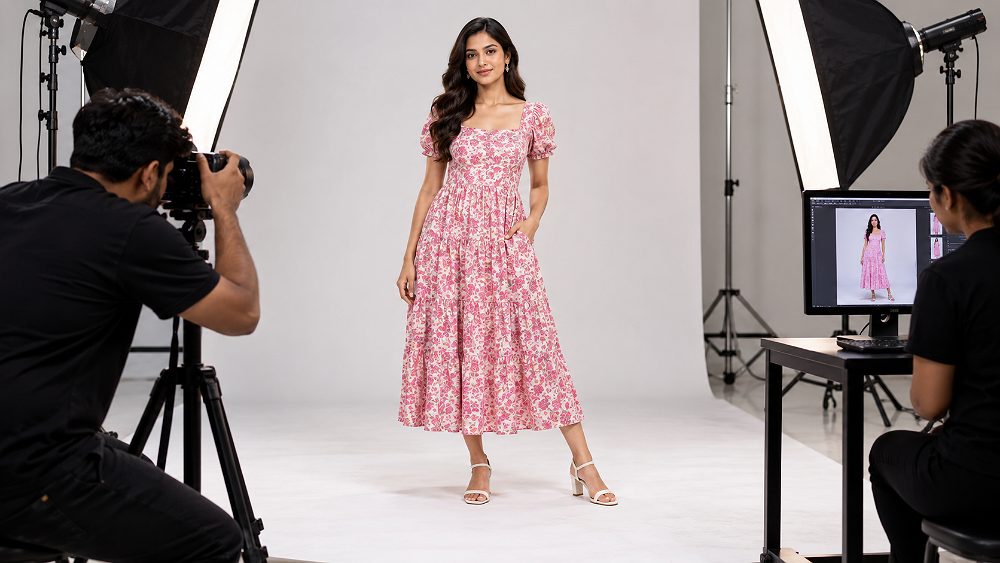
Myntra Model Photography Checklist
When a category or current template calls for model photography, confirm that the correct SKU is on the model, the garment is fully visible, the fit is easy to understand and the pose does not hide important product areas. Keep lighting, crop logic and styling consistent across related colour variants so the apparel catalogue feels like one coherent set.
Uniqs Studio separates capture consistency from catalogue-data accuracy. The studio workflow checks natural skin tones and garment colour during editing, then compares the final export against the physical sample before marketplace delivery. Brands needing a deeper model-production workflow can use the model photography service together with the fashion photography for Myntra guide.
Check Colour Accuracy Before Image Approval
Use a four-point comparison: physical sample → calibrated image → catalogue colour attribute → final SKU. If the physical garment is navy but the catalogue value says black, editing alone cannot solve the data conflict. Put the item on HOLD, correct the source value, and rerun both visual and data QC.
Verify MRP, Selling Price, Inventory and Variant Data
Myntra MRP guidelines and commercial fields should be reviewed separately from creative assets. Confirm that MRP belongs to the exact seller SKU, the selling price is attached to the correct variant, and no cross-variant price value has been copied accidentally. Reconcile product tag information with approved commercial data where applicable, and verify any legal or marketplace pricing requirement from the current authoritative source before publishing.
For product identification workflows, GS1 India’s retail and online marketplace guidance explains how standardised product data and GTIN-based identification support listings and inventory processes. Your internal sheet should still remain the operational bridge between the physical product, catalogue row and marketplace system.
Check Inventory, Colour Variants and Size Variants
| SKU | Colour | Size | Image Set | MRP | Inventory | QC |
|---|---|---|---|---|---|---|
| STYLE123-BLACK-M | Black | M | STYLE123-BLACK | Approved | Mapped | PASS |
| STYLE123-BLACK-L | Black | L | STYLE123-BLACK | Approved | Mapped | PASS |
| STYLE123-NAVY-M | Navy | M | Check mapping | Approved | Mapped | VERIFY |

Common Myntra Catalogue Rejection Reasons and How to Fix Them
Myntra catalogue rejection is easier to resolve when the team classifies the catalogue error instead of making random edits. Separate image and photography issues, product-data conflicts, attribute problems, size mapping errors and commercial mismatches. Then correct the source row or source asset and rerun the relevant Myntra listing QC stage.
If the problem is specifically visual, use the Myntra product image guidelines. For seller-level operations beyond catalogue assets, the Myntra seller checklist before starting helps teams organise prerequisites before a new collection goes live.
| QC Error | Likely Cause | What to Verify | Recommended Fix |
|---|---|---|---|
| Wrong image | Image-to-SKU mismatch | Seller SKU and image folder | Remap the correct image set |
| Wrong colour | Attribute/image conflict | Physical sample, image and colour value | Correct source value or image |
| Incorrect SKU | Duplicate or inconsistent naming | Master SKU sheet | Standardise identifiers |
| Missing attribute | Incomplete category template | Current mandatory attributes | Complete supported values |
| Invalid attribute | Wrong taxonomy value | Current category options | Select the correct live value |
| Incorrect size mapping | Brand/standard size conflict | Size chart and variant row | Correct mapping and rerun QC |
| Missing image view | Incomplete capture/export | Current category view requirement | Add required view |
| MRP mismatch | Commercial row copied incorrectly | Approved SKU-level MRP | Correct commercial data |
| Duplicate variant | Spreadsheet duplication | Style-colour-size matrix | Remove duplicate row |
| Inventory mismatch | Stock mapping issue | Current stock source | Refresh correct inventory |
Image and Photography Rejection Problems
Typical image-review problems include the wrong SKU image, poor crop, low-quality export, inaccurate colour, a missing required view, background inconsistency, the product being hidden by pose or styling, and duplicate images. Fix the image set first, then confirm that the corrected file is mapped to the correct variant.
Product Data and Attribute Rejection Problems
Missing fields, invalid category values, colour conflicts, fabric conflicts and title-to-attribute inconsistencies should be fixed in the master product data rather than patched only in the upload copy. This keeps future marketplace catalogue batches consistent and prevents the same error from recurring.
Size, SKU and Variant Mapping Problems
Duplicate SKU, wrong size mapping, missing size, incorrect MRP, inventory mismatch and wrong image-to-variant mapping all point back to the product identity layer. Use the master style-colour-size matrix to find where the relationship broke, correct it, and rerun the pre-upload audit.
Myntra Product Listing Checklist: Final QC Before Upload
The last Myntra listing upload checklist should be performed after the catalogue builder has finished—not while data is still changing. Separate catalogue creation from catalogue quality control so the reviewer can compare the output against the physical sample, approved source data and current category template with fresh attention.
Run a Two-Person Catalogue QC
Person 1 builds or updates the marketplace listing, images, attributes and commercial rows. Person 2 runs a pre-upload audit against the master source. This two-person quality assurance process is useful because creators naturally become familiar with their own mapping choices and may overlook repeated catalogue errors.
Myntra Product Listing Checklist for the Final 15-Minute Audit
Myntra Pre-Upload Master QC Table
| QC Area | What to Check | Pass Criteria | Owner | Status | Fix Required |
|---|---|---|---|---|---|
| Category | Correct taxonomy | Matches product + template | Catalogue | ☐ | — |
| Style Code / SKU | Unique and consistent | Matches all systems | Catalogue | ☐ | — |
| Colour / Size | Variant mapping | Physical sample match | Catalogue | ☐ | — |
| Title / Description | No data conflicts | Accurate listing copy | Content | ☐ | — |
| Attributes | Required live values | Complete and supported | Catalogue | ☐ | — |
| Size Chart | Mapping + measurements | Verified source values | Merchandising | ☐ | — |
| Images | Spec + SKU + quality | Current requirement met | Creative | ☐ | — |
| Colour Accuracy | Sample vs export | Acceptable match | Creative | ☐ | — |
| MRP / Inventory | Commercial mapping | Correct SKU values | Commerce | ☐ | — |
| Final QC | Independent review | No critical issue open | QC owner | ☐ | — |
| Status | Meaning | Action |
|---|---|---|
| PASS | All critical product catalogue data verified | Ready for upload |
| VERIFY | Requirement needs live portal/category confirmation | Check before upload |
| FIX | Catalogue inconsistency detected | Correct and rerun QC |
| HOLD | Critical SKU, image or price mismatch | Do not upload |
Why Good Photography Can Still Become a Bad Marketplace Listing
A common failure pattern appears when the photography team, editing team, catalogue team and inventory team work from separate files. Consider one fashion style with 4 colours and 5 sizes: that creates 20 sellable SKUs. One incorrect colour-to-image mapping can affect several variants even when the photographs themselves are technically strong.
Uniqs Studio therefore recommends one master SKU sheet shared by every team. Visual QC should check images, colour, garment presentation and image order; data QC should separately check SKU mapping, product attributes, size, product title, MRP and inventory. This separation makes the final quality assurance stage faster and easier to audit.

Use This Myntra Catalogue QC Workflow for Every New Collection
The most useful Myntra catalogue QC checklist is reusable. Uniqs Studio uses a six-stage operational model that keeps product identity intact from the physical sample to the marketplace upload. Teams can add a seventh LOG stage after submission to record rejection or correction reasons and improve the next catalogue batch.
Physical product + approved master data.
SKU sheet + product metadata + size chart + images.
Product ↔ SKU ↔ attributes ↔ images ↔ MRP.
Visual + technical + commercial checks.
Current marketplace/category requirements.
Only approved catalogue files.
Uniqs Studio S-B-M-Q-V-U Catalogue Workflow: Source → Build → Match → QC → Verify → Upload. After upload, log any marketplace rejection or correction feedback so the next batch starts with better source controls.
This discipline also translates to other marketplace operations. Amazon and Flipkart teams can reuse the source-data and SKU principles while following their own platform specifications; Ajio sellers should maintain category-specific checks; and teams managing Nykaa, Shopify or Paytm-linked commerce workflows can use the same one-source-of-truth approach for product catalogue data. For cross-platform fashion assets, see the Myntra, Amazon and Flipkart fashion photography guide.
Need Catalogue-Ready Myntra Product Images?
Uniqs Studio helps fashion and ecommerce brands coordinate product photography, model photography, colour consistency, editing and marketplace-ready image delivery so the creative handoff is easier to map into the seller catalogue. For a quick discussion, Call Satyam on +91-8076745824 or use WhatsApp +91-8076745824.
Explore Myntra Seller SupportWhen to Use a Professional Myntra Catalogue and Photography Team
Professional support becomes useful when reshoots, colour inconsistencies, file naming errors or repeated catalogue corrections are costing more time than the shoot itself. A coordinated team can plan the shot list around SKU structure, keep model photography and product photography visually consistent, organise exports by variant, and hand over files in a catalogue-ready structure.
Uniqs Studio works with Delhi NCR and India ecommerce brands that need coordinated fashion photography and catalogue asset production. Satyam’s 9+ years of professional photography experience is most useful when the challenge is not just “take a good photo,” but maintain product consistency across a full apparel catalogue. Teams can also review the Myntra garment video and product reels guide when the launch also needs video assets.
| Plan | Starter | Standard | Premium | Enterprise |
|---|---|---|---|---|
| Price | ₹ Quote on Request | ₹ Quote on Request | ₹ Quote on Request | Custom ₹ Quote |
| Best For | Small SKU batches | Growing catalogues | High-volume fashion brands | Large catalogue operations |
| Product Photography | Scope-defined | Scope-defined | Scope-defined | Custom |
| Model Photography | Optional | Available | Available | Custom |
| Editing | Defined per brief | Defined per brief | Defined per brief | Custom |
| SKU Organisation | Defined per brief | Defined per brief | Defined per brief | Custom |
| Catalogue QC Support | Defined per scope | Defined per scope | Defined per scope | Custom |
| Turnaround | Approved timeframe | Approved timeframe | Approved timeframe | Custom |
Keep Platform Rules Separate Even When the Workflow Is Shared
A strong marketplace seller operation can reuse its master data discipline, but it should not reuse one platform’s technical rules as another platform’s requirements. For Amazon-specific seller workflows, visit the Amazon seller page; for Flipkart, use the Flipkart seller page; and for fashion-focused Ajio operations, use the Ajio seller page. Myntra, Nykaa, Shopify and other channels should each get their own live specification check before publication.
Myntra Product Listing Checklist FAQs
These short answers cover the most common Myntra listing checklist, Myntra catalogue guidelines and Myntra catalogue QC questions. For changeable technical values, always prioritise the current category template.
Before upload, check the product category, style code, seller SKU, colour and size variants, product title, product description, mandatory attributes, size chart, images, MRP, inventory and variant mapping. Then run a second-person catalogue QC against the current Myntra category template before submitting.
A Myntra product listing can require correction when product catalogue data, images, attributes, size mapping, SKU mapping, pricing or another required field conflicts with the physical product or the current category rules. Read the QC feedback, isolate the affected field, fix the source data and rerun the complete pre-upload audit.
Use the image dimensions, aspect ratio, format, file-size limit, background treatment and view requirements shown in the current Myntra Partner Portal or category catalogue template. Because these specifications can change by category and workflow, verify the live requirement before exporting each new batch.
Map each brand size to the correct standard size, verify every size measurement against the physical sample or approved measurement chart, keep units consistent and confirm that the chart belongs to the exact style and size variants being listed.
Maintain one master Myntra product data sheet, use consistent SKU naming, match every image to the exact colour and size variant, separate visual QC from data QC, and use a second-person review before upload. Record recurring catalogue errors so the next batch starts with cleaner source data.
Preparing Your Next Myntra Catalogue?
Build the master SKU sheet first, verify the current category template, then coordinate product photography, model photography and catalogue-ready exports around the same product identity. Uniqs Studio can support the image-production side of that workflow for fashion and ecommerce brands.
A strong Myntra Product Listing Checklist is a quality-control system, not a one-time document. Keep the physical sample, seller SKU, product attributes, size chart, product images, MRP and stock mapping connected; verify current requirements before each batch; and log every correction so future catalogue uploads become more predictable.