
Ecommerce Fashion Photography for Myntra, Amazon & Flipkart: 11 Best Practices Clothing Brands Need in 2026
Plan one professional master shoot at Uniqs Studio and export marketplace-ready image packs — no more reshoots for every platform.
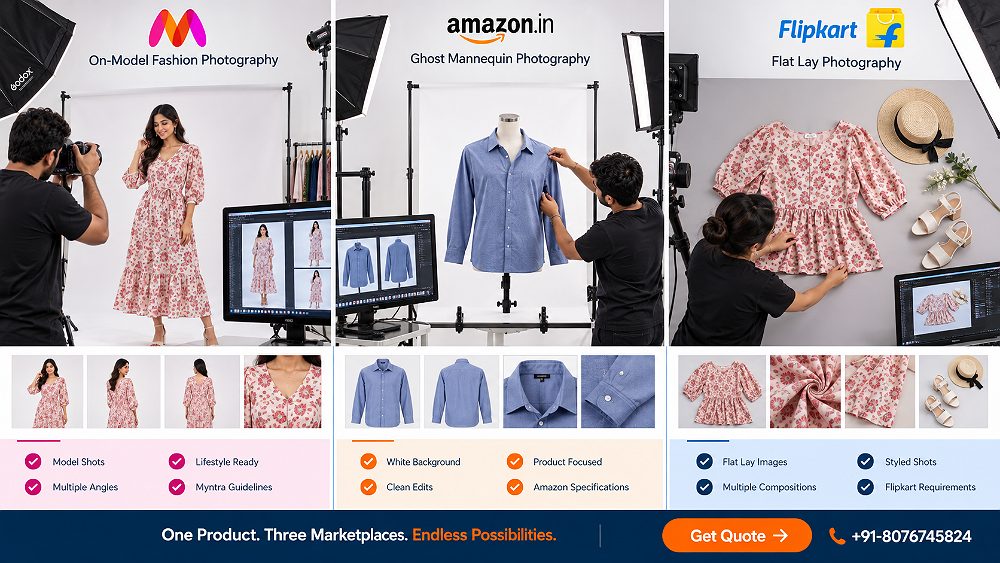
Selling the same clothing SKU on Myntra, Amazon India and Flipkart does not mean uploading identical files without planning. Each marketplace has its own product detail page style, its own image order logic, and its own catalogue upload rules — and the shopper on each app is scanning for slightly different signals. That is where a serious Fashion Photography services partner earns their fee: not by re-shooting three times, but by planning one production intelligently.
At Uniqs Studio, our commercial fashion team plans every shoot as a single master capture that produces enough clean assets — front, back, side, fit, fabric, detail — to build separate marketplace-ready image sets for each platform. This ecommerce fashion photography guide walks D2C fashion brands, apparel manufacturers and marketplace catalogue teams through the exact framework we use with clothing labels across Delhi NCR and India — from pre-shoot planning right up to the folder structure that lands on your seller portals.
Whether you are a young Myntra-first label, an Amazon India seller scaling beyond 500 SKUs, or a Flipkart fashion brand consolidating your catalogue, this playbook is written to save reshoots, protect colour accuracy and lift PDP conversion. Ready when you are, Satyam sir.
Table of Contents
- What Ecommerce Fashion Photography Means in 2026
- Myntra vs Amazon vs Flipkart Photography Requirements
- The M3 One-Shoot, Three-Marketplace Framework
- Which Fashion Photography Style Should You Use?
- Marketplace Image Compliance Checklist
- Clothing Category Photography Plan
- Ecommerce Fashion Photography Workflow
- Photography Cost & Budget Planning
- 9 Marketplace Photography Mistakes
- Why Brands Choose Uniqs Studio
- Ecommerce Fashion Photography FAQs
Quick Answer
Ecommerce fashion photography for multi-marketplace clothing brands should begin with one high-resolution master shoot covering front, back, side, fit, fabric and detail views. Those master assets are then cropped, ordered and exported according to the current requirements of Myntra, Amazon and Flipkart rather than reshooting every marketplace separately.
Key Takeaways
- One well-planned shoot can support Myntra, Amazon, Flipkart, Ajio and your D2C store when the master asset library is captured correctly.
- Marketplace image requirements — main image, aspect ratio, image resolution and background — should be checked before shoot day, not after.
- On-model, ghost mannequin, invisible mannequin and flat lay serve different jobs on the product detail page.
- Colour variation accuracy and true garment fit matter more than heavy retouching or creative filters.
- Build a master file library once, then export platform-specific PDP images per SKU and colourway.
What Is Ecommerce Fashion Photography for Clothing Brands in 2026?
Ecommerce fashion photography is the disciplined production of clear, accurate and conversion-focused clothing images built specifically for online product detail pages and marketplace listings. It is not a magazine cover and it is not a mood board — it is a system that helps a shopper on Myntra, Amazon India or Flipkart evaluate the actual garment they will receive, from silhouette down to fabric texture. Our team at Uniqs Studio treats every shoot as a catalogue engineering problem first and an aesthetic problem second.
Because a fashion catalogue in 2026 lives across at least three or four surfaces — marketplace PDP, brand D2C site, social ads, WhatsApp catalogues — the deliverable is no longer a single JPEG. It is a structured pack of hero images, secondary product images, alternate images, detail shots and zoom images, each engineered for a specific slot. A brand that plans this well can move faster from sample to upload while keeping colour accuracy locked across every SKU.
Ecommerce Fashion Photography vs Editorial Fashion Photography
Editorial fashion imagery sells aspiration, atmosphere and brand mood — heavy styling, unusual angles and cinematic light are the point. Ecommerce fashion photography inverts that priority: the garment must read cleanly on a 6-inch phone screen, and the buyer must be able to answer “does this fit me and does the colour look right?” in under three seconds. Editorial imagery still has a role in campaigns and D2C storytelling, but marketplace fashion catalogue photography obeys different rules of clarity and repeatability.
This is why we often plan two overlapping shot lists on the same day at Uniqs Studio: one clean marketplace-ready set for Myntra, Amazon and Flipkart, and a smaller lifestyle set for social and D2C use — captured back-to-back with the same model, so the brand narrative stays consistent. For a deeper look at how the editorial-vs-catalogue decision changes production planning, our team also published a longer piece on studio vs outdoor fashion shoots.
Why Marketplace Fashion Photography Needs a Production System
A one-off fashion shoot for six garments can be handled by a freelancer with a single softbox. A 300-SKU seasonal collection heading to Myntra, Amazon and Flipkart simultaneously cannot. Once you cross even 40–50 SKUs with multiple colour variations, the only way to protect quality is a repeatable production system: fixed camera position, calibrated studio lighting, tethered capture, colour reference cards, SKU labelling and a version-controlled folder structure.
That system is exactly what turns ecommerce fashion photography from a creative service into a supply-chain input. Uniqs Studio has been running this workflow for D2C fashion brands and marketplace sellers for over nine years, and we have seen first-hand how much time gets wasted when brands try to shoot with three different vendors for three different platforms. One shoot, one calibrated pipeline, three clean exports — that is the shift 2026 is asking of every serious clothing label.
Ecommerce Fashion Photography Requirements: Myntra vs Amazon vs Flipkart
Every marketplace has published its own image and catalogue upload requirements — main listing image rules, aspect ratio, image resolution and what counts as a compliant hero image. Below is a planning matrix your team can use as a starting point. It is deliberately shaped around photography decisions rather than pixel-level compliance, because the exact specs shift periodically inside each seller portal.
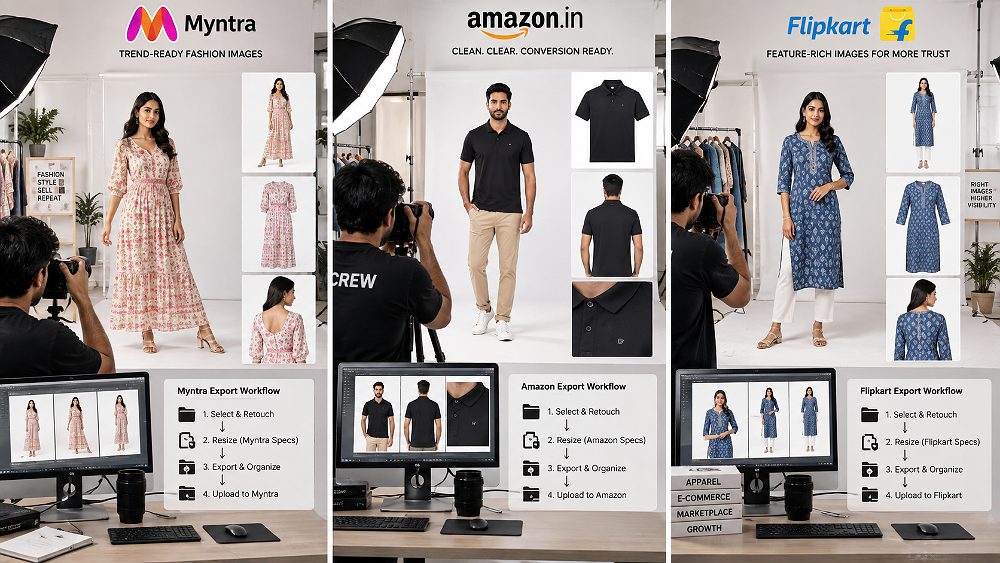
Myntra vs Amazon vs Flipkart Fashion Photography — 2026 Planning Matrix
| Marketplace | Primary Image Approach | Supporting Shots | Best Photography Styles | Background Strategy | Fit Visibility | Detail Shots | Lifestyle Use | Brand Priority | Pre-Upload Check |
|---|---|---|---|---|---|---|---|---|---|
| Myntra | On-model hero image | Back, side, styled full-length, detail | Model + ghost mannequin | Neutral / soft studio | High — silhouette + drape | Fabric texture, embroidery, embellishment | Supported in secondary slots | Fashion presentation + styling | Myntra Partner Portal category sheet |
| Amazon India | Clean product on white background | Front, back, alternate, zoom image | Ghost mannequin + selective on-model | Pure white for main listing image | Medium — via fit + secondary shots | Fabric, closures, construction | Permitted in secondary images | PDP clarity + zoom performance | Amazon Seller Central image guide |
| Flipkart | Clean product + full silhouette | Front, back, detail, side, colour variation | Ghost mannequin, on-model, flat lay | Clean neutral or white | Medium-high | Fabric detail, fit, closures | Category dependent | Catalogue consistency across SKUs | Flipkart Seller Hub category rules |
Specifications checked: September 2026. Always verify current marketplace rules inside your seller portal before final export — first-party seller documentation wins over any third-party guide.
Myntra Fashion Photography: Prioritise Fit, Styling and Fashion Presentation
Myntra is arguably the most fashion-native of the big three Indian marketplaces, which is why we recommend building the shot list around Myntra first and then adapting downwards. Buyers on Myntra scan the PDP for silhouette, drape, length, styling and how the garment sits on a real body — so on-model photography almost always carries the hero image slot for apparel categories. For deeper planning on this platform specifically, our team maintains a dedicated fashion photography for Myntra guide and a companion Myntra model shoot checklist.
Beyond the hero image, Myntra catalogues need a consistent set of secondary product images across your entire collection: same pose family, same crop discipline, same styling logic. That consistency is what makes a Myntra brand page look professionally merchandised versus a stitched-together SKU dump. At Uniqs Studio we lock these decisions on a pre-production call with the brand so shoot day is only execution.
Myntra Pre-Shoot Checklist
- □ Confirm apparel category on Myntra Partner Portal
- □ Confirm current image specifications and aspect ratio
- □ Finalise model requirements (size, look, hair)
- □ Lock required angles per SKU
- □ Prepare colour reference / fabric swatches
- □ Prepare labelled sample sheet with SKU and colourway
- □ Define final export crop before shoot day
Amazon Fashion Photography: Build a Clean, Conversion-Focused Listing Set
Amazon India rewards clarity above all. The main listing image for apparel typically needs to be on a pure white background, with the product filling roughly 85% of the frame — which is why ghost mannequin photography and clean on-model shots dominate the hero slot. Alternate images then do the heavy lifting: back view, side view, fabric zoom image, closure detail and, where permitted, a lifestyle secondary image. For a fuller walk-through of Amazon-oriented planning we recommend also reading our fashion photography for clothing brands article.
What we consistently see with Amazon fashion sellers is that a strong ecommerce fashion photography pack cuts image rejection rates and speeds up catalogue upload. Amazon’s Seller Central documentation on product image requirements is the source of truth here — Uniqs Studio treats it as required reading before every Amazon-focused shoot.
Flipkart Fashion Photography: Balance Marketplace Clarity With Strong Product Presentation
Flipkart sits between Myntra and Amazon in tone. The platform expects a clean catalogue presentation with strong product visibility, front/back/detail coverage and disciplined consistency across colour variants of the same style. Because Flipkart’s fashion vertical is large and category-specific, image rules can change with the category — a saree listing, an activewear listing and a men’s shirt listing may not share identical requirements.
For that reason, treat the Flipkart Seller Hub’s current category-level catalogue guidelines as your final authority for cropping, aspect ratio and background before you export final PDP images. Our production team keeps a rolling document of the latest requirements per major fashion category, updated whenever we run a Flipkart-focused shoot for a Delhi NCR brand.
The One-Shoot, Three-Marketplace Ecommerce Fashion Photography Framework
This is the section where most brands realise they have been overspending. The framework we use at Uniqs Studio for every multi-marketplace fashion client is deliberately named and structured so that the internal team can talk about it clearly:
The Uniqs Studio M3 Framework
Master Capture → Marketplace Mapping → Multi-Format Export
One professional ecommerce fashion photography production feeds every marketplace, every ad channel and your D2C store — without reshoots and without vendor sprawl.
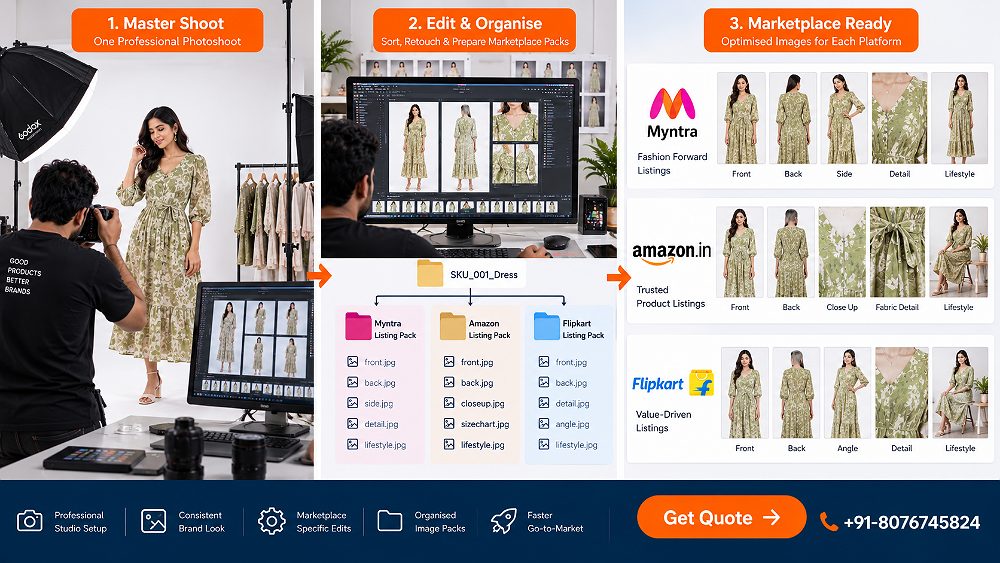
Step 1 — Create a Master Ecommerce Fashion Photography Shot List
The master shot list is the spine of the entire production. For every garment you plan to shoot at Uniqs Studio, we capture a defined library: front view, back view, side view, three-quarter, fit shot, fabric texture close-up, stitching or construction detail, label detail, one feature-hero shot and — where the brand budget allows — one lifestyle frame in a controlled environment. This library exists to answer every possible question a shopper might ask on the product detail page.
A well-built master ecommerce fashion photography shot list per SKU almost always eliminates the need for reshoots later, and it protects you against future marketplace requirement changes. For teams building this list for the first time, our clothing brand shoot planning guide is a good companion read.
Step 2 — Map Every Master Image to a Marketplace Purpose
Once the master library exists, we map each shot to a specific slot on Myntra, Amazon, Flipkart and your D2C site. This mapping is what turns loose files into a catalogue system:
Master Shot → Marketplace Usage Matrix
| Master Shot | Myntra Use | Amazon India Use | Flipkart Use | D2C Website Use |
|---|---|---|---|---|
| Front (on-model) | Hero image | Secondary if allowed | Primary or secondary | Hero |
| Back | Secondary | Alternate image | Alternate | Gallery |
| Side | Secondary | Alternate | Alternate | Gallery |
| Fabric detail | Zoom slot | Zoom image | Detail slot | Zoom / PDP tab |
| Feature detail | Styling story | Alternate | Detail | Storytelling block |
| Ghost mannequin | Category-dependent | Main listing image | Main or alternate | Silhouette gallery |
| Flat lay | Secondary support | Supporting shot | Supporting | Editorial layout |
| Lifestyle | Secondary slots | Where permitted | Category dependent | Campaign hero |
Step 3 — Export Marketplace-Specific Image Packs
Once mapping is locked, our post-production team exports platform-specific packs from the master files. That means per-marketplace cropping, canvas / aspect ratio, background handling, image resolution, compression, filename conventions, image order and folder structure — all driven off one calibrated master. This is the step where most self-shot fashion brands lose weeks; a good production partner reduces it to a same-week turnaround for typical catalogue sizes.
Naming convention matters more than most brands realise. A file called SKU-KUR-047-BLU-MYN-01.jpg tells your seller portal team everything they need to know at a glance — SKU, category, colourway, marketplace and image order. Uniqs Studio ships every catalogue with a documented naming spec so your marketplace uploaders never guess.
Which Ecommerce Fashion Photography Style Should Your Clothing Brand Use?
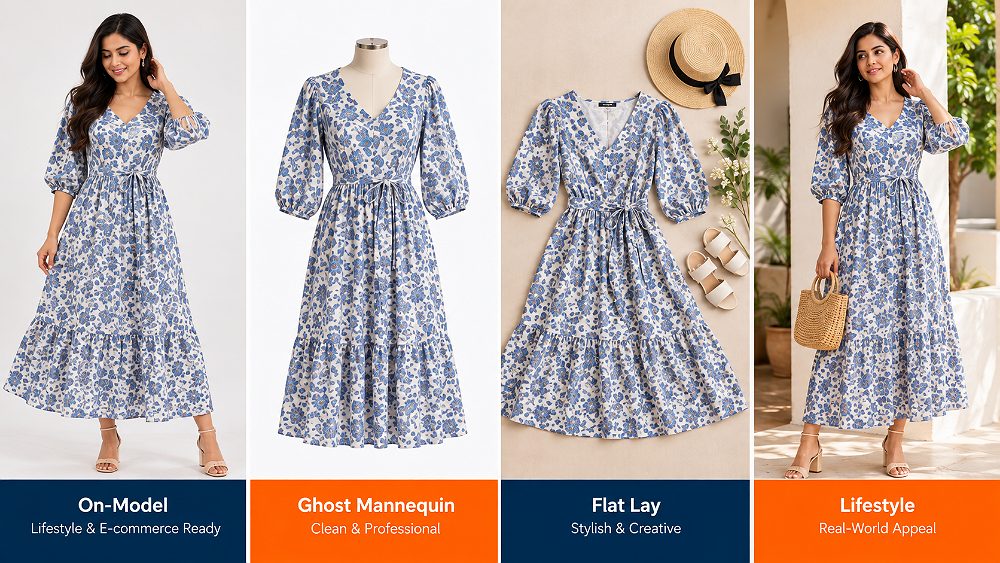
The correct photography style depends on your garment category, price point and target marketplace. Most fashion catalogues in 2026 use a combination — one style for the hero image, another for supporting slots. Here is how we decide at Uniqs Studio.
On-Model Ecommerce Fashion Photography
On-model fashion photography is the strongest possible signal of fit, drape, length, styling and proportion — which is why it dominates the hero image slot for Myntra apparel and premium D2C fashion. It also builds emotional connection: a shopper picturing themselves in the garment is closer to “add to cart” than a shopper staring at a flat piece of fabric. Our professional fashion photographer team plans on-model sessions with dedicated stylists, so pose consistency and garment fit stay uniform across the catalogue.
Cost per garment is higher because you are paying for model, stylist, hair and studio time — but per-conversion, it usually returns the strongest number on categories like womenswear, ethnic wear and premium menswear. Our team plans this shoot type as a scheduled slot with reference poses agreed in advance.
Ghost Mannequin / Invisible Mannequin Photography
Ghost mannequin photography — also called invisible mannequin photography — is the workhorse of Amazon India fashion listings and a strong option for Flipkart. It shows the garment’s three-dimensional shape without the distraction of a model, keeps catalogue consistency high and speeds up production dramatically at scale. Neck opening, arm opening and back construction are all visible cleanly. For brands running deep catalogue volumes, our dedicated garment photography services page explains the workflow in more depth.
Flat Lay Clothing Photography
Flat lay is cost-efficient, fast and works well for simple garments, secondary product images and accessory categories. It is not, however, ideal as a hero image for structured apparel like dresses, tailored shirts or ethnic sets, because it flattens silhouette and hides fit. Use flat lay for supporting slots on Amazon and Flipkart, or for editorial arrangements on your D2C site.
Lifestyle Fashion Photography
Lifestyle imagery supports — never replaces — clear product evaluation. It is where your brand storytelling lives: environment, mood, model expression, prop styling. Keep lifestyle photography for secondary marketplace slots (where permitted), D2C hero banners, social ads and campaign extensions. It is not a substitute for a clean on-model or ghost mannequin hero image on your PDP.
Photography Style Decision Matrix
| Photography Style | Best For | Fit Visibility | Production Speed | Relative Cost | Marketplace Use | D2C Use |
|---|---|---|---|---|---|---|
| On-Model | Fashion, ethnic, premium apparel | Very high | Slower per SKU | High | Myntra hero, Ajio, Nykaa Fashion | Hero + gallery |
| Ghost Mannequin | Scale catalogues, Amazon-first | Medium | Fast | Medium | Amazon, Flipkart, Meesho | Silhouette gallery |
| Flat Lay | Simple garments, accessories | Low | Very fast | Low | Supporting slots | Editorial pages |
| Lifestyle | Brand story, ads, campaigns | Medium | Slow | High | Secondary only | Campaign hero |
Ecommerce Fashion Photography Compliance Checklist for Marketplace-Ready Images
Image rejection is the single most avoidable delay in a marketplace launch. Almost every rejection we see traces back to the same three issues: wrong background, wrong crop or a hero image that fails the platform’s clarity rules. This section is your pre-flight checklist.
Get Colour Accuracy Right Before Retouching
Colour accuracy starts on set, not in Photoshop. That means a colour-managed workflow, a correctly white-balanced camera, a fabric swatch shot at the top of every SKU and a monitor calibrated to a known standard. Uniqs Studio ships every batch with a colour reference note so your marketplace uploader can spot any file that drifts.
Colour correction in post-production should only fine-tune what was captured correctly — it should never invent a shade. If the physical garment is teal and the file looks turquoise, the answer is a re-edit or, in rare cases, a re-shoot of that SKU. This single discipline reduces post-purchase returns significantly.
Keep Retouching Realistic
Good retouching removes distractions and preserves reality. Do: remove dust, lint and stray threads; fix temporary wrinkles; clean the background; correct exposure. Do not: change garment construction, artificially narrow a model’s waist, invent embroidery, remove real design elements, or alter colour beyond the physical product. Every one of these mistakes triggers returns and hurts brand trust — and on some platforms, it can trigger listing takedowns.
Check Crop, Background and Product Scale Before Export
Final QC before you hit “upload” should never be skipped. Below is the checklist Uniqs Studio runs on every batch:
Pre-Upload QC Checklist
- □ Marketplace confirmed (Myntra / Amazon / Flipkart / Ajio / Nykaa / Shopify)
- □ Category confirmed
- □ SKU + colourway locked
- □ Crop matches platform aspect ratio
- □ Product fills the frame per platform rule
- □ Background matches marketplace requirement
- □ Image resolution meets zoom image spec
- □ Image order matches the marketplace convention
- □ File type and compression clean
- □ Filename follows SKU naming spec
- □ Visual match to physical garment double-checked
Clothing Category Photography Plan for Myntra, Amazon & Flipkart
Different clothing categories reveal information in different ways — a saree needs full drape and pallu visibility, a pair of jeans needs waist, rise and leg-shape clarity. Below is the category-level photography plan Uniqs Studio uses as a starting point for every apparel brand walking in.
Clothing Category Shot Plan
| Clothing Category | Must-Capture Views | Best Primary Style | Important Detail Shot | Fit Information Needed |
|---|---|---|---|---|
| Shirts & T-Shirts | Front, back, side, collar, sleeve | Ghost mannequin + on-model | Fabric weave, collar, cuff | Shoulder + torso fit |
| Kurtis & Kurta Sets | Front, back, side, dupatta | On-model | Embroidery + neckline | Length + drape |
| Dresses | Full length front/back, side | On-model | Neckline + closures | Drape + length |
| Sarees | Full drape, pallu, border, blouse piece | On-model + flat lay | Border + weave | Drape style |
| Jeans & Trousers | Front, back, side, waist, hem | Ghost mannequin | Wash + closures | Rise + leg shape |
| Activewear | Front, back, in-motion | On-model | Fabric stretch + fit | Body fit + support |
| Ethnic Wear | Full silhouette + detail | On-model | Embellishment + drape | Fit + fall |
| Kidswear | Front, back, styled | Ghost mannequin + child model | Print + closures | Age-appropriate fit |
Shirts, T-Shirts and Tops
Focus on collar, sleeves, torso fit, back view and fabric texture. Ghost mannequin usually carries the main listing image on Amazon India, with on-model shots supporting on Myntra and Flipkart.
Kurtis, Dresses and Ethnic Wear
These are drape-heavy categories where on-model photography is almost non-negotiable for the hero image. Capture full length front and back, neckline detail, side view, embroidery close-ups and — for Anarkali or A-line silhouettes — a three-quarter that shows the sweep of the skirt.
Sarees and Draped Garments
Sarees need full drape visibility, the border, the pallu, weave detail and a clean shot of the blouse piece. On-model draping is the standard hero image; flat lay works well for supporting shots that show the full six yards.
Denim, Trousers and Bottomwear
Waist, rise, leg shape, pockets, closures and fabric wash are the buying-decision inputs here. Ghost mannequin plus a fit shot on model handles almost every SKU. For a complete walk-through of category-wise planning, our team maintains a longer fashion catalogue photography guide.
How to Plan an Ecommerce Fashion Photography Shoot From Sample to Upload
The best marketplace results come from disciplined pre-production. This is the workflow Uniqs Studio runs for every commercial fashion client — five stages that never get skipped.
1. Prepare and Label Every Garment
Every sample walks into the studio inspected, steamed, lint-rolled and labelled with SKU, colourway and category. Any garment that arrives unprepared eats shoot-day time and risks colour or fit issues on the final image. Our team supplies a garment prep spec sheet ahead of every shoot so brands know exactly what “ready to shoot” looks like.
2. Lock the Marketplace Deliverables Before Shoot Day
Before the first shutter click, we lock a matrix of Marketplace × Category × Shot × Crop × Output for every SKU. That single document eliminates almost every downstream reshoot request. It also feeds directly into how the post-production team names folders. For a broader look at planning economics, our fashion photography cost guide and our studio vs outdoor comparison both help brands scope realistically.
3. Shoot Tethered and Approve a Test SKU
Every shoot day starts with a tethered test SKU. We shoot one full look, load it on a colour-calibrated monitor and approve exposure, crop, model pose, background, colour and garment fit — before the full batch runs. That single half-hour saves days later.
4. Retouch the Master Files Once
Our post-production team retouches master, colour-accurate, high-resolution files once — before any marketplace resizing. This keeps quality consistent across every export and prevents drift when a file is re-cropped for different platforms.
5. Export and QC Each Marketplace Pack
Final delivery is a structured folder set per SKU:
/SKU-001/MYNTRA/
/SKU-001/AMAZON/
/SKU-001/FLIPKART/
/SKU-001/D2C/
Each folder is QC’d against the platform’s current image spec before it leaves our system. Any brand that needs to plug this straight into a video pipeline can also look at how we structure ecommerce video production alongside the stills.
See how a marketplace-focused fashion asset can be captured for clothing listings and ecommerce use.
How Much Does Ecommerce Fashion Photography Cost in India in 2026?
Pricing for ecommerce fashion photography in India depends on shoot style, number of images per SKU, model requirement, retouching depth, total SKU volume, turnaround and how many marketplace deliverables the brand needs. Below is the current starting-range planner Uniqs Studio uses for scoping calls. Verify the live price page for exact numbers before you sign off.
Uniqs Studio Ecommerce Fashion Photography Packages (Starting Ranges)
| Package | Starting Range | Best For | Photography Format | Typical Deliverables | CTA |
|---|---|---|---|---|---|
| Basic | ₹199–₹299 / garment | Small catalogues, basic listings | Flat lay | 2 angles + basic retouching | Get Quote |
| Standard | ₹399–₹599 / garment | Growing D2C / marketplace sellers | Flat lay + ghost mannequin | 4 angles + standard retouching | Book Shoot |
| Premium | ₹899–₹1,499 / garment | Established clothing brands | Ghost mannequin + selective on-model | 6 angles + detail imagery | Book Consultation |
| Enterprise | From ₹149 / garment at qualifying volume | Large manufacturers / catalogue teams | Custom high-volume production | Dedicated workflow, SKU pipeline | Request Enterprise Quote |
Prices verified: September 2026. For a deeper breakdown, see Satyam’s full fashion photography cost guide.
9 Ecommerce Fashion Photography Mistakes That Cause Weak Listings or Reshoots
Almost every marketplace image rejection or PDP underperformance our team investigates traces back to the same shortlist. Fix these nine and your reshoot rate drops close to zero.
- Shooting before checking marketplace requirements. Verify Myntra Partner Portal, Amazon Seller Central and Flipkart Seller Hub category rules first.
- Capturing too few angles. Front-only catalogues cost you sales on drape-heavy categories.
- Using one crop for every marketplace. Aspect ratio and crop discipline differ; treat exports as marketplace-specific.
- Poor garment preparation. Unsteamed, unlabelled samples eat shoot-day hours.
- Inconsistent colour between SKUs. Skipping colour reference cards is the fastest way to lose returns to “colour looked different online.”
- Excessive skin or garment retouching. Buyers spot artificial slimming and fake fabric — trust drops immediately.
- Ignoring fabric texture and construction detail. Zoom images and detail shots are what convert on premium categories.
- Mixing pose and framing across a catalogue. Consistency is what makes a brand page look merchandised.
- Delivering files without SKU folder structure. Naming discipline is what makes catalogue upload fast.
For a longer breakdown across models, our team also wrote a separate piece on model photoshoot preparation that pairs well with this article.
Why Multi-Marketplace Clothing Brands Choose Uniqs Studio for Fashion Photography
Uniqs Studio has been running commercial ecommerce fashion photography production out of Delhi NCR for over nine years, serving 500+ D2C brands and marketplace sellers across Amazon India, Flipkart, Myntra, Ajio, Meesho and Nykaa. Our team is built specifically for the multi-marketplace workflow — meaning models, ghost mannequin capacity, flat lay bays, calibrated colour retouching and a documented QC pipeline all live under one roof.
Founder Satyam personally reviews every catalogue that leaves the studio, which is one of the reasons brands from across Delhi, Gurgaon, Noida, Faridabad and Ghaziabad — and increasingly pan-India brands shipping samples in — come back season after season. If you are planning a catalogue for Myntra, Amazon or Flipkart, our Fashion Photography services team can build one production plan that covers all your marketplaces cleanly, with support from our professional fashion photographer line-up.
Planning a marketplace-ready fashion catalogue?
Send Uniqs Studio your SKU count, clothing category and target marketplaces to receive a marketplace-ready shoot plan and quotation.
Call Satyam · +91-8076745824 WhatsApp +91-8076745824 [email protected]
Frequently Asked Questions About Ecommerce Fashion Photography
What is ecommerce fashion photography?
Ecommerce fashion photography is the production of clear, accurate and sales-focused clothing images for online stores and marketplaces. It typically combines on-model, ghost mannequin, flat-lay and detail photography according to the garment category and the platform where the product will be sold, such as Myntra, Amazon India, Flipkart, Ajio or a D2C site on Shopify.
Can I use the same clothing photos on Myntra, Amazon and Flipkart?
A clothing brand can use the same high-quality master photographs across multiple marketplaces, but the final files may need different crops, backgrounds, image ordering or technical exports. The right approach is to plan one master shoot and create separate marketplace-ready image packs after checking each platform’s current category requirements.
Is model photography required for Myntra clothing listings?
Model-image requirements can depend on the apparel category and current Myntra catalogue rules, so brands should check their latest Myntra Partner Portal specifications before shooting. For fashion categories, on-model photography is especially useful because it communicates fit, drape, length and styling clearly to shoppers.
How many photos should a clothing brand shoot per SKU?
Instead of planning only the minimum marketplace upload count, capture a broader master set covering front, back, side, fit, fabric and important construction details. This gives the brand enough assets to create separate Myntra, Amazon, Flipkart and D2C image sets without unnecessary reshoots.
Which is better for ecommerce clothing: model, ghost mannequin or flat lay photography?
On-model photography is strongest for showing fit and drape, ghost mannequin images provide a clean three-dimensional garment shape and flat lay photography is efficient for simpler products and supporting views. The best ecommerce fashion photography strategy usually combines formats according to product type and marketplace.
Build One Marketplace-Ready Fashion Photography System, Not Three Separate Shoots
The brands that win in 2026 are the ones that treat ecommerce fashion photography as a production system, not a one-off creative service. Plan marketplace requirements before shoot day, capture a complete master library, protect colour accuracy and fit, export separate marketplace packs and keep one organised asset library for the season. That is how a Myntra hero image, an Amazon India main listing image and a Flipkart PDP set all come out of a single day at the studio.
If you are selling clothing on Myntra, Amazon, Flipkart or your own D2C store on Shopify, Uniqs Studio can build one production-ready photography plan around your SKUs and target marketplaces. Share your collection size and required platforms with Satyam and the team will come back with a customised shoot quote within 24 hours.
Ready to plan your next fashion catalogue?
Call Satyam or WhatsApp us to get started with a marketplace-ready ecommerce fashion photography plan.
Call Satyam · +91-8076745824 WhatsApp +91-8076745824 [email protected]