
Ecommerce Videoshoot Guide 2026-27: 27 Essential Shots, Video Formats & Marketplace Requirements
A practical production handbook from Uniqs Studio Delhi NCR for D2C brands, Amazon, Flipkart, Myntra, Ajio and Shopify sellers.
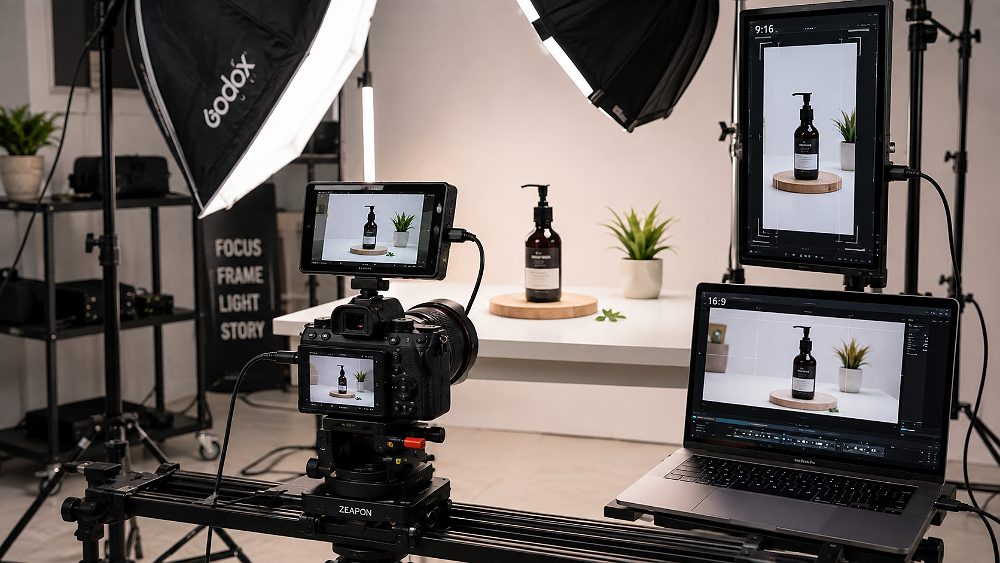
An Ecommerce Videoshoot in 2026-27 is a planned production workflow where a studio captures product demonstration, movement, macro detail and use cases, then exports the same footage into platform-specific formats for Amazon, Flipkart, Myntra, Shopify and Instagram. Most sellers still book a shoot with one universal video export in mind, and then discover during upload that Amazon, Flipkart and Myntra each want a slightly different frame, duration and quality standard.
This guide is written for D2C founders, marketplace catalogue managers, apparel brands and agencies who want to plan a professional Ecommerce Videoshoot before spending on studio hours. It covers the 27-shot master list, product intake, shoot-day workflow, horizontal vs vertical framing, model vs product-only decisions, marketplace requirements, delivery files and Indian production cost ranges. Marketplace specifications and category rules can change — always confirm the latest requirements inside your seller dashboard before final production. Last reviewed: August 2026.
Key Takeaways
- An Ecommerce Videoshoot is not one video — it is a family of exports built from one clean high-resolution master.
- Lock the shot list, aspect ratios and marketplace list before the shoot day, never during it.
- Capture footage inside a central safe-zone so 16:9, 9:16, 4:5, 3:4 and 1:1 exports all work without a reshoot.
- Plan roughly 20-35 simple product SKUs, 10-20 on-model SKUs or 5-12 lifestyle SKUs per day.
- Indicative Indian production ranges start around ₹800-₹1,500 per simple SKU and scale with model, set and deliverables.
What Happens During an Ecommerce Videoshoot?
An Ecommerce Videoshoot is a four-stage production workflow — pre-production, product preparation, filming and post-production. At Uniqs Studio, the shoot day itself is only the middle chapter; the real quality of any product videoshoot is decided in planning and delivery. Brands that treat Ecommerce Video Production as a series of predictable stages avoid the two most expensive problems in this business: reshoots and marketplace rejections.
Every serious ecommerce videography brief begins with a written brief, an SKU sheet and an agreed shot list, and ends with named export folders for Amazon, Flipkart, Myntra and Shopify. Sellers who plan to run structured on-model or ghost mannequin production can review our garment photography services or the deeper fashion catalogue photography guide before locking their video style.
Step 1: Pre-Production and SKU Planning
Pre-production is where the whole Ecommerce Video Production pipeline is quietly won or lost. Uniqs Studio builds one master SKU spreadsheet listing product code, name, category, target marketplace, required aspect ratios, shot count, model requirement, props and delivery deadline. This document becomes the shared source of truth between the brand, the styling team, the video maker and post-production.
Before any product videoshoot, we confirm which platforms will host each video — a single garms SKU going only to Instagram Reels needs different framing than the same clothing SKU going to Amazon PDP and Myntra. Sellers new to structured planning can borrow the visual discipline used in a fashion photography brief and adapt it to video, or study our apparel shot list workflow.
Step 2: Product Preparation, Styling and Set Building
Product preparation is the least glamorous but most reshoot-prone part of any product videoshoot. Apparel is steamed and colour-matched, packaging is opened, cables are neatly coiled, jewellery is polished and any assembly is completed off-camera. On lifestyle sets, props are staged to match a written brand reference before the camera powers on.
This is also where set choices are locked. A clean white cyclorama is chosen for high-SKU catalogues, a textured tabletop for premium outfits and accessories, and a full lifestyle set for storytelling clips. Sellers wanting inspiration for controlled tabletop work can look at how a professional flat lay photographer stages threads and props — many of those techniques translate directly to Ecommerce Video Production.
Step 3: Shooting Each Product Against the Approved Shot List
On the shoot floor, each SKU is filmed against the approved shot list — hero, multiple angles, feature demonstrations, macro details, product interaction and any required model movement. A shot tracker is ticked in real time so no attire, accessory or variant is missed. Camera positions, focal length and lighting are held consistent across similar SKUs to keep the catalogue looking like one visual family.
Brands often ask how many takes are “normal” — usually 1-3 clean takes per shot for product-only clips and 3-6 for on-model movement. Sellers curious about how on-camera model presentation is planned can review our fashion model photography breakdown or the model photoshoot preparation checklist before booking a video maker.
Step 4: Editing, QC and Marketplace Exports
Post-production is where one Ecommerce Videoshoot becomes many marketplace-ready videos. Editors grade colour, correct exposure, stabilise handheld footage, mix audio, add captions where useful and check that important product details stay inside each platform’s text-safe area. Only after internal QC do we cut multiple aspect ratios and export.
Typical exports include a clean high-resolution master, an Amazon product video MP4, a Flipkart product video export, a Myntra portrait cut, a Shopify PDP version and 9:16 social clips. Sellers can pair this with structured imagery from our Ecommerce Video Production service and reference how AI shortcuts stack up against real studios in our ecommerce video maker AI vs professional studio comparison.
What Products Should You Send for an Ecommerce Videoshoot?
The single biggest cause of delayed shoots is not lighting or camera — it is products arriving damaged, incomplete or in the wrong variant. A structured Ecommerce Videoshoot intake list protects your budget, your shoot-day timeline and your marketplace launch date. Uniqs Studio recommends every brand build a permanent SKU dispatch checklist and reuse it for every campaign.
Product Sample Checklist
Send only what a real customer will receive. Prototypes with different stitching, unofficial packaging or missing accessories can force a reshoot after your marketplace catalogue goes live. Sellers preparing apparel should also follow the discipline in our garment preparation checklist before dispatch.
- Final production-quality sample of each SKU or attire
- Correct colour and variant, exactly matching the intended listing
- Clean, undamaged packaging or branded box
- All accessories that ship with the product
- Chargers, cables and components where applicable
- Instruction manual when a demonstration shot is needed
- A spare unit for fragile or assembly-heavy products
- Apparel in the correct model size, steamed and lint-free
- Approved packaging or branding-safe alternatives
- A short prop or styling brief for any lifestyle shots
Information the Studio Needs Before Shoot Day
Before the first frame is filmed, the studio needs data — not just boxes. A one-page brief per SKU keeps your Ecommerce Video Production honest and repeatable. Uniqs Studio prefers to receive the SKU sheet at least 72 hours before shoot day so props, models and set can be locked. Sellers who also do imagery in parallel can reuse the same brief with our ghost mannequin photography workflow.
- SKU code and product name
- Target marketplace(s): Amazon, Flipkart, Myntra, Ajio, Nykaa, Shopify
- Two or three priority features to demonstrate
- Forbidden or non-approved claims
- Required deliverables: PDP video, ad cut, Reel
- Required aspect ratios: 16:9, 9:16, 4:5, 1:1, 3:4
- Reference videos for tone and pacing
- Model requirement: hand model, on-model, none
- Final delivery deadline
Create One Master SKU Production Sheet
One master SKU production sheet is the single most under-rated tool in a professional ecommerce product videoshoot. It aligns the brand, the video maker and the marketplace catalogue team so every SKU is filmed, edited and delivered against the same reference. Uniqs Studio can share a working sample template on request — email [email protected] or send a WhatsApp to +91-8076745824.
Ecommerce Videoshoot Shot List: 27 Essential Product Video Shots
The heart of any Ecommerce Videoshoot is a well-designed shot list. Sellers who arrive with only “make a nice product video” as a brief usually leave with clips that cannot be reused across Amazon, Flipkart and Myntra. Uniqs Studio uses the following 27-shot master list as a menu — every product videoshoot picks 5-12 shots from it, depending on category, marketplace and duration.
Treat this list as your ecommerce videoshoot shot list template, not a compulsory checklist. A clothing SKU on Myntra may need shots 21-27; a smart appliance on Amazon may need shots 1-19. Sellers who want to pair this with structured stills can look at our clothing product images per SKU guide alongside this shot list.
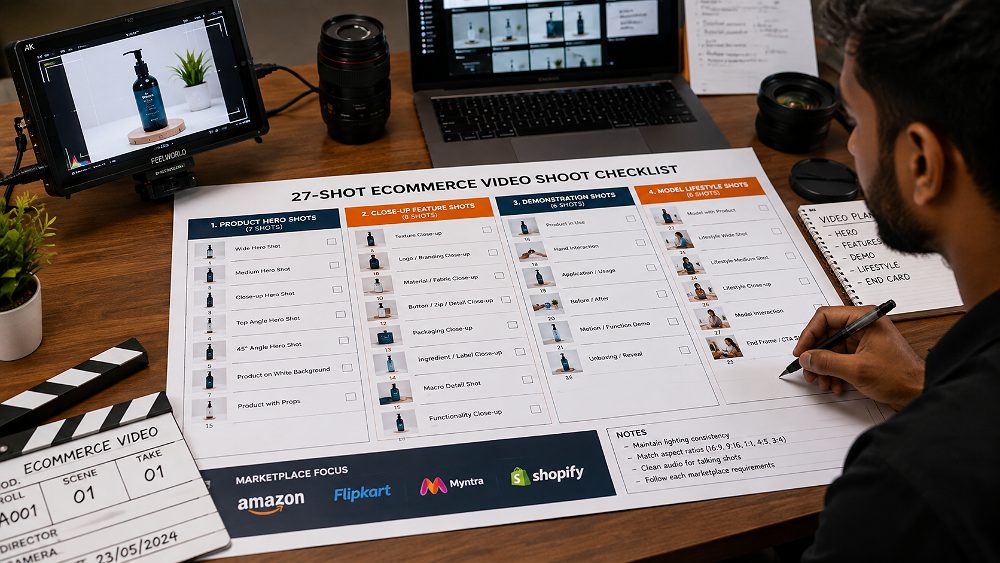
Product-Only Hero Shots
The first ten shots build a clean, marketplace-safe hero library. These are the shots that get reused for years — on Amazon PDPs, Flipkart listing videos, category pages and email banners. Product-only hero shots need controlled studio lighting, a stable camera on a slider or turntable, and identical exposure across similar SKUs. Uniqs Studio typically films these on a mirrorless cinema body with a 50-100mm range for shape-accurate framing.
- Static hero opening — product centred, no motion, 1-2 seconds
- Front view
- Left three-quarter view
- Right three-quarter view
- Side profile
- Back view
- Slow push-in on hero angle
- Slow pull-out from tight to wide
- Turntable rotation — 360-degree product view
- Top-down flat view
Product Detail and Feature Shots
Shots 11-20 are where trust is built. These macro detail and feature demonstration frames answer the silent questions every ecommerce buyer has — how does it feel, how is it built, does the fabric texture match the listing, does the button actually click? A confident product videoshoot spends real time on these frames because they lift PDP conversion and reduce returns. Sellers dealing with jewellery, watches or fine detail can benefit from macro discipline similar to our jewellery photography setups.
- Logo and branding close-up
- Material texture macro — fabric movement, grain, gloss
- Construction, stitching or joinery detail
- Controls, buttons or interface
- Opening and closing mechanism
- Product dimensions and scale reference
- Included accessories laid out
- Packaging or unboxing sequence
- Key feature demonstration
- Before and after or transformation demonstration where relevant
Model and Lifestyle Shots
Shots 21-27 add motion, human context and brand feeling. This is where clothing videos, footwear reels and jewellery lookbooks earn their premium. A model walking in an outfit communicates drape and fit better than any static image ever will. For apparel-heavy catalogues, brands often blend movement clips from an ecommerce product videoshoot with stills from our model photographer team and outputs from a full fashion photographer session.
- Model front pose in the outfit
- Model walking or forward movement
- Side movement — 90-degree profile
- Back movement — walking away from camera
- Product interaction or use in context
- Lifestyle context shot with props and environment
- Closing hero — brand-ready final frame for the PDP video
Do You Need All 27 Shots for Every Product?
No. Think of the list as a menu, not a mandatory quota. Simple accessory SKUs may only need shots 2, 5, 9, 11 and 19. A hero apparel SKU going to Myntra may need shots 21-27 plus 12 and 15. Uniqs Studio picks the right subset for each product before shoot day so your Ecommerce Videoshoot stays fast, focused and marketplace-ready.
White Background vs Lifestyle Ecommerce Video: Which Should You Shoot?
One of the earliest questions in every Ecommerce Videoshoot brief is whether to film against a clean white background or on a styled lifestyle set. There is no universal answer — the right choice depends on marketplace, category, catalogue size and campaign goal. What is universal is this: sellers who capture a clean master first can always add a lifestyle layer later, but the reverse is not true.
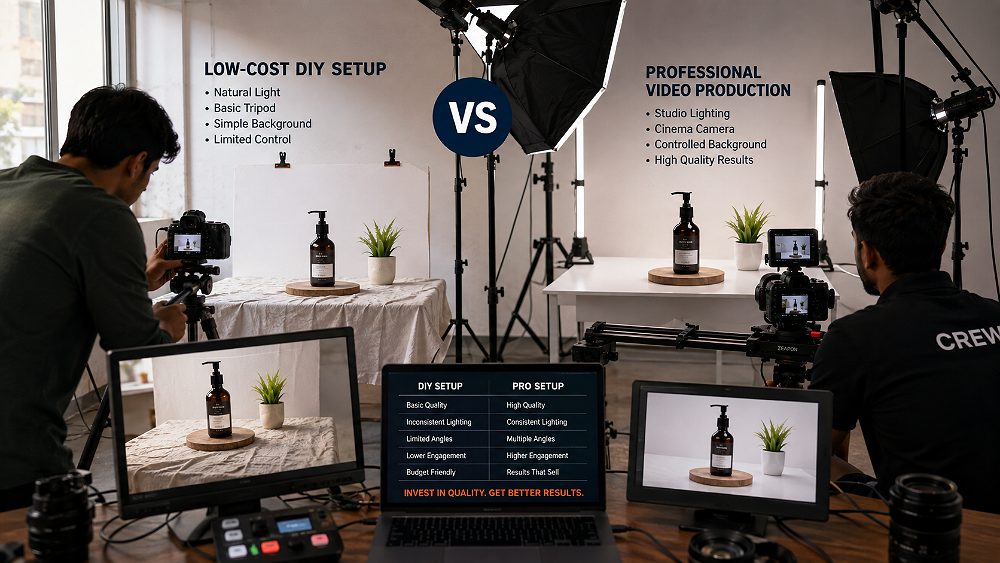
When White Background Product Video Works Best
White background is the workhorse of any Amazon product video or Flipkart product video catalogue. It delivers a clear product demonstration, consistent lighting, easy batching across many SKUs and lower set complexity — which means more attire or products per day and lower per-SKU cost. Sellers running high-volume marketplace catalogues can pair this with imagery from a structured ghost mannequin photography workflow and matching PDP stills.
When Lifestyle Product Video Works Best
Lifestyle video wins whenever emotion, scale or use context matters. Premium D2C skincare, home fragrances, bridal jewellery, streetwear and any Shopify-first brand storytelling belongs here. Lifestyle also punches harder on social platforms — Instagram Reels, Meta ads and top-of-funnel campaigns. Brands can plan lifestyle sets alongside our studio vs outdoor shoot comparison to decide whether to build the set in the studio or shoot on location.
Final Recommendation: Capture a Clean Catalogue Version First
Uniqs Studio’s default advice is simple — always capture a clean product master first, then add lifestyle footage only when the product, marketplace or campaign justifies it. This protects the catalogue, keeps daily SKU output high and gives future marketing teams reusable base assets.
| Criteria | White Background | Lifestyle | Best Choice |
|---|---|---|---|
| Marketplace PDP listing | Excellent | Limited | White |
| High-SKU catalogue | Excellent | Slow | White |
| Brand storytelling | Limited | Excellent | Lifestyle |
| Product detail visibility | Very high | Moderate | White |
| Production speed per day | Fast | Slower | White |
| Model requirement | Optional | Often needed | Depends |
| Props and set cost | Low | Higher | White |
| Social advertising performance | Neutral | Strong | Lifestyle |
| Repurposing flexibility | High | Medium | White |
Model vs Product-Only Ecommerce Videos: What Should Brands Choose?
The model question drives cost more than any other decision in a typical Ecommerce Videoshoot. A model day adds talent fees, hair and makeup, styling, fitting time and additional shot count — but for the right category, it is the single biggest lift in conversion. The rule of thumb Uniqs Studio uses is: if fit, drape, scale or human use matters, go on-model; if not, product-only will usually convert better per rupee.
Choose Product-Only Video When…
Product-only videos suit electronics, home appliances, kitchenware, accessories, tools, beauty packaging and any SKU where the buyer wants to see the object clearly. These clips batch quickly, run cheaper per SKU and slot easily into Amazon and Flipkart PDPs. Sellers running large catalogues often combine product-only videos with stills from a flat lay photographer to keep the visual language consistent.
Choose Model Video When…
Model videos are essential for apparel, ethnic wear, footwear, bags, watches, eyewear and beauty application. They communicate fit, scale, movement and emotional appeal in ways no still image can. Fashion brands can review our fashion photography for clothing brands and male model photographer pages before choosing talent for their outfits.
Apparel Often Needs Movement, Not Just a Static Pose
For any Myntra product video, static poses alone rarely tell the full story. Buyers want to see the garment drape, the fabric movement, the front-and-back silhouette and a real walking shot. Uniqs Studio typically films clothing SKUs with a 3-6 second walking clip, a front turn and a back turn — the same clips can then be resized as a Reel, an Amazon PDP video and a Shopify hero loop without a reshoot.
Horizontal vs Vertical Ecommerce Video: Which Formats Should You Request?
Aspect ratio choice quietly decides whether your Ecommerce Videoshoot works on one platform or five. In 2026-27, no serious ecommerce brand can afford to film only horizontal footage — mobile-first marketplaces and short-form social have made vertical framing non-negotiable. The good news is that with careful safe-zone planning, one 4K master can generate every aspect ratio without reshoots.
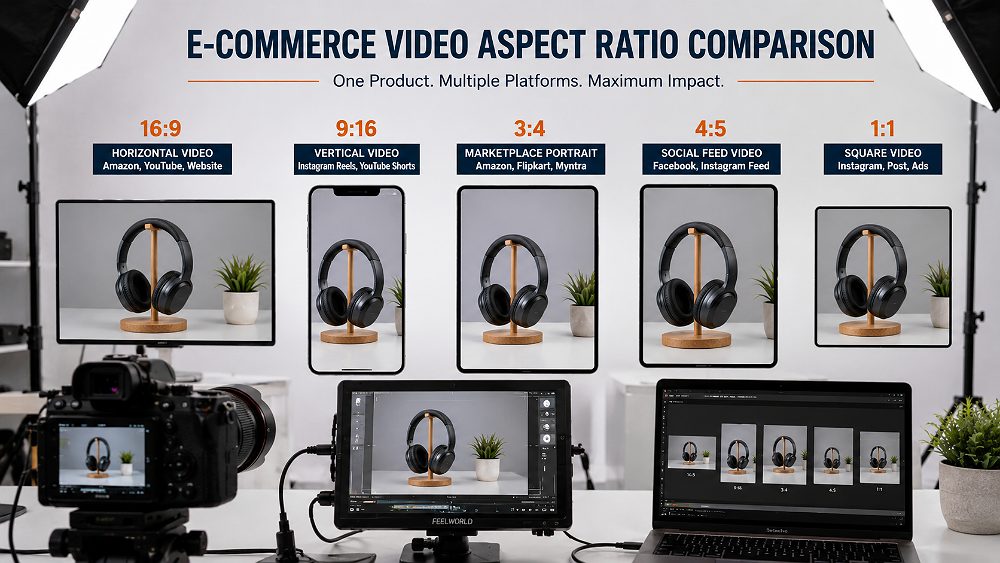
16:9 Horizontal Video
16:9 at 1920×1080 (1080p) is the traditional format for Amazon product video uploads, YouTube, brand websites, Shopify hero loops and A+ content. It remains the safest primary export for any ecommerce PDP where a wider viewer is expected. Uniqs Studio always keeps a clean 16:9 master version because it doubles as archive footage for future ad edits.
9:16 Vertical Video
9:16 at 1080×1920 is now the default for Instagram Reels, mobile-first social commerce, short-form ads and Meta paid campaigns. Vertical framing is also increasingly requested by marketplaces for hero placements. A modern product video maker should treat 9:16 as a first-class deliverable, not an afterthought.
3:4 Portrait Video
3:4 at 1080×1440 or higher is a portrait-friendly format that suits many marketplace layouts, fashion catalogue content and category-specific crops. It also survives well when a platform slightly recomposes vertical assets. Uniqs Studio recommends this cut for Flipkart product video and Myntra content where a live seller portal requests it.
1:1 and 4:5 Social Variants
1:1 and 4:5 remain important for social feed placements, retargeting ads and legacy Facebook units. Uniqs Studio delivers these as optional cuts alongside the primary 9:16 and 16:9 exports so brands can plug into any campaign without re-editing.
Best Production Strategy: Shoot for Multiple Crops
The most efficient Ecommerce Video Production strategy is to compose every important element — products, models, hands, on-screen text — inside a central safe area. That way, the same high-resolution footage can generate 16:9, 9:16, 4:5, 3:4 and 1:1 exports without a reshoot. This is a small discipline that saves a large budget across a year of campaigns.
How Long Should an Ecommerce Product Video Be?
There is no universal marketplace rule for video length in 2026-27, but there are strong practical patterns. Attention drops sharply after 15 seconds on social, marketplace PDP viewers usually watch 20-45 seconds, and demonstration content can justifiably run longer when the product needs it. Uniqs Studio treats duration as a purpose question, not a platform quota.
Recommended Video Length by Purpose
These are production planning recommendations, not universal hard platform limits. Always confirm the live maximum accepted duration inside the seller dashboard for your category before final export.
| Use Case | Recommended Length |
|---|---|
| Quick product feature clip | 6-15 seconds |
| Fashion movement clip / clothing reel | 8-20 seconds |
| Marketplace product overview (Amazon / Flipkart) | 20-45 seconds |
| Detailed feature demonstration | 30-60 seconds |
| Complex product tutorial | 45-120 seconds |
| Shopify PDP video | 20-60 seconds |
| Instagram Reels cut | 6-30 seconds |
Do Not Make a Video Longer Just to Explain Every Feature
One long PDP video rarely outperforms three modular short clips built for different funnel stages. Uniqs Studio recommends splitting complex features into 10-20 second modular cuts — one for the hook, one for the feature, one for social use. Modular editing also protects your Ecommerce Video Production investment against future platform changes.
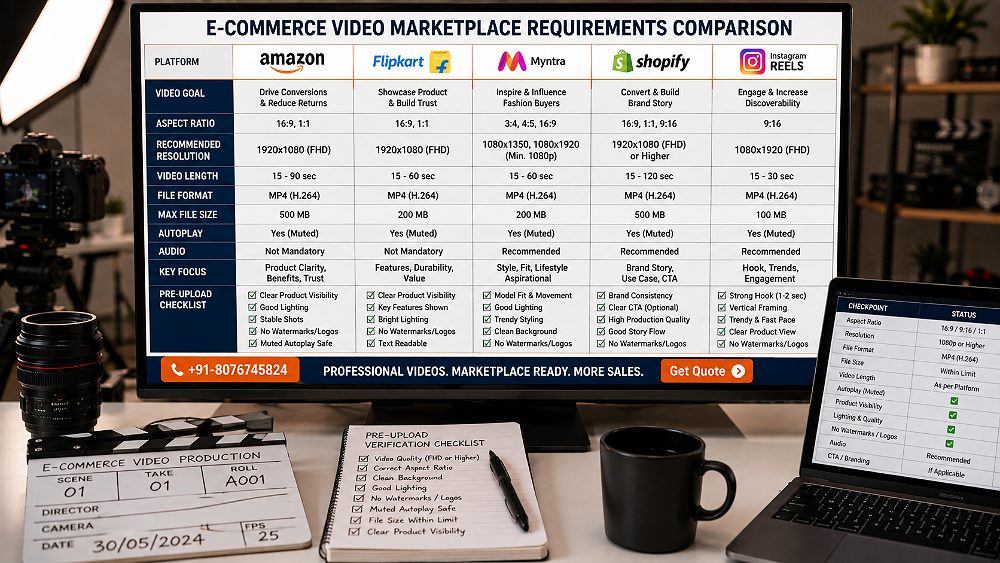
Ecommerce Video Requirements for Amazon, Flipkart, Myntra, Shopify & Instagram in 2026-27
This is the section every seller wants first — and where most articles go wrong. Marketplace specifications and category rules can and do change. What follows is an honest snapshot from Uniqs Studio’s live 2026 workflow, but every brand must reconfirm the current requirements inside their own seller dashboard or partner portal before approving final production. This section was last reviewed in August 2026.
⚠ Verify Before Shooting
Every marketplace can change duration, resolution or aspect-ratio rules by category. Always check Amazon Seller Central, Flipkart Seller Hub, Myntra Partner Portal and Shopify Help Center for your specific product category before locking your Ecommerce Videoshoot plan.
Amazon Product Video Requirements
For an Amazon product video, MP4 with H.264 encoding remains the safest primary delivery, with a MOV archive kept for future edits. Amazon seller guidance currently supports video uploads up to 1080p resolution, with a maximum upload size of 5 GB per file. The product shown must match the ASIN it is uploaded against, and Amazon rejects videos that promote unrelated websites, promotional redirects or unsupported claims.
Uniqs Studio always exports a clean 1920×1080 H.264 MP4 master plus a clean high-resolution archive without marketplace-specific overlays. This makes future re-uploads to A+ content, Store pages or Sponsored Brand video ads much faster. For the current live rules, check Amazon Seller Central India against your category.
Flipkart Product Video Requirements
A Flipkart product video is uploaded through the Seller Hub Listing Videos workflow against the relevant FSN. Videos pass platform quality checks — the product appearance must match the listing, and Flipkart rejects videos with watermarks, unrelated third-party promotions, competitor branding or time-sensitive promotional content.
Portrait-friendly framing is worth planning for Flipkart, especially in mobile-first categories. Uniqs Studio recommends keeping both a clean high-resolution master and a marketplace-specific MP4 export ready. Always verify current duration, size, resolution and category limitations inside Flipkart Seller Hub before your final export.
Myntra Product Video Requirements
A Myntra product video is not one universal specification — Myntra catalogue rules vary by article type, category and seller workflow. What is consistent is that fashion video should clearly communicate fit and movement, colour accuracy is critical, and the garment or attire on screen must match the catalogue attributes for size, colour and styling.
The safe production workflow is: confirm category, download the current specification sheet from the Myntra Partner Portal, approve required portrait framing, shoot a high-resolution master and then export the exact seller-portal version. Never rely on a two-year-old third-party specification sheet — Myntra category rules move faster than most public blogs update. Brands filming apparel movement can also study our garment photography for ecommerce guide for still-image discipline that pairs well with video.
Shopify Product Video Requirements
A Shopify product video is the most flexible of the major platforms. Shopify currently supports direct product video uploads in MP4, MOV and WEBM formats, with a maximum upload size of 1 GB, a maximum video duration of 10 minutes and support for up to 4K resolution. YouTube and Vimeo embedding is also supported for longer content.
Uniqs Studio’s recommended Shopify delivery is a clean MP4 H.264 at 1080p for efficient PDP loading, plus a higher-resolution master when the brand plans to reuse footage in ad campaigns. For live specifications, always check the current Shopify Help Center.
Instagram and Social Commerce Video
For Instagram Reels and social commerce, prioritise a 9:16 vertical master at 1080×1920. Keep important product detail inside the UI-safe area, hook the viewer in the first 1-2 seconds, and edit modular short cuts of 6-30 seconds. Ajio, Nykaa and Meesho social feeds also perform strongly on 9:16 vertical clips repurposed from the same Ecommerce Videoshoot master.
Marketplace Requirements Quick Comparison
Use this table as a planning shortcut, not as a QC checklist. Every platform requires a final verification step inside the live seller portal before upload.
| Platform | Primary Production Format | Recommended Framing | Typical Content Goal | Verify Before Upload? |
|---|---|---|---|---|
| Amazon | MP4 H.264 up to 1080p | 16:9 platform-safe | Product demonstration | Yes |
| Flipkart | MP4 platform export | Portrait-safe / Seller Hub rule | Product understanding | Yes |
| Myntra | Portal-specific export | Portrait / model movement | Fashion fit & movement | Yes |
| Shopify | MP4 preferred, MOV / WEBM OK | 16:9, 9:16 or PDP-native | Product education | Yes |
| Instagram Reels | MP4 | 9:16 vertical | Discovery / social conversion | Yes |
What Files Should an Ecommerce Video Production Studio Deliver?
A product videoshoot is only as valuable as its delivery package. Uniqs Studio has seen brands lose thousands of rupees of production value because a studio delivered one flattened final file with baked-in music and text — nothing reusable, nothing future-proof. A proper delivery package should include a master, marketplace exports, social versions, clean cuts, thumbnails and organised folders.
1. High-Quality Master Video
The most valuable single file is the clean high-resolution master — no marketplace-specific overlays, no baked-in captions, no licensed music. This is the archive-ready source your future marketing team will thank you for.
2. Marketplace-Ready MP4 Exports
Ready-to-upload MP4 exports should include an Amazon export, a Flipkart export, a Myntra or category-specific export and a Shopify export. Each named clearly against its target platform.
3. Vertical Social Media Versions
Deliver 9:16 as the primary social version, with optional 4:5 and 1:1 cuts. These are essential for Instagram Reels, Meta paid ads and any modern top-of-funnel campaign.
4. Clean Version Without Text or Music
A clean version with no on-screen text and no licensed music is arguably more valuable than any single finished cut. It gives your team endless reuse across new campaigns, localised markets and future platforms without licensing risk.
5. Thumbnail / Cover Frames
A properly chosen cover frame lifts click-through on every marketplace, from an Amazon product video tile to a Shopify PDP loop. Delivery should include still cover frames at the correct dimensions for each platform.
6. Captions and Subtitle Files Where Required
For accessibility and silent-autoplay social feeds, deliver both a burned-in caption option and a clean version, ideally with an SRT subtitle file so future translations and regional versions become quick to produce.
7. Proper File Naming and SKU Folder Structure
Structured folders save more time than any editing plugin ever will. Uniqs Studio delivers each SKU inside a numbered folder with clear sub-folders per platform, so brand teams never guess which file belongs where.
SKU-1024/
├── MASTER/
├── AMAZON/
├── FLIPKART/
├── MYNTRA/
├── SHOPIFY/
├── SOCIAL-9x16/
└── THUMBNAILS/
Recommended Naming Convention
Use a repeatable pattern: SKU-1024_product-name_amazon_1920x1080_v01.mp4. This makes marketplace uploads, version tracking and future audits painless — even two years later when the original video maker has moved on.
How Many Ecommerce Product Videos Can Be Shot Per Day?
This is the most important qualification question a brand can ask before booking any Ecommerce Videoshoot — and the answer any honest studio gives is “it depends”. Actual daily output depends on shot count, styling, model changes, props, approvals, product complexity, camera movement, retakes and set changes. The ranges below are planning ranges, not production guarantees.
Simple Product-Only Catalogue Videos
Simple product-only videos batch quickly. When the shot template is locked, product preparation is complete and SKUs are similar, a well-planned studio can film approximately 20-35 SKUs per day with short catalogue clips. Minimal styling changes and identical camera positions across similar SKUs are the key to hitting the higher end of this range.
On-Model Fashion Videos
On-model apparel and fashion videos run at approximately 10-20 SKUs per day depending on outfit changes, styling, hair and makeup, product complexity, the number of required takes and the total shot count per SKU. Efficient callsheets and a fitting session the day before make a large difference to real-world output.
Lifestyle and Demonstration Videos
Lifestyle and demonstration videos are the most time-intensive — plan for approximately 5-12 SKUs per day when set changes, props, complex demonstrations, multiple angles, on-camera talent and scripted actions are involved. Premium D2C campaigns often accept slower daily output in exchange for higher-quality clothes and lifestyle storytelling.
What Actually Determines Daily Output?
Daily SKU output on any Ecommerce Video Production day is driven by many small decisions, not one big one. Number of SKUs, number of shots per SKU, model or outfit changes, product preparation quality, set changes, props, client approval speed, camera movement complexity, retakes, audio setup and lighting changes all quietly add up. Planning ahead is the single highest-leverage action.
| Shoot Type | Planning Range | Complexity | Best For |
|---|---|---|---|
| Simple product-only | 20-35 SKUs/day | Low | Large marketplace catalogues |
| Detailed product demo | 10-20 SKUs/day | Medium | Feature-led products |
| On-model fashion | 10-20 SKUs/day | Medium-High | Apparel and outfits |
| Lifestyle / campaign | 5-12 SKUs/day | High | Premium D2C campaigns |
How to Plan an Ecommerce Videoshoot for Maximum Output
Every efficient Ecommerce Videoshoot follows the same discipline — decisions before the shoot, execution during the shoot, exports after the shoot. Studios that spend expensive shoot hours deciding lighting, model poses or aspect ratios are usually the same ones sending disappointing invoices.
Lock the Shot List Before Products Reach the Studio
Uniqs Studio insists on a locked shot list at least 48 hours before shoot day. It removes creative debate from a paid production floor and turns the day into a smooth execution sprint. Brands can review our model photography portfolio guide and model photoshoot preparation checklist to standardise their briefs.
Group Similar Products Together
Batch similar SKUs — same set, same model, same lighting — into blocks of 5-10. Every switch between set or outfit costs 15-30 minutes; every batched block saves it back. This alone can lift daily output by 20-30% in a typical product videoshoot.
Approve One Test SKU Before Batch Production
Uniqs Studio’s standard method is: film one full test SKU end-to-end, deliver a quick approval reel to the brand, lock camera, lighting and editing style, and only then batch the remaining catalogue. It sounds slow — it is the fastest way to avoid a full catalogue reshoot.
Capture Multi-Platform Safe Masters
Film every frame with a central safe zone in mind so the same 4K master exports cleanly to 16:9, 9:16, 4:5, 3:4 and 1:1. This one habit protects your Ecommerce Video Production from every future platform crop change.
Separate Creative Decisions From Production Day
Shoot days should execute approved decisions, not make them. Uniqs Studio pushes all creative choices — background, model, mood, format — into pre-production. On the day, the crew focuses on lighting precision, movement quality and clean captures.
Ecommerce Videoshoot Cost in India: What Should Brands Budget?
Pricing for an Ecommerce Videoshoot in India in 2026-27 is driven by SKU quantity, video duration, shot count, model requirement, hand model, props, set design, location, product preparation, turntable use, camera movement, voiceover, sound design, motion graphics, number of aspect ratios, number of final versions, turnaround speed and reshoot policy. There is no single per-video price that suits every brand — but there are honest planning ranges.
What Changes Ecommerce Video Production Cost?
The biggest cost drivers are almost always talent, set complexity and multi-platform deliverables. A single-shot product-only clip for one marketplace is straightforward; the same SKU with a model, a lifestyle set and five platform versions is a different budget entirely. Sellers who also plan structured imagery in parallel can benchmark against our fashion photography cost in Delhi guide.
| Plan | Best For | Indicative Budget | Deliverables |
|---|---|---|---|
| Basic Catalogue | High-volume product-only shoots | ₹800-₹1,500 per SKU | Short product clip, standard set, one core export |
| Standard Product Demo | Feature-rich ecommerce products | ₹1,500-₹3,000 per SKU | Multiple views, feature demonstrations, edited marketplace export |
| Premium Model / Lifestyle | Fashion, beauty, premium D2C | ₹3,000-₹7,500+ per SKU | Model / lifestyle filming, movement shots, multiple formats |
| Enterprise Campaign | Large catalogues, multi-format campaigns | ₹75,000-₹2,50,000+ per project | Custom production, talent, sets, multi-platform deliverables |
Indicative India planning ranges only. Final pricing depends on SKU quantity, creative complexity, model or talent, sets and deliverables. Confirm current rates directly with Uniqs Studio.
How to Reduce Ecommerce Video Shoot Cost Without Reducing Quality
Smart brands cut cost without cutting craft. Batch similar SKUs, lock creative before shoot day, use one approved set, prepare products before arrival, capture clean reusable masters, approve one test SKU, avoid unnecessary aspect-ratio reshoots and supply complete product information. These small habits often save 20-40% on the final invoice.
How to Choose an Ecommerce Video Production Company
Choosing the right Ecommerce Video Production partner is a longer decision than choosing a single video maker. You are picking a workflow, not just a lens. Uniqs Studio recommends every brand run the same 10-question filter before signing any studio proposal for their ecommerce videography needs.
Ask These Questions Before Hiring a Studio
- Do you understand marketplace product video workflows for Amazon, Flipkart and Myntra?
- Do you plan shots SKU-by-SKU, not shoot-by-shoot?
- Can you capture horizontal and vertical-safe footage from the same take?
- Are clean masters included in the delivery package?
- Are marketplace-specific MP4 exports included?
- How is colour accuracy checked and calibrated?
- How are product files named and delivered?
- What happens if marketplace specifications change mid-project?
- Can one test SKU be approved before batch production?
- What is included in your reshoot and revision policy?
Professional Ecommerce Video Production for Marketplace Sellers
If you want a production team to plan the shot list, capture the products and prepare multi-platform deliverables in one clean workflow, explore Uniqs Studio’s Professional Ecommerce Video Production service. Satyam leads every shoot personally, and the same team handles imagery through our model photographer and jewellery photography teams.
Frequently Asked Questions About Ecommerce Videoshoots
Every week, Uniqs Studio answers the same set of questions from D2C founders and marketplace managers preparing their first serious Ecommerce Videoshoot. Here are the five most common — with direct, honest answers you can act on today.
An Ecommerce Videoshoot usually includes product preparation, styling, studio lighting, shot-list execution, feature demonstrations, quality checks, editing and marketplace-specific exports. The exact workflow depends on the product category, number of SKUs, model requirement and the platforms where the videos will be published.
A well-planned studio may film roughly 20-35 simple product-only SKUs per day, around 10-20 on-model or detailed products, and fewer complex lifestyle videos. Actual output depends on shot count, styling, model changes, props, approvals and product complexity.
Brands should ideally capture footage that can be safely exported in both horizontal and vertical formats. A 16:9 version works well for many ecommerce and website uses, while 9:16 is important for mobile-first social platforms. Marketplace-specific portrait crops such as 3:4 may also be required.
A strong ecommerce video delivery package should include a high-quality clean master, marketplace-ready MP4 exports for Amazon, Flipkart, Myntra and Shopify, vertical social versions where required, thumbnails, properly named SKU folders and ideally a clean version without text or licensed music for future reuse.
Simple high-volume product clips may start around ₹800-₹1,500 per SKU, while detailed demonstrations, model shoots and lifestyle productions cost more. Final Ecommerce Videoshoot pricing depends on SKU quantity, shot count, models, locations, sets, editing and required platform versions.
Final Thoughts: Plan First, Shoot Once, Export Many
The best Ecommerce Videoshoot in 2026-27 is not the one with the most expensive camera or the biggest studio — it is the one that was properly planned. Sellers who lock the shot list, batch similar SKUs, capture multi-platform safe masters and demand structured delivery folders consistently spend less and sell more. Uniqs Studio’s job as your production partner is to make that discipline the default.
If you would like Satyam to walk you through a production plan for your next Amazon, Flipkart, Myntra, Ajio or Shopify launch, get in touch — email [email protected] or WhatsApp +91-8076745824.
People Also Search For
- Ecommerce Video Production
- Ecommerce videography
- Ecommerce video maker
- Product video maker
- Product videoshoot
- Ecommerce product videoshoot
- Product video shoot
- Amazon product video
- Flipkart product video
- Myntra product video
- Shopify product video
- Ecommerce video shoot cost
- Ecommerce product video
- Product videography
- Ecommerce video production company
- Product video production
- Ecommerce video shooting
- Product video studio
Long-Tail Related Searches
- ecommerce videoshoot guide 2026
- ecommerce product videoshoot guide India
- ecommerce videoshoot shot list
- product videoshoot shot list
- ecommerce video shoot requirements
- ecommerce product video requirements
- how to plan an ecommerce videoshoot
- what happens during an ecommerce videoshoot
- how many product videos can be shot in one day
- how many products can be filmed per day
- what products to send for ecommerce video shoot
- white background product video vs lifestyle video
- model video vs product only video
- horizontal vs vertical ecommerce video
- best video format for ecommerce products
- best product video length for ecommerce
- Amazon product video requirements India
- Flipkart product video requirements
- Myntra product video requirements
- Shopify product video requirements
- Instagram ecommerce product video format
- ecommerce marketplace video requirements India
- ecommerce product video file format
- product video delivery files
- ecommerce videoshoot cost in India
- product video shoot cost in Delhi
- ecommerce video production cost India
- product videoshoot studio Delhi NCR
- ecommerce video production company Delhi
People Asking Question
- What happens during an ecommerce videoshoot?
- What is an ecommerce videoshoot?
- What shots are needed for an ecommerce product video?
- How many products can be shot in one day?
- What products should I send to a video studio?
- Should ecommerce videos use a white background?
- Is lifestyle video better than white background video?
- Should ecommerce products be filmed with a model?
- What aspect ratio should ecommerce videos use?
- Should product videos be horizontal or vertical?
- How long should an ecommerce product video be?
- What format should product videos be delivered in?
- What are Amazon product video requirements?
- What are Flipkart product video requirements?
- What are Myntra product video requirements?
- What are Shopify product video requirements?
- How much does an ecommerce videoshoot cost in India?
- What files should an ecommerce video studio deliver?
Related Voice Searches
- How do I plan a product video shoot for my ecommerce brand?
- What shots should I ask my ecommerce video studio for?
- How many products can a studio shoot in one day?
- Should I shoot my products vertically or horizontally?
- What is the best video size for Amazon and Flipkart?
- How long should my Amazon product video be?
- Do I need models for Myntra product videos?
- What should I send to an ecommerce video production studio?
- How much does a product videoshoot cost in India?
- Can the same product video be used on Amazon and Instagram?