
Amazon Model Photography: 17 Proven Photoshoot Steps for Fashion & Clothing Brands
A practical production guide for fashion brands, garment manufacturers, catalogue teams and Amazon India sellers who need consistent on-model images that communicate fit, silhouette, styling and product detail.
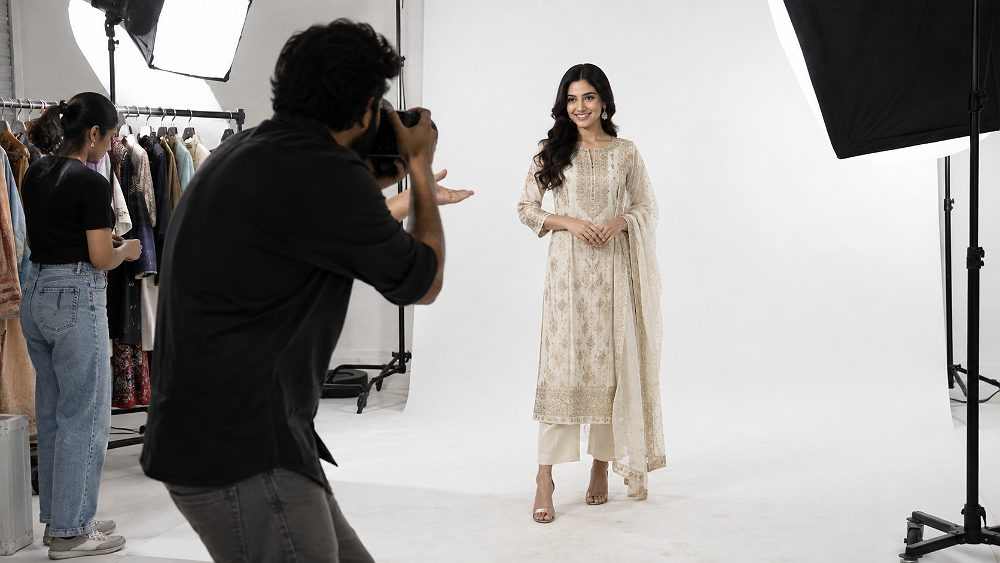
For a fashion brand, Amazon Model Photography is not simply a model standing in front of a camera. It is a controlled ecommerce production system in which model selection, garment measurements, styling, pose direction, lighting, crop consistency and SKU-level quality control all work together. A kurti, western dress, oversized shirt or menswear co-ord can look technically sharp yet still underperform if the shopper cannot quickly understand the real silhouette, length, drape or fit.
This guide is built specifically for model-based Amazon apparel listings rather than broad marketplace photography. Brands preparing a larger campaign can also explore Uniqs Studio’s Fashion Photography services, while teams focused on listing execution will find the workflow here centred on casting, fitting, shot planning and repeatable Amazon Model Photography. The same production discipline also helps multi-channel teams preparing catalogues for Amazon and Flipkart, or adapting image sets for Myntra and Ajio.
Uniqs Studio approaches Amazon Model Photography as a product-communication exercise. Satyam’s working principle is simple: the model should help the shopper understand the garment without becoming visually more important than the garment. That means an impressive face or dramatic editorial pose never compensates for a sleeve hidden by hair, an incorrect hemline, inconsistent crop or a badly fitted sample. For broader marketplace context, see the fashion photography for Amazon clothing sellers and the ecommerce fashion photography for Myntra, Amazon and Flipkart.
- What Is Amazon Model Photography?
- How to Plan the Photoshoot
- Choosing the Right Model
- Garment Fitting
- Styling, Hair & Makeup
- Complete Shot List
- Best Model Poses
- Lighting, Background & Camera
- Shoot-Day Workflow
- Editing & Quality Control
- Cost in India
- Common Mistakes
- Choosing a Studio in Delhi NCR
- Pre-Shoot Checklist
- FAQs
- Start model selection with garment measurements and target-customer fit, not appearance alone.
- Build every Amazon clothing model shoot around a SKU-level shot plan before the camera is switched on.
- Use repeatable poses and framing for catalogue consistency, then add creative secondary images separately.
- Protect colour, fabric texture and actual fit during retouching; polish should never become product misrepresentation.
- For high-volume Amazon Model Photography, live approval and garment preparation save more time than rushing the shutter rate.
What Is Amazon Model Photography?
Amazon Model Photography is commercial ecommerce photography in which clothing is photographed on a professional model for product listings. Its purpose is to communicate garment fit, silhouette, proportion, length, styling and important construction details through consistent, product-focused images that can be repeated across multiple SKUs and colour variants.
Amazon Model Photography vs General Fashion Photography
The difference is intent. Amazon Model Photography prioritises repeatable product presentation, while editorial fashion photography prioritises visual storytelling. One is not “better” than the other; they solve different jobs. A brand can use both in the same campaign, but it should not let dramatic editorial styling replace the clean catalogue images that shoppers rely on to judge the product.
| Factor | Amazon Model Photography | Editorial Fashion Photography |
|---|---|---|
| Primary goal | Product clarity and fit communication | Story, mood and brand expression |
| Model posing | Controlled, repeatable, garment-first | Expressive and concept-led |
| Background | Clean and listing-compatible | Flexible location or set design |
| Lighting | Consistent across SKUs | Creative freedom by frame |
| Cropping | Standardised for catalogue rhythm | Varies with composition |
| Garment visibility | High priority | Can be partially obscured for style |
| Usage | Amazon India and ecommerce listings | Campaign, lookbook, social, ads |
How to Plan an Amazon Model Photoshoot Before Shoot Day
A high-quality Amazon Model Photography result begins before the model arrives. The planning brief should confirm SKU count, colour variants, garment sizes, target model profile, required image types, styling rules, number of looks, expected output formats and the approval process. When these details are left for shoot day, production becomes reactive and small errors repeat across dozens of products.
For teams shooting across Amazon, Myntra and Ajio, one production can often serve several channels when the master shot plan is built carefully. The marketplace-specific crop or image order can be handled later, but the raw capture must include enough clean angles and detail coverage. The fashion photography for Myntra explains the Myntra side of that planning, while the Amazon Model Photography image planning helps teams think in terms of a useful Amazon image sequence rather than a random number of photographs.
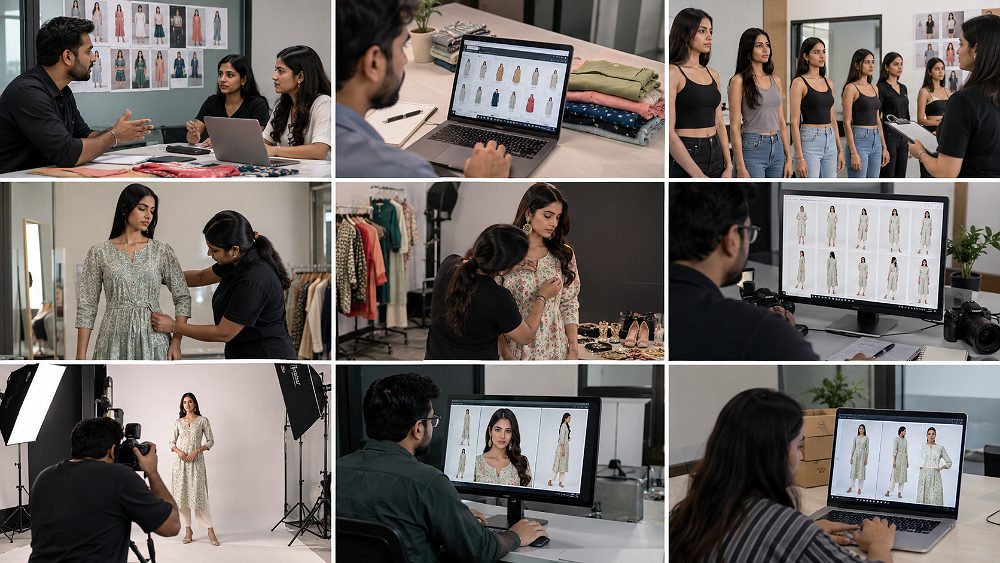
Create a SKU-Based Amazon Model Photography Shot Plan
The master shot plan should work like a production dashboard. Record the SKU, product name, colour, size, assigned model, garment notes, required angles, accessory rules, detail requirements, shot status, retouching notes and final filename. For a professional Amazon catalogue model shoot, the spreadsheet is not admin overhead—it is the control system that prevents missing images, wrong colours and unclear hand-offs after the shoot.
- SKU and colour variant confirmed
- Model and current size matched to the sample
- Front, back, side and detail requirements marked
- Accessory and footwear rules noted
- Priority reshoot flags visible to the team
- Final filename structure agreed before export
Decide How Many Looks and Shots You Need
Current Amazon guidance should always be checked before publishing a category-specific listing plan. Amazon’s own Seller Central guidance emphasises accurate, clear product imagery and distinguishes the main image from alternate images; requirements can also vary by category. Teams can review the Amazon Seller Central image guidance before final upload rather than relying on old checklists copied across years.
The 17 Proven Photoshoot Steps
- 01Lock the SKU list. Freeze products, colour variants and sample sizes before production.
- 02Define the listing image family. Separate core product views from creative secondary frames.
- 03Shortlist models by garment fit. Start with measurements, then brand look and posing skill.
- 04Confirm current measurements. Do not rely on an old model card when samples are fitted tightly.
- 05Assign model-to-SKU combinations. Pre-map sizes and categories for faster changeovers.
- 06Inspect every garment. Check stitching, closures, labels and visible defects.
- 07Steam and lint-clean. Treat garment preparation as part of photography quality.
- 08Approve styling rules. Define hair, makeup, footwear, jewellery and accessory limits.
- 09Create the shot template. Standardise front, back, side, three-quarter and detail views.
- 10Mark camera and model positions. Build repeatable framing across the catalogue.
- 11Test lighting and colour. Protect skin tone, fabric texture and white/black garment detail.
- 12Shoot the primary listing views first. Complete the must-have angles before creative experimentation.
- 13Direct category-specific poses. Let the garment construction determine movement and hand placement.
- 14Capture construction details. Photograph embroidery, pockets, cuffs, zips, texture and finishing.
- 15Approve each SKU live. Check fit, colour, focus and completed angles before changing garments.
- 16Retouch without redesigning the product. Remove distractions while preserving actual colour and fit.
- 17Deliver by SKU and channel. Keep exports organised for Amazon and any secondary ecommerce use.
Choosing the Right Model for Amazon Fashion Model Photography
Choose a model whose current measurements fit the samples, whose proportions suit the clothing category, and whose posing control supports repeatable ecommerce frames. For Amazon Model Photography, catalogue experience and consistency can matter more than a highly editorial look because the model may need to present dozens of garments with the same posture, crop and visual energy.
The most reliable selection order is: garment measurements, target customer relevance, category suitability, posing ability and repeat availability. An ethnic-wear brand may need a model who can manage dupatta placement and graceful garment movement; a western-wear catalogue may prioritise clean posture, leg lines and consistent three-quarter turns. For local fashion-brand planning, the guide to fashion photography for clothing brands in Delhi adds useful campaign context.
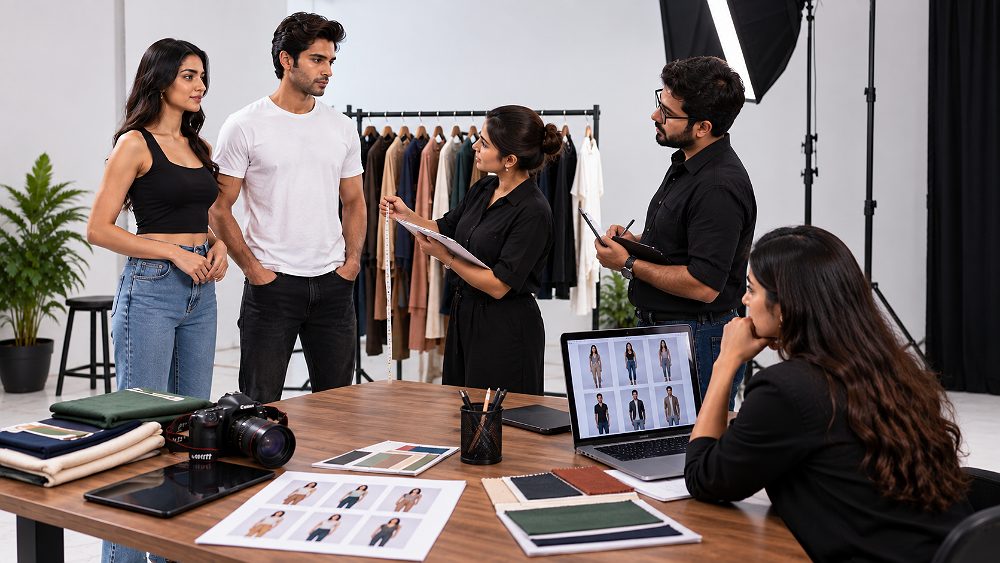
Match the Model to Your Target Customer and Clothing Category
A visually impressive model can still be the wrong commercial choice. Amazon Model Photography works best when the model makes the garment’s fit easy to understand for the intended buyer. Premium fashion may tolerate more attitude and stronger pose language, while mass-market catalogue clothing usually benefits from neutral expressions and repeatable posture. Menswear, womenswear, ethnic wear and western wear each need different emphasis, but all should preserve accurate garment proportion.
Model Measurements You Should Confirm Before Booking
| Factor | What to Check | Why It Matters | Risk If Ignored |
|---|---|---|---|
| Current size | Garment size worn today | Fast sample matching | Unexpected tight or loose fit |
| Height | Current barefoot height | Length and proportion planning | Incorrect dress/trouser read |
| Bust/chest | Actual measurement | Upper-body fit | Pulling, gaping or excess fabric |
| Waist | Actual measurement | Dress, kurti and bottom fit | False silhouette |
| Hips | Actual measurement | Lower garment drape | Fit distortion |
| Shoe size | Where footwear is needed | Styling continuity | Last-minute footwear mismatch |
| Availability | Repeat-shoot windows | Catalogue consistency | Model changes between drops |
Why Current Model Measurements Matter
Measurements can change, and old model cards create avoidable delays. During an Amazon Model Photography, a sample that does not fit can force excessive pinning, styling compromises or an emergency size swap. That lost time multiplies across a large catalogue. Confirming current measurements before the booking is one of the simplest ways to protect both the schedule and the truthfulness of the final silhouette.
Garment Fitting for an Amazon Clothing Model Shoot
Garment fitting is where Amazon Model Photography becomes product-accurate rather than merely attractive. Whenever possible, fit the key samples before production, mark the correct model/SKU combinations, identify oversized or undersized pieces and keep backup sizes for products with uncertain grading. The priority is a credible retail fit—not a heavily pinned shape that customers cannot actually buy.
Check shoulder seams, sleeve length, bust or chest tension, waist position, hip ease, trouser break, hemline and overall garment balance. Pinning can be used for minor presentation control, but it should not change the essential fit. This matters particularly in Amazon ethnic wear model photography, Amazon dress model photography and fitted western-wear categories where a few centimetres can visibly alter the silhouette.
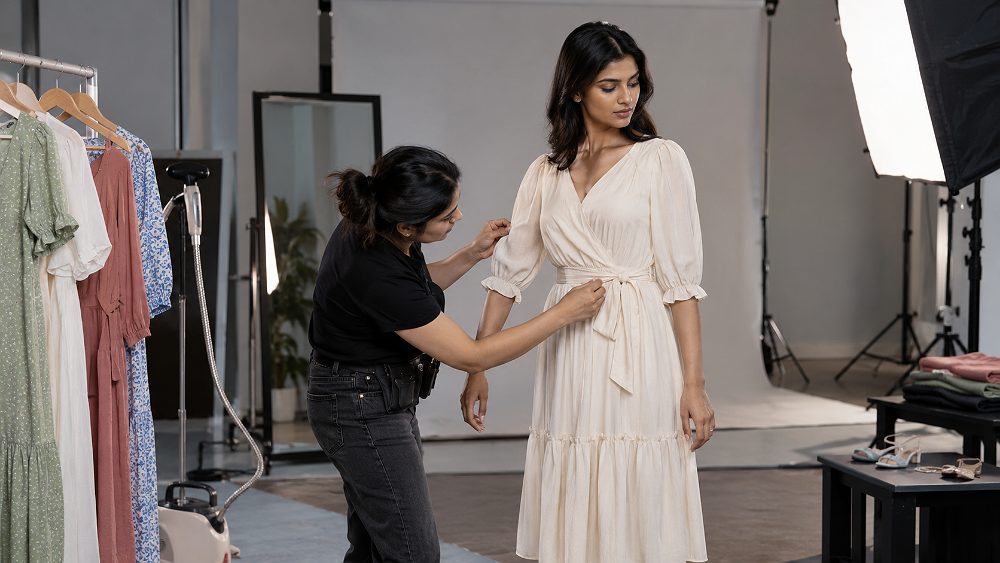
Prepare Every Garment Before It Reaches the Model
- Inspect: confirm the correct SKU, size and colour and flag visible defects.
- Steam: remove storage folds without flattening intended texture.
- Remove lint: especially on black, navy and textured fabrics.
- Check buttons and zips: test closures before the model changes.
- Organise by SKU: keep the rack in shoot order with visible tags.
- Prepare accessories: separate required styling pieces from optional props.
- Confirm model size: place backup size close to the assigned look.
- Stage the next look: prep while the current SKU is being photographed.
A useful Uniqs Studio observation is that many model-shoot delays are prevented before the camera is switched on. Matching samples to confirmed model measurements and organising every SKU in shooting order usually saves more time than trying to move faster once the shoot begins. For catalogue teams that want a deeper garment-only production system, the studio’s garment photography services cover product preparation and consistent SKU capture beyond on-model work.
Styling, Hair and Makeup for Amazon Model Photography
Styling in Amazon Model Photography should support product positioning without stealing attention. Hair should not cover necklines, collars or back details. Makeup should look polished under studio lighting while keeping skin believable. Footwear, jewellery and accessories should be controlled through a catalogue rule so one SKU does not look dramatically more styled than the next.
Keep Styling Consistent Across Your Clothing Catalogue
Create a one-page styling guide that defines hair, makeup intensity, footwear, jewellery, pose energy, garment tucking, sleeve treatment, crop and background. A growing fashion brand may shoot new drops every month; without a reference, each production slowly drifts. A style guide preserves the visual system even when the SKU mix changes.
Styling Ethnic Wear vs Western Wear
- Control dupatta placement and drape.
- Keep embroidery and necklines visible.
- Use jewellery only when it supports positioning.
- Watch sleeve fall, hem and set proportions.
- Use movement carefully to show fabric without blur.
- Keep layering intentional and minimal.
- Check waist fit and hemline closely.
- Use pocket interaction only when it reveals function.
- Coordinate footwear with crop and silhouette.
- Avoid accessories that block product construction.
Complete Amazon Model Photography Shot List for Clothing Brands
A strong Amazon Model Photography shot list starts with the garment questions a shopper cannot answer from text alone: What is the true length? How does the side profile sit? What happens at the back? Where is the embroidery? How does the fabric fall? The exact sequence depends on the category, but a clear front view plus useful alternate angles and detail frames is a dependable commercial framework.
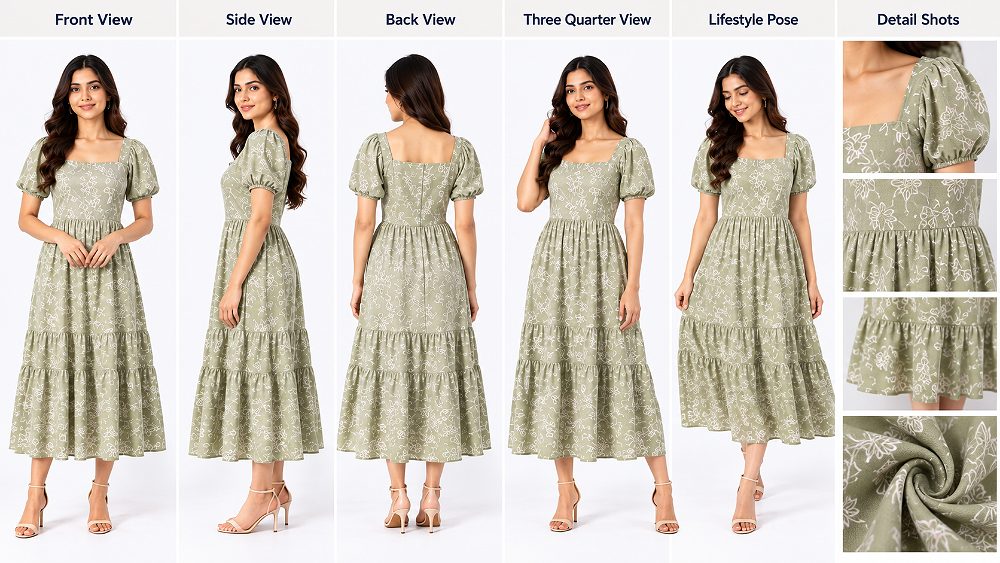
| Shot | Purpose | Best For | What It Should Show |
|---|---|---|---|
| Front | Primary silhouette | Nearly every clothing SKU | Length, neckline, waist, overall construction |
| Back | Rear construction | Products with closures/details | Back design, fit, embroidery, length |
| Side | Depth and drape | Dresses, tops, outerwear | Volume, side seam, slit, sleeve shape |
| Three-quarter | Natural product dimension | Most on-model listings | Fit across torso and garment depth |
| Detail | Construction proof | Embroidered/feature-rich garments | Fabric, stitching, buttons, zips, cuffs |
| Fit/movement | Drape communication | Flowing or oversized clothing | Movement, volume and realistic silhouette |
| Styling image | Inspiration | Secondary listing/campaign use | Outfit coordination without hiding product |
1. Clean Front View
The front view is the visual reference point for most Amazon Model Photography. Keep the model balanced, avoid unnecessary hand gestures and make sure the complete garment is readable. For structured clothing, symmetry may help; for relaxed categories, a small natural weight shift can prevent stiffness. The goal is not to make every frame identical, but to keep the silhouette comparable across SKUs.
2. Back View
Use a back view when it adds information: closures, back neckline, yoke, embroidery, pockets, pleats, fit or overall length. A model’s hair should be moved when it covers design details. If the back is visually identical and adds no value, the team can decide whether another detail or fit frame is more useful.
3. Side and Three-Quarter Views
Side and three-quarter views are valuable for garment depth, sleeve volume, side slits and waist/hip fit. In Amazon Model Photography, these angles should still look deliberate and easy to compare; avoid exaggerated torso twists that create an artificial waist or pull fabric away from its natural fall.
4. Fabric, Embroidery and Garment Detail Shots
Detail photography should answer product questions, not simply create pretty close-ups. Capture fabric texture, print registration, embroidery, buttons, zips, pockets, stitching, neckline construction, cuffs or special finishes. A useful Amazon apparel image shot list identifies these details per SKU so the photographer does not rely on memory.
5. Fit and Movement Images
Movement images can show drape, volume and fabric behaviour when the pose remains controlled. A gentle step, small turn or natural arm movement can be more informative than a dramatic editorial motion. The priority is still accurate garment fit. If movement makes the hem fly into an unrealistic shape, it stops helping the shopper.
6. Styling and Secondary Listing Images
Secondary images are where a brand can introduce more personality while keeping the main product views clean. Use them for styling inspiration, outfit coordination and premium positioning. Brands planning coordinated stills and motion can pair this workflow with the Amazon garment video guide and the ecommerce videoshoot shot-list guide so model direction, garment preparation and set continuity carry across both media formats.
Best Model Poses for Amazon Clothing Photography
The best Amazon Model Photography poses make garment fit easier to read. Start with straight standing, then a relaxed stance, three-quarter turn, side profile, back view and natural hand placement. Add walking or product-feature interaction only as secondary poses when they reveal movement or construction without hiding the clothing.
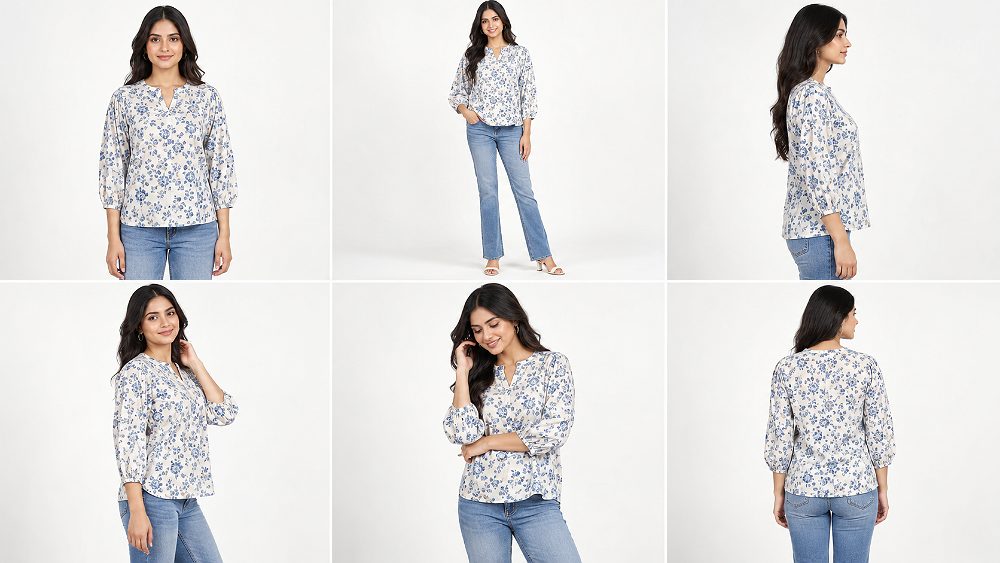
Recommended Pose Hierarchy
- Straight standing for the clearest silhouette.
- Relaxed standing with controlled weight shift.
- Three-quarter turn for depth and torso fit.
- Side profile for sleeve, waist and hem information.
- Back pose when rear construction matters.
- Natural hand placement that does not cover features.
- Walking or small movement as a secondary frame.
- Product-feature interaction only when it clarifies function.
Poses That Show the Garment Without Distorting Fit
Keep shoulders relaxed, weight balanced and hands away from important details. Do not pull fabric tight, tuck aggressively or bend the body in a way that artificially changes the silhouette. In Amazon Model Photography, repeatability matters because customers compare related colours and styles; a different extreme pose on each SKU makes real fit differences harder to judge.
Category-Specific Posing for Dresses, Kurtis, Shirts and Bottomwear
Dresses and Gowns
For Amazon dress model photography, begin with a clean front pose that shows neckline, waist placement and hem. Use a three-quarter angle to reveal volume, then a small controlled turn for drape if the fabric benefits from movement. Avoid lifting or spreading the skirt unless that shape reflects normal wear.
Kurtis, Kurtas and Ethnic Sets
Amazon kurti model photography needs special attention to embroidery, side slits, sleeve design, kurta length and coordinated bottomwear. Dupatta placement should look natural but never hide the neckline or key surface work. When movement is used, keep the garment construction readable.
Shirts, Tops and T-Shirts
For tops, shirts and T-shirts, control shoulder line, sleeve fall and garment length. A small hand placement can make the pose feel natural, but hands should not cover logos, pockets, plackets or hem details. Oversized fits need enough space around the body to show intentional volume.
Trousers, Jeans and Bottomwear
Bottomwear model photography depends on waist position, hip fit, leg line and hem/break. Keep the upper-body pose quiet so attention stays on the product. Front, side and back views often provide more commercial value than expressive upper-body gestures.
Lighting, Background and Camera Setup for Amazon Model Photography
Technical consistency is what allows Amazon Model Photography to scale from a few hero products to a catalogue with dozens or hundreds of SKUs. The setup should deliver even garment illumination, controlled shadows, enough depth of field, repeatable camera height, consistent crop, accurate colour and natural skin tone while retaining textile detail.
Lighting Clothes Without Losing Fabric Texture
Avoid two opposite errors: flat overexposure that erases texture and underexposure that turns dark clothing into a featureless block. Soft directional light usually gives fabric enough shape without creating distracting shadow patterns. Watch white balance throughout the shoot, especially when garment colours are close to one another and buyers will compare variants on the same listing.
Colour control also continues in post-production. Adobe’s guidance on Photoshop colour profiles explains why ICC-based colour management helps maintain more consistent appearance across devices. For ecommerce, that technical discipline supports a practical business goal: do not “improve” a garment colour into something the customer will not receive.
Keep Framing Consistent Across Every SKU
Standardise camera position, model mark, crop family, lens, background and pose family. The larger the catalogue, the more valuable these controls become. A brand with 80 shirts benefits far more from predictable framing than from inventing 80 unrelated compositions. Consistency creates a visual comparison system for shoppers and a faster production system for the team.
Amazon Model Photoshoot Workflow on Shoot Day
Shoot day should feel like a production line with creative judgement, not a race. Amazon Model Photography is most efficient when one person owns SKU tracking, the stylist owns garment readiness, the photographer owns framing and light, and a brand or catalogue representative can approve the first SKU before the team scales the setup.
- Check the garment and SKU tag.
- Steam the first look and stage the next one.
- Confirm model styling and product-specific notes.
- Test lighting, focus and colour.
- Shoot primary front/back/side views.
- Capture three-quarter and supplementary poses.
- Review garment fit on tethered images.
- Check construction details and focus.
- Mark the SKU complete or flag reshoot needs.
- Move to the next look only after approval.
Use a Live Shot-Approval System
A live approval station should confirm the correct SKU, colour, fit, styling, completed angles, visible defects and any reshoot flags. This single habit prevents the expensive discovery that an important back view or detail shot is missing after the model, makeup artist and production team have left.
Organise High-Volume Catalogue Shoots Efficiently
Batching by model, garment category, lighting setup and styling family can reduce changeover time, but speed should not replace quality control. For a 60-SKU fashion brand with ethnic and western categories, Uniqs Studio would pre-sort garments, assign sample sizes, separate styling groups, approve the first SKU of each category and then repeat the established lighting and framing while checking fit before every garment change.
Editing and Quality Control After an Amazon Model Shoot
Post-production should make Amazon Model Photography cleaner and more consistent without changing what the customer is buying. A practical workflow covers exposure balance, white balance, background cleanup, temporary skin blemishes, dust and lint, minor garment cleanup, crop consistency, output sizing and filename structure.
The key boundary is product truth. Retouching may remove a temporary crease created during handling, but it should not shorten a garment, narrow the waist, remove genuine design features or invent a smoother fabric texture. Similarly, skin cleanup should remain natural; an ecommerce model should still look like a person, and the garment should still look like the real sample.
Garment Retouching vs Misrepresentation
- Dust and lint
- Temporary handling creases
- Background marks
- Minor exposure balancing
- Temporary skin blemishes
- Crop and horizon consistency
- Actual garment length
- Real product colour
- True fit or body ease
- Genuine design features
- Fabric weave or texture
- Construction details
Amazon Model Photography Cost in India
Amazon Model Photography cost in India varies with model category, SKU volume, number of looks, styling, makeup, studio time, photography, retouching, video requirements, turnaround and usage. A small test catalogue and a multi-model production should not be priced the same way. For planning, brands can use indicative ranges, then request a quote against the real brief.
The biggest cost drivers are usually production time and complexity rather than the number of shutter clicks. Premium models, multiple makeup changes, complex ethnic styling, high SKU counts, multiple image families, advanced retouching and combined video deliverables can all increase the production scope. The broader fashion photography cost in Delhi guide provides additional context for campaign-level fashion shoots.
| Plan | Best For | Production Scope | Styling | Retouching | Indicative Investment | CTA |
|---|---|---|---|---|---|---|
| Basic | Small catalogue tests / new sellers | Compact SKU set, single model setup | Basic coordination | Standard ecommerce cleanup | ₹15,000–₹25,000+ | Request Quote |
| Standard | Growing fashion brands | Broader SKU batch, planned pose family | Coordinated styling | Consistent catalogue retouching | ₹30,000–₹50,000+ | Request Quote |
| Premium | Established clothing brands | Larger catalogue, richer secondary imagery | Stylist + makeup planning | Advanced consistency/QC | ₹55,000–₹90,000+ | Request Quote |
| Enterprise | High-volume / multi-model productions | Custom workflow and deliverables | Production-specific | Custom QC pipeline | Custom quote | Discuss Scope |
Indicative only; final pricing depends on SKU volume, models, deliverables and production complexity.
What Makes an Amazon Model Shoot More Expensive?
- Multiple models or size groups.
- Premium or highly experienced models.
- Complex ethnic or layered styling.
- Multiple hair and makeup changes.
- Large SKU counts with detailed coverage.
- Several image styles per product.
- Video content in the same production.
- Fast turnaround or weekend production.
- Advanced retouching requirements.
- Extended usage or campaign requirements.
10 Amazon Model Photography Mistakes Clothing Brands Should Avoid
The most expensive mistakes in Amazon Model Photography are usually process mistakes, not camera mistakes. A technically perfect photograph cannot rescue the wrong model size, a badly steamed garment or a missing SKU view. Use this list as a production risk check before the shoot begins.
- 01Selecting models before confirming garment measurements. Samples then force pinning, rescheduling or unrealistic fit.
- 02Shooting without a SKU-based shot list. Important views go missing and file sorting becomes unreliable.
- 03Using poorly fitted sample garments. Customers read the wrong silhouette.
- 04Ignoring steaming and preparation. Retouching time rises and fabric presentation looks careless.
- 05Letting poses hide product details. Hands, hair or twists cover features shoppers need to see.
- 06Inconsistent framing between SKUs. Catalogue pages lose visual rhythm and comparison value.
- 07Using excessive accessories. Styling begins to compete with the item for sale.
- 08Changing garment colour during editing. Attractive output becomes commercially misleading.
- 09Over-retouching model or clothing. Texture, skin and fit stop looking believable.
- 10Ending the shoot without live quality checks. Missing angles are discovered only after production has closed.
How to Choose an Amazon Model Photography Studio in Delhi NCR
A good Amazon Model Photography studio in Delhi NCR should show more than attractive portfolio frames. Evaluate whether the team can arrange suitable models, coordinate styling and makeup, manage garment handling, maintain repeatable lighting, track high SKU volumes, perform ecommerce retouching and deliver consistent files on schedule.
Ask how the studio handles test frames, live approval, sample-size problems, model changes and reshoots. A serious Amazon Model Photography workflow should have answers before the booking. For brands based across Delhi, Noida, Gurugram/Gurgaon, Faridabad and Ghaziabad, logistics also matter: garment movement, model call times and approval-team travel can influence an otherwise simple production day.
Uniqs Studio combines fashion and ecommerce production experience in Delhi NCR, with Satyam leading the photography workflow. Brands that need a wider creative production can review the fashion photography; teams that want a dedicated on-model brief can use the model photography services. To discuss SKU volume, sample sizes and model requirements directly, contact Uniqs Studio or call +91-8076745824.
Questions to Ask Before Booking a Model Photography Studio
- Can the studio arrange models that match current sample measurements?
- Is styling included, coordinated or billed separately?
- Is makeup included and who approves the beauty direction?
- How many looks can realistically be planned in the production window?
- How is SKU tracking handled during the shoot?
- What retouching is included and what counts as advanced work?
- Which file sizes and naming structures are delivered?
- What is the expected turnaround?
- How are genuine reshoots or garment defects handled?
- Can the same team support repeat catalogue drops?
If motion content is part of the brief, ask whether the photography setup can transition efficiently to video. The Myntra garment videos and product reels is useful for teams planning garment reels, and the product reels from one shoot demonstrates how one model day can supply several content formats when the brief is built in advance.
Amazon Model Photoshoot Checklist for Fashion Brands
A complete Amazon Model Photography checklist should cover three stages: before shoot, during shoot and after shoot. The goal is not paperwork for its own sake; it is making sure every garment, model, angle and file is accounted for while the full production team is still available to fix an issue.
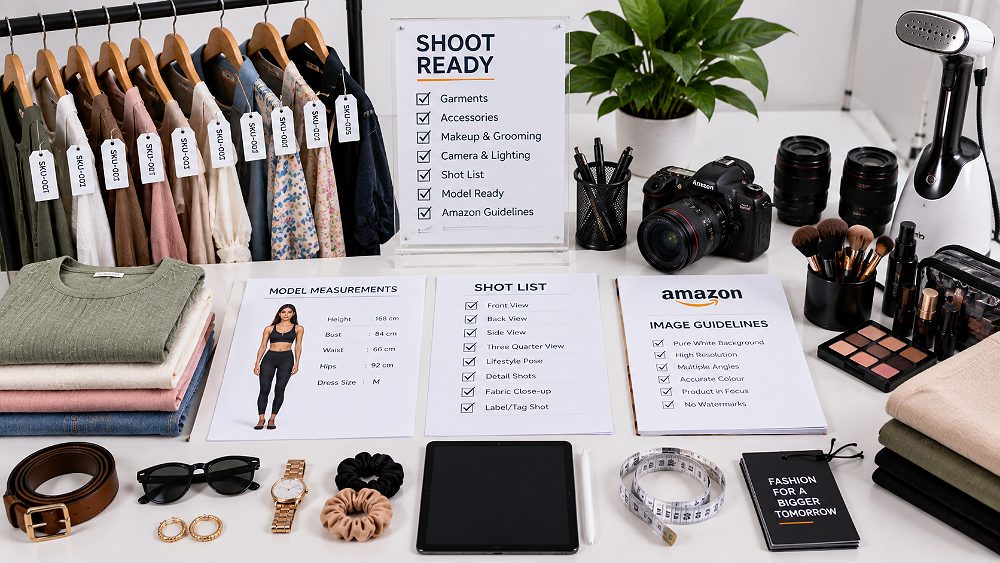
- Final SKU list
- Samples checked
- Correct and backup sizes
- Model confirmed
- Current measurements confirmed
- Shot list complete
- Styling references approved
- Accessories prepared
- Garments steamed
- Makeup brief shared
- Output requirements confirmed
- Correct SKU photographed
- Front view captured
- Back view captured where useful
- Side/three-quarter views captured
- Details captured
- Fit checked
- Colour checked
- Focus checked
- Garment defects checked
- Files sorted by SKU
- Selects approved
- Retouching reviewed
- Colour consistency checked
- Final crops checked
- Delivery folder organised
This system also helps fashion brands that sell beyond Amazon. A master catalogue can feed Flipkart, Myntra, Ajio, Nykaa and Shopify when channel-specific crops and image-order rules are managed after capture. For Amazon-specific expansion into motion, the Amazon garment video guide is the logical next workflow to plan.
Frequently Asked Questions About Amazon Model Photography
Plan Your Amazon Model Photography Shoot with Uniqs Studio
Successful Amazon Model Photography connects model selection, garment fit, styling, shot planning, pose direction, technical consistency and post-production into one repeatable system. When those controls are in place, the model becomes a clear scale and fit reference, catalogue images become easier to compare and high-volume production becomes much easier to manage.
Uniqs Studio works with fashion brands, garment manufacturers and ecommerce catalogue teams across Delhi NCR. Share the SKU count, product category, sample sizes and model requirements so Satyam can plan the right production structure. For enquiries, call +91-8076745824, WhatsApp +91-8076745824 or email [email protected].
Send the SKU count, category and model size requirements. Uniqs Studio can structure the casting, fitting, shot list and production workflow around the real catalogue.