
Fashion Photography for Amazon: 17 Essential Rules to Win More Clothing Sales in 2026–27
A practical India-focused pillar guide for D2C brands, garment manufacturers, marketplace sellers and catalogue teams planning compliant, conversion-aware apparel imagery for Amazon Seller Central.
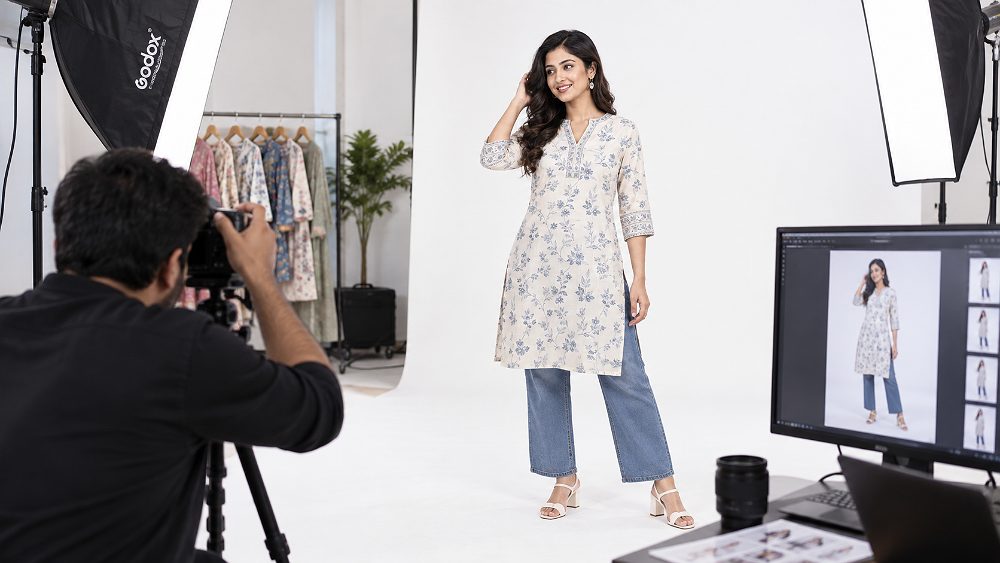
For a clothing seller, Fashion Photography for Amazon is not simply a model shoot with a white backdrop. The image set has to communicate garment fit, fabric texture, colour accuracy, construction and scale while also respecting Amazon India image compliance rules. A buyer cannot touch the fabric or try the garment on, so the product detail page depends on photography to remove uncertainty before the purchase.
The strongest Amazon fashion photography system treats the MAIN image, secondary images, product zoom, model poses, garment styling, retouching and product video as one connected merchandising sequence. That same discipline is useful across fashion ecommerce operations on Amazon, Flipkart and Myntra, while Ajio and Shopify brands can adapt the same source shoot to their own channel requirements.
This guide explains the practical production decisions behind Amazon clothing photography: what to shoot first, how to plan SKU photography, when to use apparel models, flat lay photography or ghost mannequin, how to protect colour accuracy, and where brands typically create avoidable listing risk. It also connects those choices to conversion rate, customer returns and catalogue consistency without making unrealistic sales guarantees.
Fashion Photography for Amazon should begin with a truthful, compliant product-first image and then use supporting views to answer fit, detail, texture, styling and size questions. Amazon currently states that product images should be clear, 500–10,000 pixels on the longest side, with more than 1,000 pixels preferred for zoom; MAIN images generally require a pure white background and product-dominant presentation. Always recheck the live category guidance in Amazon Seller Central before upload.
- Build the image sequence around buyer questions, not around random poses.
- Shoot the real garment with controlled studio lighting; use AI for ideation, not to invent product fit, colour or texture.
- Capture compliance-first assets before lifestyle or campaign-style secondary images.
- Lock framing, garment styling and retouching rules before high-volume catalogue photography begins.
- Verify Amazon Seller Central category guidance before each publishing cycle because requirements can change.
What Is Fashion Photography for Amazon?
Fashion Photography for Amazon is ecommerce apparel photography designed around the needs of a product listing rather than an editorial story. The job is to present the actual garment with enough consistency and detail that shoppers can understand silhouette, fabric, length, finishing and intended styling. It combines the discipline of catalogue photography with the communication value of model-led fashion imagery.
How Amazon Fashion Photography Differs From Regular Fashion Photography
Regular fashion work may prioritise mood, unusual crops, dramatic lighting or expressive poses. Amazon fashion photography is more product-first: the clothing must remain easy to inspect, and the image sequence should answer commercial questions quickly. For a broader view of model-led ecommerce production, the fashion photography for clothing brands guide explains how brand identity and catalogue consistency can work together.
Fashion Photography vs Catalogue Photography
Catalogue photography is usually more repeatable and SKU-driven, while fashion photography can add model personality, movement and styling context. On Amazon, the most useful approach blends both: consistent product-first frames for comparison, then secondary images that demonstrate garment fit and styling. Sellers handling large apparel ranges can also review the fashion catalogue photography guide for production planning.
Why Professional Amazon Fashion Photography Matters for Clothing Sellers
Fashion ecommerce is unusually dependent on visual information because the buyer is judging a three-dimensional, wearable object through a screen. A strong set of Amazon clothing product images helps the shopper understand colour, fabric texture, garment fit, proportion and finishing before purchase. That does not guarantee a higher conversion rate, but it can reduce visual ambiguity and make the product easier to evaluate.
Better Product Understanding and Customer Confidence
Front, back, three-quarter and close-detail views answer different questions. A clean front frame establishes the product; secondary images reveal sleeve shape, drape, closures, seams and textile behaviour. When image sequence and size information work together, a product detail page can explain the garment more clearly and may help reduce avoidable customer returns caused by misunderstanding.
Stronger Brand Perception Across Marketplaces
Consistency also affects brand perception. A D2C label that uses the same crop logic, studio lighting, fashion styling and retouching standard across Amazon, Flipkart and Myntra looks more organised than a catalogue assembled from mismatched shoots. Brands also repurpose professional source assets for Ajio, Shopify and Meesho, while separate crops or content layers can be created for Nykaa Fashion, Paytm-style marketplace placements or social channels where relevant.
Amazon Fashion Photography Requirements for Clothing in 2026–27
Amazon image requirements can vary by marketplace, product category and future policy update, so sellers should always verify the latest guidance in Amazon Seller Central product image requirements before publishing. The production goal is to create files that satisfy both technical image compliance and the merchandising needs of a clothing buyer.
Amazon MAIN Image Requirements
The MAIN image is the first product-facing asset in search and on the product detail page. Amazon currently emphasises a professional photograph of the actual product, a pure white background, product-dominant framing and the absence of extra text, logos, borders or watermarks. For apparel, keep the presentation front-led and easy to inspect, and check category-specific rules before deciding whether a model is permitted for the MAIN image.
Image Size, Resolution and File Format
Amazon’s current India guidance states that product images should be 500–10,000 pixels on the longest side; images above 1,000 pixels are preferred for product zoom. JPEG is preferred, with TIFF, PNG and non-animated GIF also supported in the referenced guidance. Sharp focus matters because jagged edges, pixelation or careless masking weaken both compliance and buyer confidence.
Main Image Rules for Apparel Models
Adult apparel can use model presentation where the relevant category allows it, but the garment should remain the visual priority. Standing, product-first model poses are a practical baseline because they preserve silhouette and length. Child, baby and category-sensitive restrictions should be checked separately in Seller Central rather than assumed from a previous season’s style guide.
Additional Image Opportunities
Secondary images can carry the information that does not belong on the MAIN image: alternate angles, fabric texture, stitching, close details, feature callouts, fit views, styling and lifestyle context. Amazon also recommends a richer media set, so the shoot plan should reserve enough useful assets rather than stopping after one compliant white background photography frame.
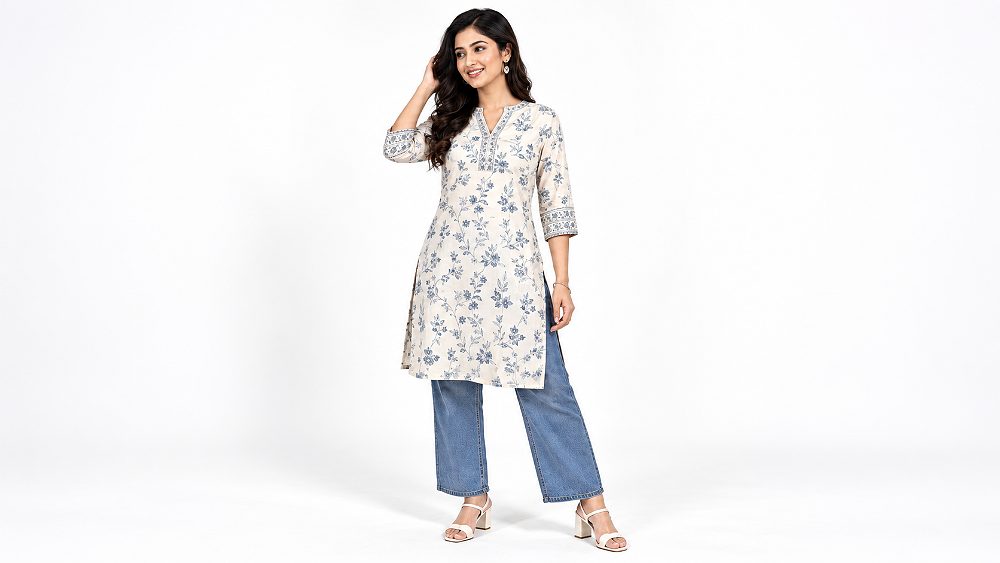
Amazon also warns that images not meeting content requirements may be prevented from displaying and can contribute to listing suppression until corrected. The official Amazon image troubleshooting guidance is the better place to confirm live enforcement behaviour than relying on an old checklist saved in a studio folder.
7 Essential Image Types for an Amazon Clothing Listing
The best image sequence is not a collection of favourite frames; it is a planned progression from recognition to explanation. For Fashion Photography for Amazon, shoot these seven image roles consistently so every SKU answers the same core buyer questions.
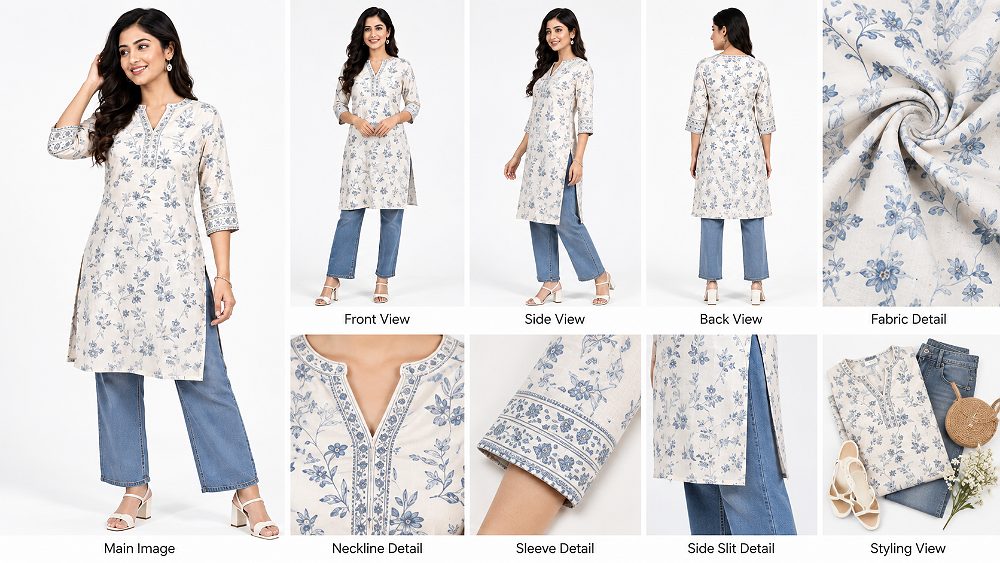
Recommended Amazon Fashion Image Sequence
| Position | Image | Primary Purpose |
|---|---|---|
| 1 | MAIN Front Image | Product recognition and search visibility |
| 2 | Three-Quarter / Alternate View | Shape and silhouette |
| 3 | Back View | Complete product understanding |
| 4 | Fit Image | Fit, proportion and length |
| 5 | Fabric / Detail Close-Up | Texture and construction |
| 6 | Lifestyle Image | Styling and real-world context |
| 7 | Feature / Size Graphic | Measurements or benefits |
| 8 | Additional Detail | Resolve remaining buyer questions |
This same disciplined sequence can be adapted for channel differences. The ecommerce fashion photography marketplace guide compares common marketplace use cases, while the Myntra fashion photography guide is useful when the same catalogue must serve more than Amazon.
Model Photography vs Flat Lay vs Ghost Mannequin for Amazon Clothing
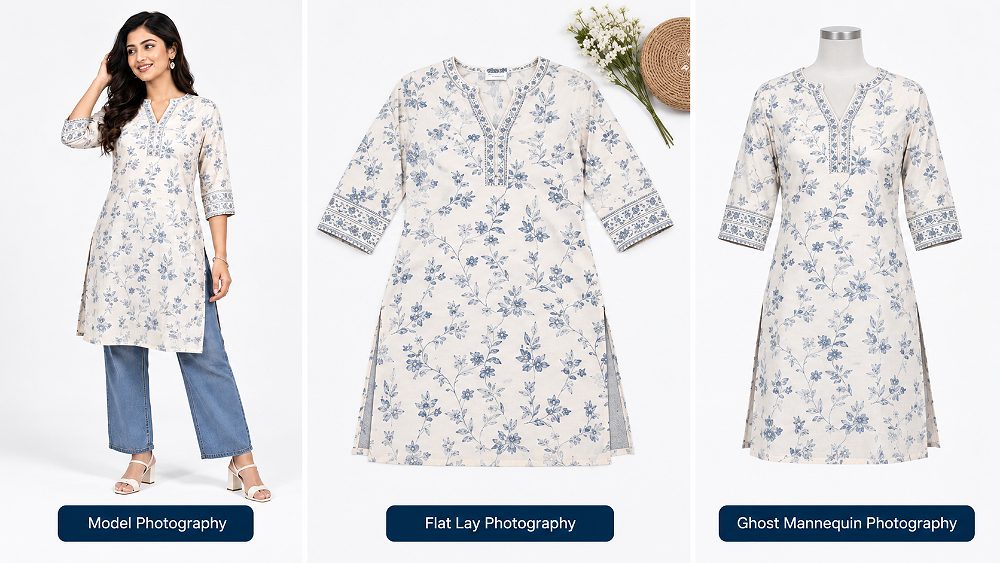
No single method wins for every garment. Model photography explains fit and styling, flat lay photography is efficient for simple products and high-volume catalogues, while ghost mannequin preserves a three-dimensional apparel shape without showing a person. A smart Amazon apparel photography plan may use one method for the MAIN image and another for secondary images, subject to category rules.
| Photography Type | Best For | Shows Garment Fit | Amazon MAIN Image Potential | Lifestyle Value | Production Level |
|---|---|---|---|---|---|
| Model Photography | Dresses, tops, ethnic wear, fashion-led garments | Excellent | Category dependent | Excellent | Medium–High |
| Flat Lay | Simple garments, kidswear, accessories, budget catalogues | Limited | Category dependent | Low | Low |
| Ghost Mannequin | Shirts, jackets, structured clothing | Good shape representation | Category dependent | Medium | Medium |
When to Use Fashion Photography With an Amazon Model
Use fashion photography with an Amazon model when fit, drape, length or movement materially changes the buyer’s understanding of the garment. Dresses, kurtas, tops, activewear and outerwear often benefit. For model-pose planning beyond Amazon, the model shoot checklist for poses and angles provides a useful production reference.
When Flat Lay Photography Works Better
Flat lay is efficient when the garment shape is simple, when a model is unnecessary, or when the brand needs fast, repeatable SKU photography. It is also valuable for styling compositions in secondary images. Uniqs Studio’s flat lay photography service is relevant for apparel sellers building clean catalogues at scale.
When Ghost Mannequin Photography Makes Sense
Ghost mannequin works well for shirts, jackets and structured products because it shows internal shape while removing visible mannequin hardware in post-production. Compare the method with other ecommerce options through the ghost mannequin photography service before deciding the production mix.
Best Amazon Fashion Photography Poses for Clothing Models
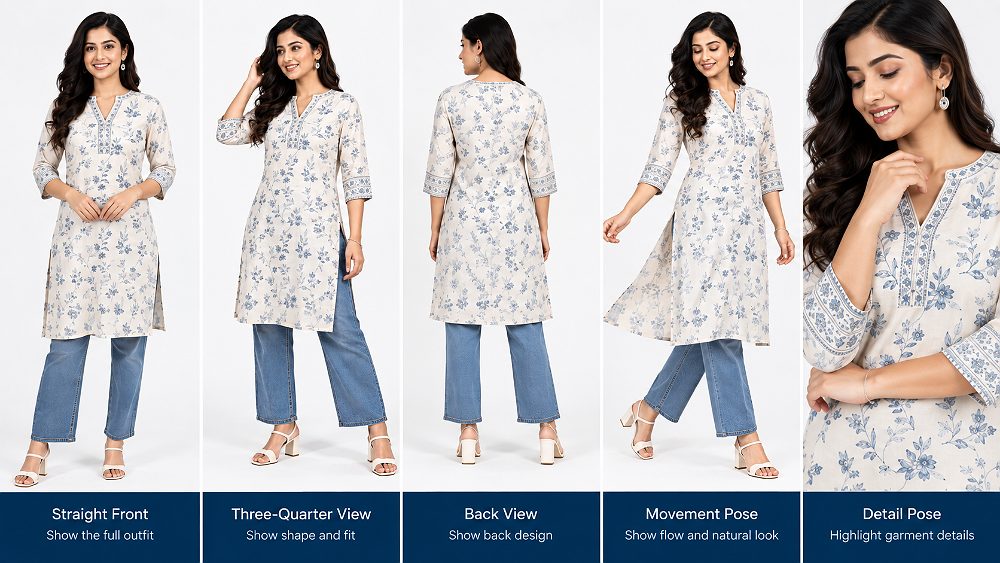
Model poses for Amazon should explain the garment before they express personality. Straight front and back views create comparability across SKUs; three-quarter angles reveal shape; natural movement can show drape; and detail-focused hand placement can highlight a pocket, cuff, neckline or closure without covering important construction.
For high-volume model work, consistent foot position, lens height and body orientation matter as much as posing style. Brands can also review Uniqs Studio’s model photography services and the studio vs outdoor fashion photography guide to understand why controlled studio conditions are usually easier for repeatable ecommerce catalogues.
Complete Amazon Fashion Photography Shot List for Clothing Sellers
A written shot list prevents missed details when models, stylists and multiple colourways are moving quickly. For Fashion Photography for Amazon, separate mandatory product views from optional creative assets, then apply the same naming structure across every SKU.
- MAIN front image
- Front model view
- Three-quarter view
- Side view where useful
- Back view
- Fabric close-up
- Stitch/detail close-up
- Neckline/collar detail
- Sleeve detail
- Pocket/zip/button detail
- Fit/silhouette image
- Length/proportion image
- Lifestyle image
- Styling image
- Size/measurement graphic
- Key feature graphic
- Colour variation images
- Product video
Adjust the Shot List by Garment Category
Tops and T-shirts need neckline, sleeve and hem clarity; dresses and ethnic wear need full-length proportion, flare and detail views; bottomwear benefits from waist, pocket, side and back construction; jackets need collar, closure, lining and structural detail. For broader apparel production planning, see the garment photography service and the clothing brand photography guide.
How to Plan Fashion Photography for Amazon: Step-by-Step Workflow
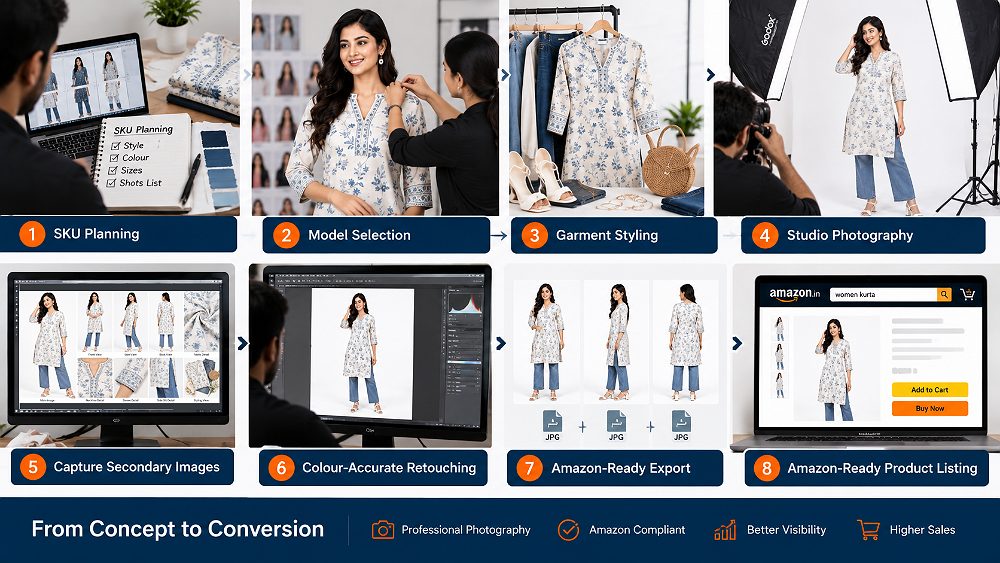
The production workflow matters most when a seller has many SKUs, colours or sizes. The goal is to lock decisions before the camera starts so the catalogue remains consistent and rework stays low.
Audit SKUs and Product Variations
Start with a master SKU sheet covering style code, colour, size samples, hero variant and required deliverables. This prevents SKU photography from becoming a folder of unnamed images and makes variant matching easier later in Amazon Seller Central.
Define the Required Image Sequence
Decide the image sequence before model casting. The MAIN image, alternate view, back, fit, fabric texture, lifestyle and feature slots should be planned around the buyer’s questions, not decided after the shoot.
Select Models and Confirm Sizing
Choose apparel models whose measurements align with the sample size and brand fit. Record model measurements and garment size so retouching is not used to manufacture an unrealistic silhouette. Consistent model casting also makes product comparison easier across a fashion ecommerce range.
Prepare and Style Every Garment
Garment styling begins before the model steps on set: steaming, lint removal, symmetry, collar shaping, sleeve alignment and hem control. The styling team should preserve the product’s real construction while making it camera-ready.
Shoot Compliance Images First
Capture the front-led white background photography and other must-have views while the garment is fresh and the setup is locked. This reduces the risk that creative work consumes the schedule before essential image compliance assets are complete.
Capture Secondary and Lifestyle Images
Once compliance assets are safe, move to secondary images, styled details and controlled movement. These frames can explain fabric behaviour, layering and real-world use without compromising the truthful representation of the product.
Retouch for Accuracy, Not Artificial Perfection
Retouching should remove dust, temporary creases and background distractions while preserving colour accuracy, texture and genuine garment fit. Avoid aggressive body reshaping or fabric smoothing that makes the delivered product look different from the listing.
Export, Name and Quality-Check Files
Export high-resolution marketplace-ready files, use a repeatable naming convention, and match every image to the correct colour variant. Before upload, check crop, sharpness, colour and product identity against the SKU sheet.
Lighting, Styling and Retouching for Amazon Apparel Photography
Studio Lighting for Accurate Fabric and Colour
Soft, controlled studio lighting should separate the garment from the background while retaining fabric texture. Very flat lighting can erase weave and construction; overly hard lighting can exaggerate wrinkles and create misleading shine. Exposure, white balance and light position should stay consistent across colourways so the catalogue does not shift visually from one SKU to the next.
Garment Styling Before the Shoot
Professional garment styling means steaming, aligning collars, shaping sleeves, checking buttons, controlling folds and making hems symmetrical before each frame. Fashion styling can add accessories in secondary images, but they should never confuse what is included in the purchase. Preparation is often faster and more believable than fixing everything in post-production.
Ecommerce Retouching Without Misrepresenting the Product
Good ecommerce retouching cleans dust, threads and background edges, corrects exposure, and matches the photographed colour to the approved product reference as closely as practical. It should preserve stitching and fabric texture. Brands planning high-volume post-production can read the fashion photography cost guide to understand why styling, image count and retouching scope affect budgets.
Amazon Fashion Photography for Colour and Size Variations
Colour variations should be photographed or colour-managed so each child SKU is represented accurately. Reuse the same camera position, crop, studio lighting and model orientation wherever practical. When a brand relies on recolouring, it should still compare each output against the physical garment because fabric response, trims and stitching can differ between colourways.
Maintaining Consistency Across Large Catalogues
Consistency is a system: lens height, model mark, crop reference, garment preparation, pose library, retouching notes and file naming should all be documented. Garment manufacturers and marketplace sellers can then repeat the same visual logic when new SKUs arrive weeks later, rather than rebuilding the catalogue style from memory.
Product Video for Amazon Fashion Listings
A short product video can add information that still images cannot: drape in motion, fabric movement, back fit and how the garment behaves while walking. The sequence should stay product-first—front fit, three-quarter, back, movement, detail and one or two real features—rather than becoming a brand film that hides the item.
Model Video vs Product-Only Video
Model video works best when fit and movement matter; product-only video can be efficient for flat-lay, ghost mannequin or detail-led items. Brands deciding between AI-assisted video and a real studio shoot can compare the AI vs professional ecommerce video guide. The ecommerce videoshoot shot-list guide and product video types guide help plan reusable motion assets.
One well-planned shoot can also create marketplace clips, short-form brand assets and product reels. See one shoot, multiple product video assets and Myntra garment video and model reels for adjacent production ideas.
Amazon Fashion Photography Pricing in India
Amazon clothing photography cost depends on SKU count, colourways, model fees, makeup, fashion styling, number of images, retouching depth, studio production, video requirements and turnaround. The table below is an indicative planning structure, not a fixed Uniqs Studio rate card; confirm a project-specific quote before publishing or budgeting.
| Plan | Recommended For | Photography Scope | Model | Video | Indicative Starting Range |
|---|---|---|---|---|---|
| Basic | Small sellers / testing SKUs | Essential catalogue/product images | Optional | No | ₹8,000+ |
| Standard | Growing Amazon brands | Model + detail + listing image set | Yes | Optional | ₹18,000+ |
| Premium | D2C / fashion brands | Full conversion-focused image sequence | Yes | Short video | ₹35,000+ |
| Enterprise | Manufacturers / large catalogues | High-volume customised production | Custom | Custom | Quote Based |
Per-SKU vs Day-Based Pricing
Per-SKU pricing is easier when deliverables are standardised. Day-based production can suit large batches, complex model work or mixed stills-and-video schedules where the number of final assets varies. The right structure depends on how repeatable the shot list is and how much styling is required per garment.
10 Amazon Clothing Photography Mistakes Sellers Should Avoid
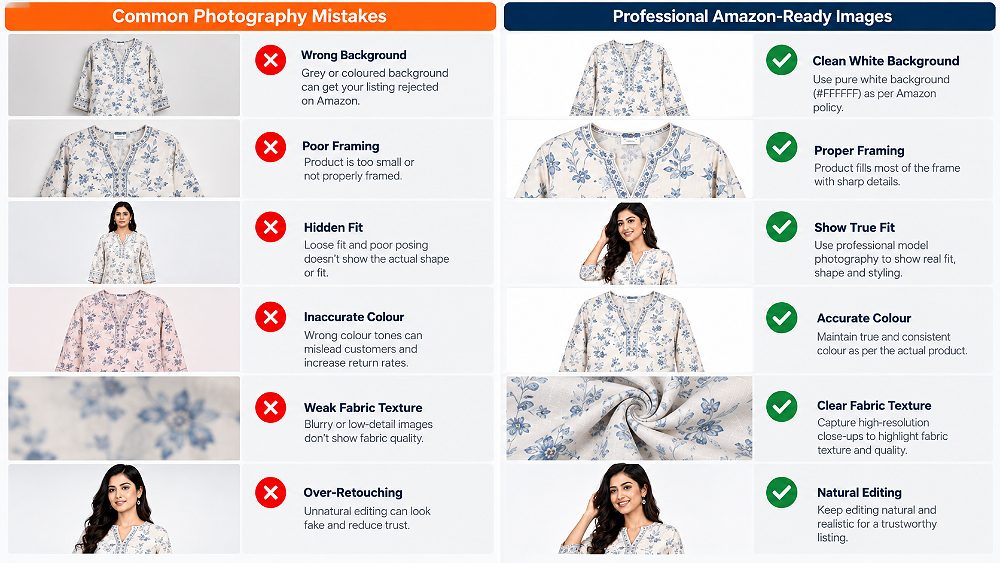
An off-white, coloured or distracting MAIN background can create avoidable compliance problems. Build pure white delivery into the post-production standard.
Excess empty space reduces product visibility and can fail product-dominant framing expectations.
Crossed arms, deep bends or editorial crops can hide construction and weaken fit communication.
Uncontrolled lighting or aggressive grading may make a buyer expect a different shade than the physical item.
Removing real texture or reshaping the garment too heavily can make the listing look polished but less truthful.
Buyers need the parts they cannot infer from the front image: closures, seams, back shape and trim details.
Changing crop, model mark or exposure across colours makes a product family look fragmented.
Wrinkles, lint, uneven collars and twisted seams should be fixed before capture rather than treated as a retouching problem.
Soft files reduce product zoom usefulness and make fine fabric details harder to assess.
A dramatic pose can still fail commercially if the shopper cannot see length, fit, fabric or construction.
How to Choose a Fashion Photography Studio for Amazon
A suitable Amazon fashion photography studio should understand both production and listing needs. Review complete catalogue sets—not only hero shots—to see whether framing, model direction, colour accuracy and retouching remain consistent across many products. Ask how the studio handles SKU mapping, garment preparation, model sizing, file naming and revision scope.
- Marketplace photography experience
- Model casting and size confirmation
- Garment styling support
- Makeup where required
- Images per SKU defined
- Retouching scope documented
- Video options available
- File dimensions and naming agreed
- Delivery timeline confirmed
- Revision policy written
If the same collection needs both marketplace and editorial assets, discuss that before shoot day. Uniqs Studio’s fashion photography services can be combined with ecommerce video production so stills and motion use the same product preparation and visual standard.
Fashion Photography for Amazon in Delhi NCR: Working With Uniqs Studio
For brands that want consistent marketplace-ready imagery, explore Uniqs Studio’s Fashion Photography services for clothing, ecommerce and catalogue shoots. A coordinated production can cover product receipt, SKU planning, model casting, garment styling, still photography, retouching, exports and product video without splitting responsibility across multiple vendors.
Satyam and the Uniqs Studio team work with D2C brands, garment manufacturers and marketplace sellers who need repeatable apparel photography for Amazon India and related channels. To discuss SKU count and deliverables, call +91-8076745824, WhatsApp +91-8076745824, or email [email protected].
Amazon Fashion Photography Checklist Before Uploading Your Images
- Product accurately matches listing
- MAIN image checked against current category requirements
- Pure white background confirmed where required
- Product clearly fills the frame
- Front and back views clear
- Colour accuracy checked
- Images sharp enough for useful zoom
- Fabric texture remains visible
- Fit easy to understand
- Detail shots included
- Variants match their correct SKUs
- Image sequence reviewed
- File names mapped to SKU sheet
- Secondary graphics checked for accuracy
- Product video added where available
- Seller Central rules rechecked before publishing
Before planning the next Amazon catalogue, create a fixed image sequence for every SKU. That small decision makes shooting, retouching and listing management more consistent.
Frequently Asked Questions About Fashion Photography for Amazon
Amazon product images should clearly and accurately represent the item. MAIN images generally require clean product-focused presentation on a pure white background, while apparel-specific rules can vary by category. Sellers should verify the current Amazon Seller Central category requirements before uploading.
Model photography can be used for qualifying adult apparel categories and is useful for showing fit, length and silhouette. The exact rules for models, poses and MAIN images are category-specific, so sellers should confirm the current Amazon guidance before the shoot.
Amazon currently recommends at least six high-quality product images and one video. A clothing seller can use the available image slots for MAIN, alternate angle, back, fit, fabric detail, lifestyle and feature information depending on the garment and category.
Amazon’s current India guidance accepts images from 500 to 10,000 pixels on the longest side and prefers images larger than 1,000 pixels for zoom. Sharp JPEG files are a practical production default, while other supported formats should follow current platform guidance.
Amazon fashion photography pricing in India depends on SKU volume, models, styling, makeup, images per product, retouching and video production. Simple catalogue shoots usually cost less than model-led ecommerce productions, so brands should request a quote based on the final shot list.
Build an Amazon Fashion Catalogue That Explains the Product Clearly
Need Amazon-ready fashion images for your clothing catalogue? Explore Uniqs Studio’s Fashion Photography services for professional model, ecommerce and apparel photography. Share your SKU count, garment category and required image types so the shoot can be planned around compliance, fit communication and reusable marketplace assets.
For a written brief, email [email protected]. For production planning questions, call +91-8076745824.