
Myntra SPF Claim & Returns Guide 2026-2027: How Sellers Can Handle Wrong and Damaged Returns
An evidence-first operational guide for Myntra sellers handling wrong-item returns, damaged parcels, missing returns, RTO discrepancies, claim evidence, rejected claims and seller protection workflows.
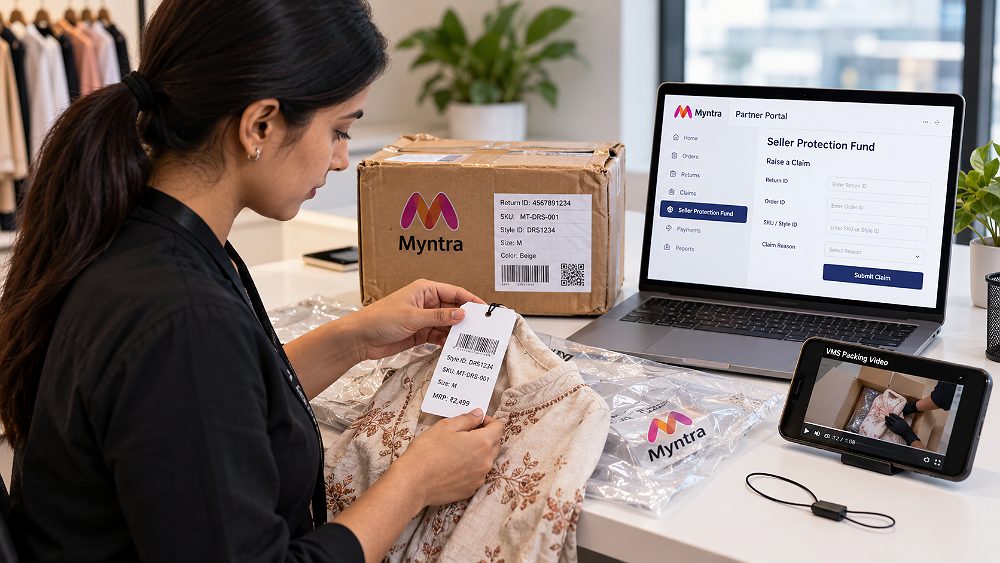
A Myntra SPF Claim becomes relevant when a seller faces an eligible return or fulfilment discrepancy and needs Myntra to review the loss under its Seller Protection Fund workflow. The practical problem is rarely the form itself. The real challenge is preserving the right evidence before a wrong product, damaged return, missing return or RTO discrepancy disappears into normal warehouse handling.
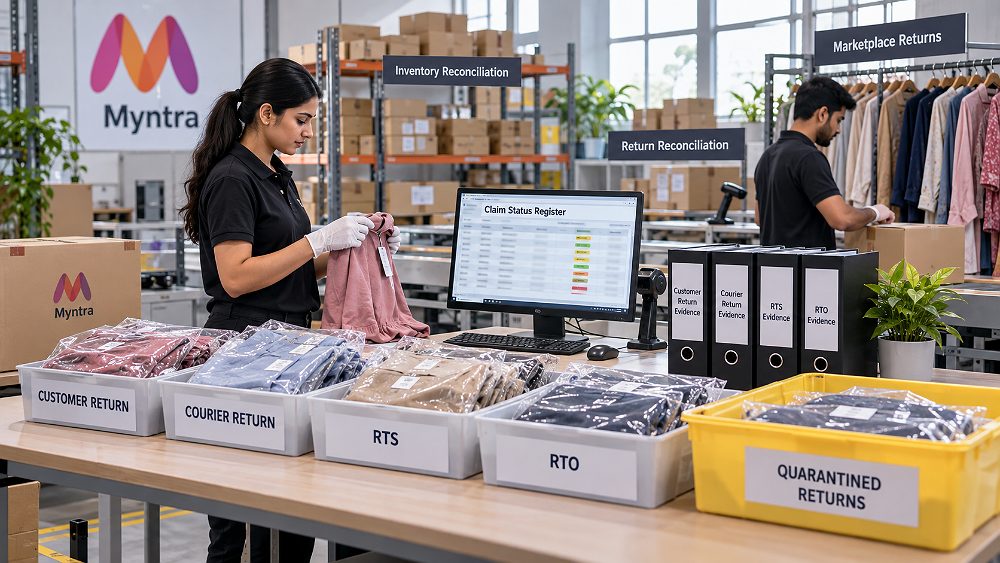
For an existing Myntra seller, the safest operational mindset is IDENTIFY → INSPECT → DOCUMENT → CLAIM → TRACK → PREVENT. First identify whether the parcel is a customer return, courier return, Return to Seller (RTS) or Return to Origin (RTO). Then inspect product condition, preserve claim evidence, verify the current claim eligibility inside the Partner Portal, file through the designated Seller Protection Fund route, record the claim status and improve the warehouse SOP that allowed the loss to become difficult to prove.
This article supports the broader Myntra seller guide by going deep on return protection. Sellers who are still building their account can also use the Myntra seller account registration guide before moving into catalogue, order and return operations.
Myntra SPF Claim: Quick Answer for Sellers
A Myntra SPF Claim is a seller-protection request for an eligible return or fulfilment loss. Myntra Seller Support currently directs sellers to Partner Portal → Services → Seller Protection Fund and states that VMS and Tag Loop adoption are mandatory for SPF claims. Preserve the return parcel, identifiers, product condition and original dispatch evidence before submission, then follow the live portal instructions for the exact case.
Key Takeaways Before You Open a Return
- Do not restock a disputed return before SKU, style ID, barcode, Tag Loop, return ID and product condition are checked.
- Keep original dispatch evidence and return-opening evidence linked to the same order ID and shipment ID.
- Use the designated SPF claim option in Myntra Partner Portal rather than an unrelated support category.
- Track every claim reference, decision and evidence location in a central register.
- Reduce preventable genuine returns with accurate catalogue content, consistent colour representation and marketplace-ready product images.
Myntra SPF Claim in 2026-2027: What Sellers Need to Know
The Myntra Seller Protection Fund is the seller-protection mechanism used for eligible return and fulfilment disputes. It is not a blanket refund for every customer return, courier issue or product complaint. A Myntra seller protection claim should begin only after the operator identifies the specific return discrepancy and checks the current eligibility rules in the live Partner Portal.
What Is the Myntra Seller Protection Fund?
Seller protection exists because marketplace returns can create losses that are different from a normal, correctly received customer return. A parcel may contain the wrong item, a product may arrive damaged, a component may be missing, or a return can remain unreconciled between portal status and warehouse receipt. The SPF process gives the seller a structured route to submit evidence for review, but seller reimbursement or seller compensation is not automatic and should never be assumed before Myntra completes its review.
Where Is the SPF Claim Option in Myntra?
Current Myntra Seller Support directs sellers to the Partner Portal path Services → Seller Protection Fund. That makes the Partner Portal the operational source of truth at filing time. The seller should use the current designated claim category, complete the fields shown for that case and preserve a local copy of the claim reference. For current portal notices, use Myntra Seller Support and the Myntra Seller Protection Fund portal.
When Should a Seller Investigate an SPF Claim?
Investigate when the physical return and the expected return record do not match: a wrong-item return, damaged return, missing return, missing accessory, or courier/RTO discrepancy. The operator should not label every difficult return as marketplace fraud. The better method is to document the facts first: what was dispatched, what the portal says, what the warehouse actually received, and which identifier or product characteristic proves the mismatch.
Sellers operating across other channels should keep the same evidence discipline even when the platform workflow changes. Amazon and Flipkart may use different support paths, while Ajio and Paytm can have their own operational rules. Nykaa and Shopify brands also benefit from warehouse-level reconciliation because clean return data helps separate platform disputes from genuine product or expectation problems.
Myntra Return Problems: Identify the Correct Claim Scenario First
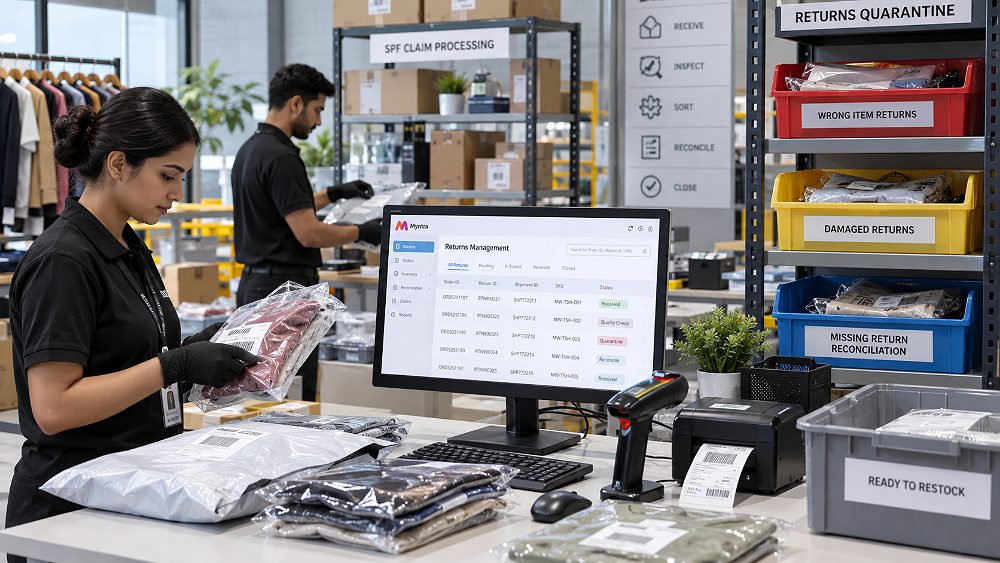
Good Myntra return management starts with classification. The warehouse should decide what happened before anybody asks how to raise Myntra SPF claim. This is important because the same parcel can look like a customer return from a distance but actually be an RTO, an RTS handover discrepancy or a wrong product returned against a valid return ID.
Wrong Product Returned to a Myntra Seller
A Myntra wrong product return exists when the returned item materially differs from the item that the seller can prove was dispatched. Compare brand, product SKU, style ID, size or variant, product characteristics, labels, Tag Loop information and original packing evidence. If a wrong item returned to Myntra seller appears to be another brand or another SKU, quarantine it immediately and create a factual comparison instead of describing the case only as “Myntra return fraud seller.”
Damaged Product Returned to the Seller
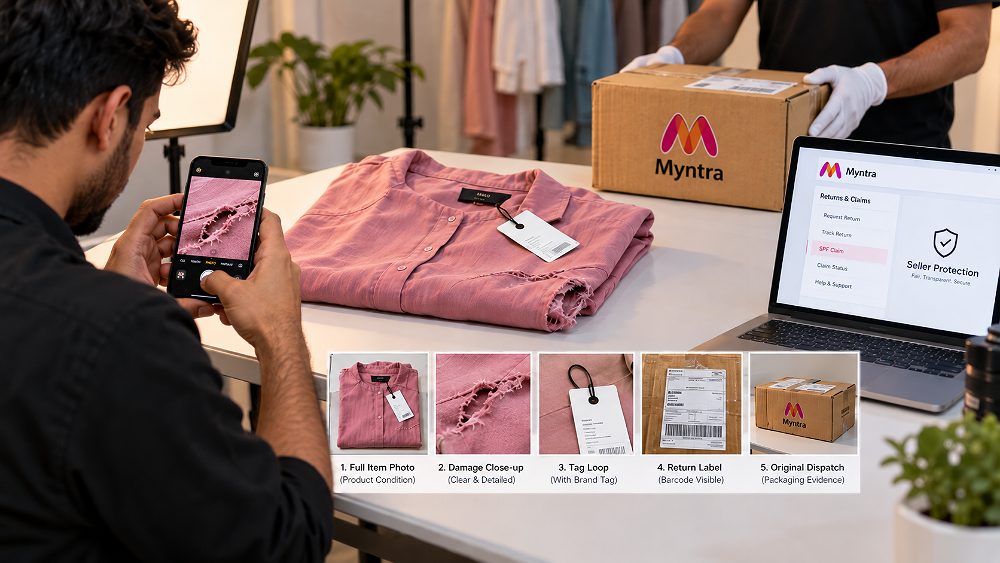
A Myntra damaged product return needs condition evidence. Capture the full product, close-up damage, labels and packaging. Separate transit or packaging damage from wear, stains, tears, broken hardware or missing parts. When the seller later files a Myntra seller return claim, the images should make the product condition understandable without forcing the reviewer to guess where the damage is.
Myntra Return Not Received
A Myntra return not received case should first be reconciled against portal status, tracking, warehouse receipts and inventory entries. Record when the status changed and whether the physical unit ever entered the facility. Missing-return investigations become weak when the business has no reliable receiving log, because there is no internal record to compare with the marketplace event.
Myntra RTO and Courier Return Issues
A Myntra RTO return is operationally different from a customer return. RTO means the order is returning through the fulfilment flow without a completed customer delivery, while RTS language may be used for a product being returned to the seller. Operators should reconcile the return ID, shipment movement and warehouse receipt before deciding whether the issue fits a current seller-protection case.
| Return Type | Example | Evidence to Preserve | Immediate Seller Action | Claim Investigation |
|---|---|---|---|---|
| Wrong item | Different brand/SKU received | Dispatch proof, identifiers, return photos, labels | Quarantine and compare | Check current wrong-return SPF case |
| Damaged item | Tear, stain, broken part or severe packaging damage | Full-item photo, close-up, package, IDs | Do not restock | Check current damage eligibility |
| Missing return | Portal record exists but warehouse did not receive unit | Tracking, receiving log, return ID, inventory record | Reconcile systems | Check live missing-return route |
| RTO discrepancy | RTO status and physical receipt differ | Shipment ID, RTO status, bag/parcel evidence | Reconcile before escalation | Use current eligible category |
| Missing component | Accessory or detachable component missing | Original product/packing proof and return photos | Document completeness | Check current policy scope |
| Correct return | Correct product and condition match expected return | Normal receiving record | Process under standard return SOP | No SPF investigation unless another discrepancy exists |
For fashion-specific catalogue expectations, sellers can use the fashion photography for Myntra guide and the Myntra product photography image guidelines. Accurate visual representation helps reduce avoidable expectation mismatch even though it does not replace the evidence needed for an SPF dispute.
Myntra SPF Claim Evidence: What Sellers Should Preserve
The strongest Myntra SPF claim evidence is evidence that connects the original dispatch to the returned parcel without gaps. A practical evidence file should help a reviewer answer three questions: what was sent, what came back, and how can the two be matched to the same transaction? That is why evidence management has to begin at dispatch, not only after a loss appears.
VMS Packing Evidence for Myntra SPF Claims
Myntra Seller Support currently states that VMS (Video Management System) adoption is mandatory for SPF claims. Operationally, VMS evidence should make the original packing event retrievable and useful: the correct product should be visible, the relevant order or product context should be identifiable, and the packing sequence should be clear enough to support the dispute. Do not invent technical camera or retention specifications; follow the current VMS policy shown through Myntra’s live seller resources.
Tag Loop and Product Identification Evidence
Myntra Seller Support also states that Tag Loop adoption is mandatory for SPF claims. In day-to-day warehouse receiving, Tag Loop evidence helps connect the returned item to its expected identity and condition. Staff should avoid removing, discarding or overlooking identifiers before discrepancy photos are taken. For a Myntra Tag Loop SPF case, the useful principle is simple: preserve identity evidence before the item moves into any re-tagging, repair or restocking workflow.
Return Photos, Videos, Labels and Package Evidence
Beyond the live mandatory systems, good evidence-management practice includes photographs of the outer package, shipping label, return label, product from multiple angles, brand label, size label, product SKU or style identifier, barcode, Tag Loop and any visible damage. If the seller maintains return-opening video, preserve the relevant clip and link it to the order ID and return ID. These practices improve internal traceability; they should not be presented as official mandatory requirements unless the live Myntra instructions say so.
Order and Return Data Sellers Should Record
The claim folder or register should capture the order ID, shipment ID, return ID, SKU, style ID, product name, date received, warehouse or receiver name, return reason, claim reference and current Myntra claim status. A consistent filename such as RETURNID_SKU_YYYYMMDD_WRONGITEM_01.jpg makes evidence faster to retrieve than a phone gallery filled with generic filenames.
Myntra SPF Evidence Checklist
| Evidence | Why It Matters | When to Capture | Storage Recommendation |
|---|---|---|---|
| VMS packing evidence | Supports what was packed before dispatch | At original packing | Index by order/shipment reference |
| Tag Loop / product identity | Supports item identity | Dispatch and return inspection | Link photo/reference to SKU and return ID |
| Return parcel + labels | Connects physical parcel to return event | Before opening and during receiving | Claim folder |
| Product condition images | Shows wrong item or damage clearly | Before restocking or handling changes | Original-resolution files |
| Order/return data | Prevents identifier mismatch | At reconciliation | Central claim register |
| Internal receiving note | Shows who received and what was found | Same shift/day | Warehouse log linked to claim |
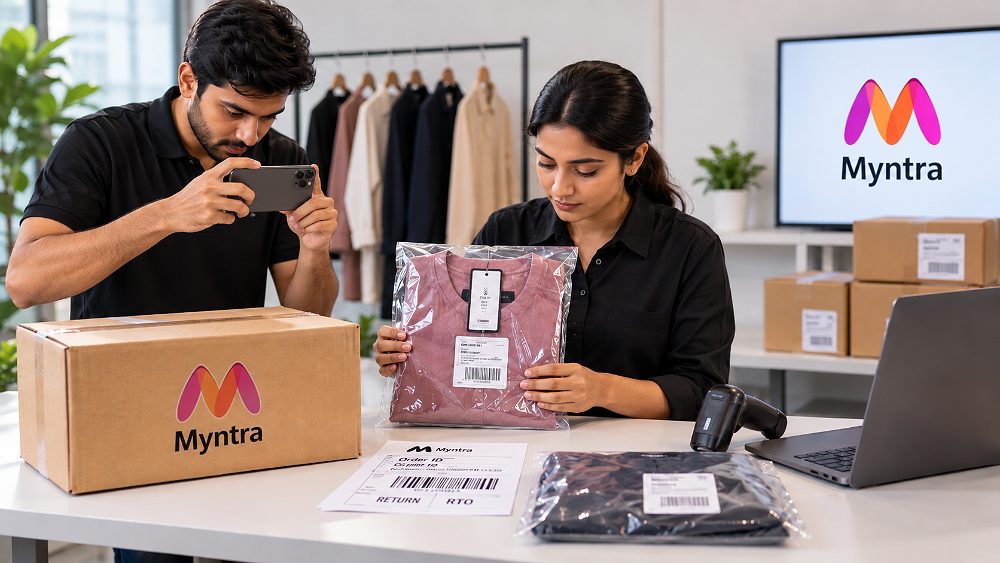
How to Raise a Myntra SPF Claim: Step-by-Step Process for Sellers
For sellers searching how to raise Myntra SPF claim, the process should start only after the return problem and supporting evidence are organized. The exact screen labels or eligibility fields may change, so the sequence below focuses on durable operational steps while the live Partner Portal remains authoritative.
Verify the Order, Return and Claim Scenario
Confirm order ID, return ID, shipment ID, product SKU and the physical item received. Classify the discrepancy as wrong-item, damaged, missing return, RTO/courier discrepancy or another currently supported case. This prevents a Myntra seller return claim from entering the wrong workflow.
Collect and Organize Supporting Evidence
Locate Myntra VMS SPF claim evidence, Tag Loop identity evidence and return-condition documentation. Keep factual notes short and make every file traceable to the affected transaction.
Open the Seller Protection Fund Section
Use Partner Portal → Services → Seller Protection Fund. This is the current SPF claim option in Myntra Seller Support guidance. Avoid raising an unrelated ticket when a designated SPF route exists.
Select the Appropriate Claim Case and Add Details
Match the claim category to the actual discrepancy, enter identifiers exactly, add concise factual notes and associate the evidence requested by the live workflow. Do not exaggerate the case or guess fields.
Submit and Record the Claim Reference
Record the submission date, return ID, issue, internal owner and claim or ticket reference. The central register should make it possible for another team member to understand the case without reopening every file.
Track the Myntra SPF Claim Status
Follow the current Partner Portal status, record Myntra’s decision and retain evidence until the case is resolved. If the claim is rejected, capture the exact reason before changing the evidence set or opening a support follow-up.
Internal Claim Notes Format
Brands that are expanding their Myntra operation should also understand the commercial side of the account. The Myntra seller fees and charges guide helps teams connect return losses with unit economics, while the Myntra seller growth guide covers catalogue and growth levers beyond dispute handling.
How to Handle a Myntra Wrong Product Return Without Losing Evidence
Compare the Returned Item With the Original Dispatch Evidence
If a Myntra seller received wrong item in return, compare the physical product with the dispatch record before doing anything else. Match SKU, style, brand, variant, size, labels, Tag Loop and visible characteristics to the original packing evidence. A wrong product return claim process is strongest when the seller can show a direct side-by-side mismatch rather than relying on a generic statement that the item is “not ours.”
Document the Wrong Item Before It Re-Enters Inventory
Move the product to a temporary discrepancy or quarantine location. Photograph the item and identifiers, record the receiver and date, and link every file to the return ID. Do not mix the product with normal stock, because later inventory movement can make the chronology harder to explain. This is also how Myntra return fraud protection for sellers becomes operational rather than emotional: facts first, conclusions second.
Raise the Correct Seller Protection Claim
Use the current applicable SPF case instead of guessing an unrelated ticket category. The seller should verify what the live portal requests, attach or associate the relevant evidence, and save the claim reference. For clothing brands, consistent imagery can also reduce genuine “not as expected” returns; see the fashion photography for clothing brands guide and the fashion catalogue photography guide.
Myntra Damaged Product Return: Inspect, Capture and Decide
Inspect and Classify the Damage
For a Myntra damaged return claim for seller review, record what is actually damaged. Separate product damage from packaging damage, missing or broken parts, stains, tears, signs of wear and other condition changes. Note the location and severity in plain language. A clear classification helps the warehouse decide whether the unit can be restocked, quarantined or moved to a claim-review shelf.
Capture Damage Evidence Properly
Myntra damaged return evidence should include a full-item image for context, close-ups of the damage, labels and product identifiers, relevant package condition and the return label. Compare these records with the original dispatch evidence where useful. The purpose is not to create the largest possible evidence set; it is to create a coherent evidence set that shows identity, condition and transaction linkage.
Decide Whether to Raise an SPF Claim
Check the current seller-protection eligibility and claim category before submission. Do not assume that every damaged return is compensable or that the same evidence applies to every product category. If the current workflow supports the scenario, submit the factual case and track the claim status to resolution.
Myntra Return Not Received and RTO Return: What Sellers Should Do
Reconcile the Return Before Filing a Claim
A Myntra return not received claim should begin with reconciliation. Check the portal status, tracking movement, warehouse receipt, inventory entry, return ID and the date the status changed. If the portal shows a return event but the warehouse cannot locate the product, confirm whether the issue is physical non-receipt, an unscanned receiving event or an inventory posting problem.
Do Not Treat RTO and Customer Returns as the Same Scenario
The Myntra RTO return claim process can involve a different operational history from a customer return. Because the product may be coming back through a fulfilment route rather than after customer use, the seller should preserve the shipment trail and inspect the parcel against the expected order. Classification matters because claim evidence and portal fields should match the actual event.
Escalate Only With Reconciled Records
Before any seller-support escalation, the operator should know which system says the product was returned, whether the warehouse physically received it, who checked the receiving area and what inventory record exists. This makes a Myntra seller protection claim easier to audit internally and reduces duplicate or contradictory tickets.
Why Myntra SPF Claims Get Rejected — and What to Check Next
Sellers searching why Myntra SPF claim gets rejected should focus on the exact rejection reason shown in the current workflow. A rejection does not automatically mean the seller had no loss; it can also indicate that the claim did not meet the evidence, identification, category, process or timing requirement applicable to that case.
Missing or Unusable VMS Evidence
Because Myntra Seller Support currently states that VMS adoption is mandatory for SPF claims, missing or unusable VMS evidence can directly weaken the case. The warehouse should make packing evidence retrievable by transaction and train staff to treat it as an operational record rather than an afterthought.
Tag Loop Requirements Were Not Followed
Current Myntra Seller Support also states that Tag Loop adoption is mandatory for SPF claims. If the required identity evidence was not followed or preserved, the seller may be unable to establish that the returned product relates to the dispatched item in the expected way.
Wrong Claim Category or Incomplete Information
A wrong claim category creates a mismatch between the problem and the workflow used to review it. Incomplete identifiers, vague descriptions or missing return records can create the same issue. Before submission, compare the claim category with the physical discrepancy and the evidence set.
Claim Filed Outside the Applicable Current Timeline
Time limits can change by policy and scenario. This guide does not hard-code an old number of days. The seller should check the current Partner Portal instructions at the time of filing and record the return-received date and claim-submission date so the business can demonstrate its own chronology.
Order, SKU or Evidence Details Do Not Match
Identifier mismatch is one of the easiest operational errors to prevent. A claim can become difficult to review if the order ID, return ID, SKU, style ID, file names and written description point to different products or events. Reconcile identifiers before pressing submit.
| Rejection / Problem | Likely Evidence Gap | What to Check | Prevention |
|---|---|---|---|
| Missing VMS | Original packing proof unavailable | VMS record and order linkage | Index evidence at dispatch |
| Missing/incorrect Tag Loop evidence | Identity trail weak | Returned product identifiers | Preserve before handling changes |
| Wrong claim category | Case does not match workflow | Physical discrepancy vs selected case | Classify first |
| Poor product photos | Damage/wrong-item issue unclear | Context + close-up + IDs | Standard photo checklist |
| Identifier mismatch | Order/return/SKU data conflict | All transaction fields | Two-person or system verification |
| Late submission | Current filing window may have passed | Live portal timeline | Same-day discrepancy logging |
| Incomplete return records | Warehouse chronology missing | Receiver, date, inventory entry | Mandatory receiving log |
| Duplicate/inconsistent claim data | Multiple versions of same case | Central claim register | Single internal case owner |
What to Do if a Myntra SPF Claim Is Rejected
Read the Rejection Reason Before Taking Action
Do not immediately resubmit the same information. Record the rejection wording and compare it with the original claim category, transaction identifiers and evidence submitted. This gives the team a concrete troubleshooting target.
Match the Rejection Against Your Evidence
If the reason points to missing evidence, confirm whether the evidence truly does not exist or whether it was not linked correctly. If the issue is identity mismatch, compare the order, return and SKU records again. Keep the internal claim register updated even if the claim cannot proceed further.
Use the Current Seller-Support Workflow Where Applicable
If the live Partner Portal or Myntra Seller Support provides an applicable follow-up route, use that route and stay factual. Do not assume every rejected claim can be reopened or approved. The objective is accurate reconciliation and process improvement, not repeated submissions without new or corrected information.
Myntra Seller Protection SOP: Reduce Future Return Losses
The best Myntra seller returns guide should help prevent evidence loss before the next claim. A repeatable warehouse SOP turns the SPF process from emergency troubleshooting into normal ecommerce operations. The same discipline is useful when a brand also sells on Amazon or Flipkart because inventory reconciliation and return evidence are cross-marketplace problems even when claim portals differ.
Create a Dispatch Evidence SOP
Verify product SKU and style, tags, VMS record, Tag Loop, packaging and dispatch handover before the order leaves. Use serialized packaging or other current platform-required packaging exactly as instructed by the live Myntra seller resources. The dispatch team should know where evidence will be stored and how another person can retrieve it later.
Create a Return Receiving SOP
Scan the return, inspect it before restocking, photograph discrepancies, compare identifiers, quarantine questionable returns and assign a responsible employee. The receiver should distinguish normal customer returns from wrong-item, damaged, missing-component and courier discrepancies before inventory is updated.
Maintain a Central Myntra SPF Claim Register
At minimum, capture order ID, return ID, SKU, issue, claim date, claim ID, claim status, amount if applicable, evidence location and final resolution. This turns claim tracking into a measurable operational process and lets a marketplace manager see recurring patterns instead of treating every case as isolated.
Use Accurate Myntra Catalog Content to Reduce Genuine Returns
Seller protection addresses eligible disputes; it does not replace catalogue quality. Accurate colour, fit, shape, texture and detail representation can reduce genuine expectation-driven returns. Uniqs Studio works with fashion and ecommerce brands on marketplace-ready catalogue content, and the Myntra model shoot checklist helps teams plan consistent model coverage.
For multi-marketplace teams, the Myntra, Amazon and Flipkart fashion photography guide shows how catalogue requirements can be coordinated. Amazon sellers can also review Amazon’s seven-image fashion photography approach without forcing the same visual sequence onto Myntra listings.
Ajio and Nykaa sellers may have different content expectations, while Shopify gives brands more control over their own product pages. Paytm marketplace operations can also differ from a brand-owned storefront. The common lesson is that trustworthy product content and disciplined warehouse records reduce preventable ambiguity across channels.
| Stage | Warehouse Action | Evidence | Responsible Team | Record to Update |
|---|---|---|---|---|
| Dispatch | Verify SKU/style and pack correctly | VMS, Tag Loop, packaging evidence | Packing | Dispatch log |
| Return receipt | Scan and isolate before restock | Parcel, label, return ID | Receiving | Return register |
| Inspection | Compare identity and condition | Photos, identifiers, damage detail | QC / Returns | Inspection note |
| Claim decision | Check current eligibility | Complete evidence set | Marketplace Ops | Claim register |
| Submission | File through designated SPF route | Portal-requested evidence | Marketplace Ops | Claim reference |
| Resolution | Record outcome and root cause | Decision / correspondence | Ops Lead | SOP improvement log |
Myntra SPF Claim Checklist for Sellers
Before Filing
- □ Identify the correct return problem.
- □ Verify order and return IDs.
- □ Compare original SKU and style.
- □ Locate VMS evidence.
- □ Confirm Tag Loop evidence.
- □ Photograph the returned product and discrepancy.
- □ Save relevant labels and packaging evidence.
- □ Verify current claim eligibility and current claim deadline in Partner Portal.
While Filing
- □ Select the correct claim scenario.
- □ Enter identifiers exactly.
- □ Add a factual description.
- □ Attach or associate the requested evidence.
- □ Check files before submission.
- □ Save the claim/reference number.
After Filing
- □ Record submission date and internal owner.
- □ Track Myntra claim status.
- □ Keep evidence accessible until resolution.
- □ Record Myntra’s response and outcome.
- □ Document the approval/rejection reason.
- □ Update warehouse SOP when a recurring root cause appears.
Product content can also be part of prevention. Brands planning more motion content can compare Myntra garment videos and product reels with the AI garment video versus real fashion shoot guide. For broader marketplace production, the ecommerce videoshoot shot-list guide explains how one production plan can support multiple commerce assets.
Catalogue Accuracy and Return Protection Work Together
Satyam, founder and lead photographer at Uniqs Studio, works with ecommerce and apparel brands on marketplace-ready product visuals. Photography cannot decide SPF eligibility, but accurate product representation can reduce avoidable customer expectation gaps. For claim procedures, this article deliberately points sellers back to Myntra’s live Partner Portal and Seller Support rather than presenting Uniqs Studio as an official Myntra authority.
Need More Consistent Product Visuals for Myntra and Other Marketplaces?
If inaccurate colours, missing details or inconsistent catalogue images are contributing to genuine returns, Uniqs Studio can help fashion brands plan marketplace-ready product and model photography. Discuss your product category, SKU volume and required image set with Satyam.
Myntra SPF Claim FAQs
A Myntra SPF Claim is a seller-protection request submitted for an eligible return or fulfilment loss under Myntra’s Seller Protection Fund workflow. The seller should identify the discrepancy, preserve transaction-linked evidence and use the current Partner Portal process. Approval depends on the applicable policy, evidence and case review.
Current Myntra Seller Support directs sellers to Partner Portal → Services → Seller Protection Fund. Sellers asking “Where can I find the SPF option in Myntra seller portal?” should use that live route and follow the fields shown for their case rather than relying on an older screenshot or third-party tutorial.
Myntra Seller Support currently states that VMS and Tag Loop adoption are mandatory for SPF claims. Depending on the case, sellers should also preserve accurate order/return identifiers and clear discrepancy evidence. If asking “What proof do I need for a Myntra SPF claim?”, treat the live portal request as authoritative and keep supporting warehouse records organized.
Inspect and segregate the item before restocking. Compare SKU, style, brand, variant, labels and Tag Loop against original dispatch evidence, photograph the discrepancy, link evidence to the order and return IDs, verify current claim eligibility and file through the applicable SPF workflow. This is the practical answer to “What do I do if Myntra sends me the wrong return?”
A Myntra SPF claim rejection can relate to missing required evidence, identifier mismatch, an incorrect claim category, non-compliance with current process requirements or filing outside the applicable live timeline. Read the exact rejection reason first. If asking “Why did Myntra reject my SPF claim?”, reconcile that reason against the evidence and current Partner Portal instructions.
Build a Stronger Myntra Seller Operation Around the Claim Workflow
SPF claims solve one narrow operational problem. A stronger seller system connects registration, catalogue quality, fees, growth and return control. Start with the complete Myntra seller hub, then use the relevant supporting guides for onboarding, photography, fees and sales growth.
Fashion brands that also sell on Amazon can compare platform-specific visual requirements through the Amazon clothing seller photography guide. This makes it easier to separate platform policy from reusable content-production standards while keeping each marketplace listing compliant with its own current requirements.
Build Evidence Before You Need the Claim
A reliable Myntra SPF Claim process starts long before the seller clicks “submit.” The warehouse must IDENTIFY the return type, INSPECT the physical product, DOCUMENT identity and condition, CLAIM through the correct Seller Protection Fund workflow, TRACK the claim status and PREVENT repeat losses by improving dispatch, receiving and catalogue SOPs.
When the next parcel arrives, do not begin with “Will Myntra approve this?” Begin with “Can our records clearly show what happened?” That evidence-first approach improves Myntra return management, keeps seller-protection claims auditable and creates better ecommerce operations even when a specific dispute is not eligible for compensation.